

jennifer_5438
Participant
April 17, 2026
Question

Open Sans Bold - on machine but not showing as available in InDesign

  • April 17, 2026
  • 5 replies
  • 28 views

Last month, I finalized an InDesign file that features a lot of precisely-sized text fields and tables. It was all perfect, good-to-go for this month’s deadline. I went into the file a few days ago to make a minor edit, and suddenly the Open Sans font was behaving very strangely - InDesign made it look like the Bold instance was missing altogether, and any time I added or deleted text anywhere in a field or table that used Open Sans, the field or table reacted as if I were inserting a font of a larger size, and the carefully designed field and table bounds were exceeded, creating hundreds of overflow errors across the document.

I have tried:

  1. Re-installing Open Sans on my computer (and restarting), both trying the variable variety and the static variety of the four instances (regular, bold, italic, bold italic) the document uses. I restarted between each attempt.

  2. Following the advice of our office's most experienced InDesign user, I installed the Open Sans family through Adobe Creative Cloud, restarting of course after. I could see the fonts I needed, but the overflow issue persisted.

  3. On the suspicion on that maybe multiple font sources was the problem, deleted Open Sans from my computer to rely solely on the Creative Cloud font (+ restart). Same as last time: I could see the fonts I needed, but the overflow issue persisted. And, now I realized, when I package the file, the Open Sans font was no longer included in the package. I need the package to include all components, so the printer can have everything they need to create this document identically as it appears on my computer. So CC didn’t work, and its fonts are a no-go for our workflow, anyway.

  4. Deleted the Creative Cloud font, logged out of Creative Cloud, re-downloaded and re-installed Open Sans, and restarted. At which point, I realized I was reproducing exactly what I had done in step 1, and that I was at an impasse.

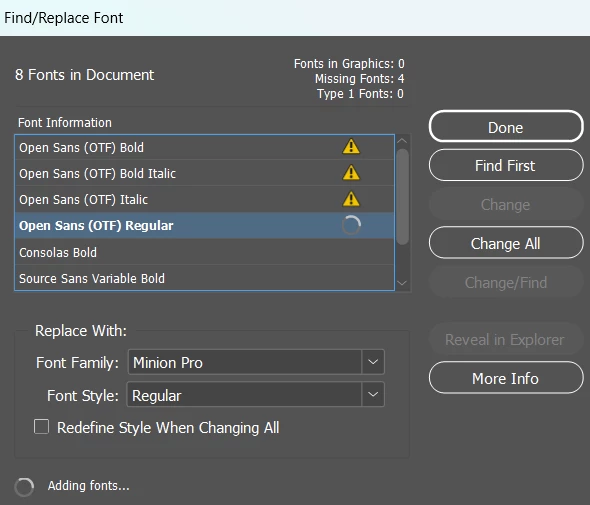
Currently, I do *not* have the Creative Cloud font installed; I just have the four instances of a static version of Open Sans installed. The document LOOKS right, it BEHAVES correctly (it doesn’t freak out if I add or delete text); but the InFlight panel says I’m missing Open Sans everywhere. And the find/replace fonts window shows a spinner, like it’s just stuck looking to add these fonts. I’ve left it for a long time and nothing ever finishes.


I then tried to follow this advice: Fonts seem to install, but don't... | Community At the moment, per the font list in Settings>personalization, the four desired Open Sans font instances are supposedly installed on my computer. But when I checked the list of fonts in the computer registry, it's nowhere to be found. That doesn’t seem right.

I then tried to follow this advice: Quick Tip: Troubleshooting Font Problems in Adobe InDesign If I go to Program Files/Common Files/Adobe in search of the fonts folder that supposedly exists, there’s no fonts folder. No clue what that means.


I have no idea what the root cause of this sudden change is, and the deadline is barreling down on me. Does anyone have any advice? Thanks in advance!

    5 replies

    Joel Cherney
    Community Expert
    Community Expert
    April 17, 2026

    The thread that leo.r linked to about Calibri offers a possible solution that doesn’t require any kind of administrative access to your computer. The solution I’ve used in the past would be to completely uninstall all of the relevant fonts and clean the font caches before reinstalling, which has worked for me when I’ve run into this issue with fonts that were not overwritten by Windows Update. Looks to me like Open Sans is not one of those fonts that Windows Update has locked down, so the solutions that involve admin access to Windows Update shouldn’t be strictly necessary. But the advice I linked to above (just manually editing the IDML to remove references to fonts) seems like the fastest way to rescue your document. 


    That being said: 


    > But when I checked the list of fonts in the computer registry, it's nowhere to be found. That doesn’t seem right.


    If you installed font files yourself, that might be odd. If you installed Open Sans via Adobe Fonts, that wouldn’t be surprising. Did you check under both hkey_local_machine and hkey_current_user?  


    > I then tried to follow this advice: Quick Tip: 


    That just looks like ordinary bad advice to me. InDesign can read fonts from quite a few different locations. InDesign can see the fonts in your \Windows\Fonts folder just as well as its own fonts folder in \Program Files\Adobe\InDesign\your-version\Fonts. Any folder called “Document Fonts” that is in the same folder as your INDD file are available in InDesign, and I bet it can see the fonts in \Users\yourusername\AppData\Roaming\Adobe\Fonts too (which may be analagous to the \CommonFiles\ location from, I think, the Windows 7 era). Furthermore, InDesign behaves badly when fonts aren’t in one place only - so, having four faces of Open Sans installed locally and one with the same name but a different version number in the Document Fonts Folder could cause this kind of font drop. 


    Also, another location where InDesign can get fonts is wherever it that Adobe Fonts stores its Creative Cloud fonts on your drive, which might actually be the root cause of your problem. Having locally installed fonts share names with Creative Cloud fonts also causes issues, and if you have four faces of Open Sans installed locally, you don’t want to let InDesign add Open Sans OTFs to conflict with your locally-installed fonts. That’s what we’re seeing in your screenshot, right? I’d suggest removing all Open Sans from Adobe Fonts entirely, maybe cleaning your font cache (assuming that you have access to the relevant locations on your workstation), and then reopening the file and replacing all of those Open Sans (OTF) fonts with whatever you have locally installed. 


    (Or just crack the IDML open and edit manually, seems faster)

    jennifer_5438
    Participant
    April 17, 2026

    (Also, thanks leo.r for the coaching on how the packaging and CC works.)

    jennifer_5438
    Participant
    April 17, 2026

    Yep, this sure seems like the problem. For me, it's affecting Open Sans. Turning off windows updates also not an option for this highly locked down state-owned university computer. I have two time-sensitive, high priority documents that are now screwed up past recognition. We need a solution ASAP.

    leo.r
    Community Expert
    Community Expert
    April 17, 2026

    I wonder if your problem is similar to the ones reported in the threads below. As far as I understand, they’re related to a recent Windows update (more info in the threads):


    leo.r
    Community Expert
    Community Expert
    April 17, 2026

    And, now I realized, when I package the file, the Open Sans font was no longer included in the package. I need the package to include all components, so the printer can have everything they need to create this document identically as it appears on my computer. 


    Fonts installed via Creative Cloud are not being packaged. If your printer opens your file with InDesign, then he also has a Creative Cloud subscription and thus can activate exactly the same font (plus InDesign can activate it automatically).


    (I know it doesn’t address the main problem reported in your post.)