
LauraFuriosa
Inspiring
May 22, 2023
Answered

Open Sans Italic looking Bold on Indesign

  • May 22, 2023
  • 3 replies
  • 713 views

I'm working on a book in Indesign that uses Open Sans. When I apply italic the text becomes also bold.

But the character options says it is only italic:
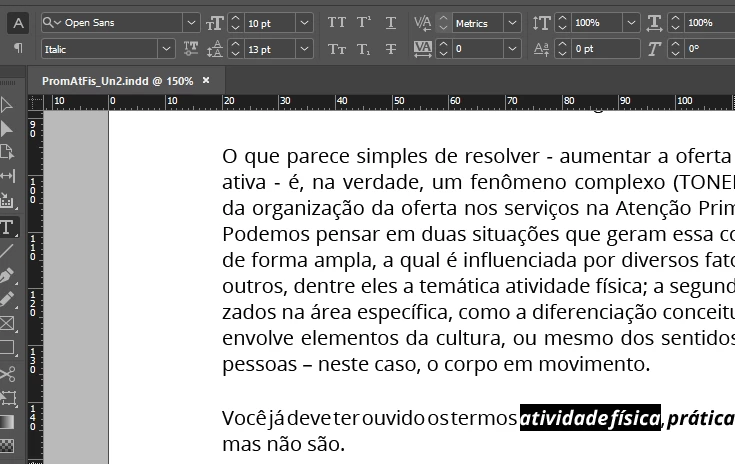


I already reinstaled the font (Google fonts version), and the problem persists. This problem doesn't happen on Illustrator. I already tried cleaning the font cache.

This topic has been closed for replies.
Correct answer LauraFuriosa

I don't use any font manager. After reading your response, I deleted the google's version, deactivated and reactivated the adobe version, and now it is ok! I think maybe the issue was the auto-activation like you said. I'm gonna try turning off the auto-activation and see if the google version works, just out of curiosity. Thanks!

3 replies

Barb Binder
Community Expert
Community Expert
May 23, 2023

Hi @LauraFuriosa:


This is my experience using Open Sans activated on fonts.adobe.com. Is that where you activated your versions?


~Barb


~Barb at Rocky Mountain Training
Brad @ Roaring Mouse
Community Expert
Community Expert
May 22, 2023

Make sure, despite the fact you've loaded Google's versions, that InDesign is not trying to auto-activate the versions from Adobe Fonts at the same time, as they are different versions (i.e. turn off Auto-Activate Adobe Fonts under Preferences > File Handling). Also make sure you haven't loaded BOTH Google's static and variable versions at the same time.

Are you using a font manager? If so, did you use its font cache purger?

Other ideas: make sure you've load ALL the styles. Some open source fonts like Open Sans have a notorious history of bad construction/internal style names which causes the incorrect one being loaded because it's the first "Italic" seen alphabetically. I can't remember if this was the case with Open Sans, but there's been much discussion on this forum about Open Sans's deficiencies.


In the PDF you made, what is listed in your Document Properties for the questionable font?


Fyi: the versions being served on Adobe Fonts are v1.10, and the Google Ones I have v3.00. the v3.00 have slighly adjusted metrics and outline shapes, so although they are essentially identical, there will be some reflow from one to the other.

LauraFuriosa
LauraFuriosaAuthorCorrect answer
Inspiring
May 23, 2023

I don't use any font manager. After reading your response, I deleted the google's version, deactivated and reactivated the adobe version, and now it is ok! I think maybe the issue was the auto-activation like you said. I'm gonna try turning off the auto-activation and see if the google version works, just out of curiosity. Thanks!

LauraFuriosa
Inspiring
May 23, 2023

Omg, sorry for the video link. I pasted it accidentally, deleted the text, but it stayed there somehow and I didn't notice and published.


[video link removed by moderator]

James Gifford—NitroPress
Legend
May 22, 2023

Does the perception of bold persist when printed or exported to PDF?

LauraFuriosa
Inspiring
May 22, 2023

Yes. 😞

Bevi Chagnon - PubCom.com
Legend
May 22, 2023

Can you check to see if that text has a character style applied to it?


|    Bevi Chagnon   |  Designer, Trainer, & Technologist for Accessible Documents ||    PubCom |    Classes & Books for Accessible InDesign, PDFs & MS Office |