marcus_007
Participant
June 1, 2026
Question

Opening a 2004 indd file in InDesign 2026 fully fails...

  • June 1, 2026
  • 5 replies
  • 25 views

I’m experiencing a very frustrating situation where i try to open an old 2004 .indd file in InDesign2026…

Any idea opening this file would be welcome. Not convinced at all it is corrupt… just a generic message.

  1. opening the file through context menu “open with”
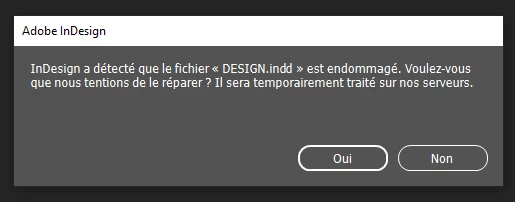
  2. Message from InDesign stating “InDesign has detected the file was corrupted. Would you like us to repair it? It will be temporarily processed on our servers. YES/NO”
  3. Pressing YES
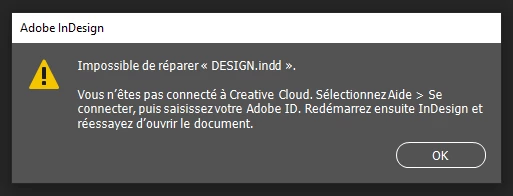
  4. New message stating “Impossible to repair. You are not connected to CreativeCloud. Connect with your ID, restart and try again”
  5. Done, but I was already connected. Retried anyway, still the same messages and failure.
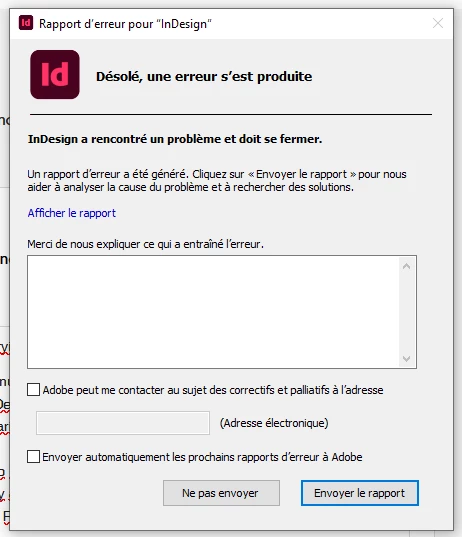
  6. Upon quitting Indesign a little bit dispaired, i get an exception message.
  7. Alas, resigning !!!
  8.  

    5 replies

    Peter Spier
    Community Expert
    Community Expert
    June 1, 2026

    I can also give it a try. I have versions going back to CS6 on this machine, and even earlier on some archives.

    Mike Witherell
    Community Expert
    Community Expert
    June 1, 2026

    Marcus, let me try to open it?

    Mike Witherell
    Abhishek Rao
    Community Manager
    Community Manager
    June 1, 2026

    Hi ​@marcus_007


    Sorry to hear you're running into this.

    In addition to the suggestions already shared by the experts, could you also try opening the file on a different machine or OS, if available?

    If you still have access to an intermediate version of InDesign, it may also help to open the file their first and then resave as IDML before opening it in InDesign 2026.

    Could you also let us know which exact InDesign version originally created the file, if you know it?

    If possible, please share the file here or send it to me via DM if it contains confidential content. I’d be happy to investigate further on my end and take it up with the product team if needed.


    Looking forward to your update.

    Abhishek

    Peter Spier
    Community Expert
    Community Expert
    June 1, 2026

    I had a similar experience a month or so ago (not connected error even though I was logged in) while trying to open another user’s file. I was ultimately able to partly recover the file using a windows-only tool before getting the error on the adobe server, but the file’s owner was able to repeat the process and successfully recover the file.

    See 


    Community Expert
    June 1, 2026

    I wouldn't assume the file is actually corrupt yet.

    A 2004 InDesign file is extremely old by current standards, and sometimes the problem is the file format conversion rather than corruption.

    The interesting part is that InDesign is offering to upload the file for server-side repair, then immediately failing with a Creative Cloud authentication error despite you being signed in. The subsequent crash report suggests the repair process itself may be what's failing.

    A few things I'd try:

    Confirm you're signed into the Creative Cloud Desktop application, not just InDesign.

    Sign out of Creative Cloud completely, restart the machine, sign back in, then try again.

    Try opening the file while holding Shift+Ctrl+Alt (Windows) or Shift+Option+Command+Ctrl (Mac) to reset preferences.

    If possible, try opening the file in an older version of InDesign first and then resaving it. Very old INDD files sometimes convert more reliably through intermediate versions.

    If you still have access to the original machine or an older backup, look for an IDML, INX, or a later-saved copy of the document.
     

    Out of curiosity, what exact version created the file? Was it InDesign 2.0, CS, CS2, etc.? That may help determine whether this is a compatibility issue or genuine file corruption.