Known Participant
January 4, 2022
Answered

OpenType font marked as PostScript Type 1 font

  • January 4, 2022
  • 9 replies
  • 19699 views

Hi there!

Adobe has announced that from 01-01-2023 all PostScript Type 1 fonts will be obsolete and not be supported anymore.
Last month I’ve rebuild an InDesign document (macOS, Catalina) and changed all PostScript Type 1 fonts to OpenType fonts in order to have a future proof document. All document text is now formatted with the new fonts. No problem so far.


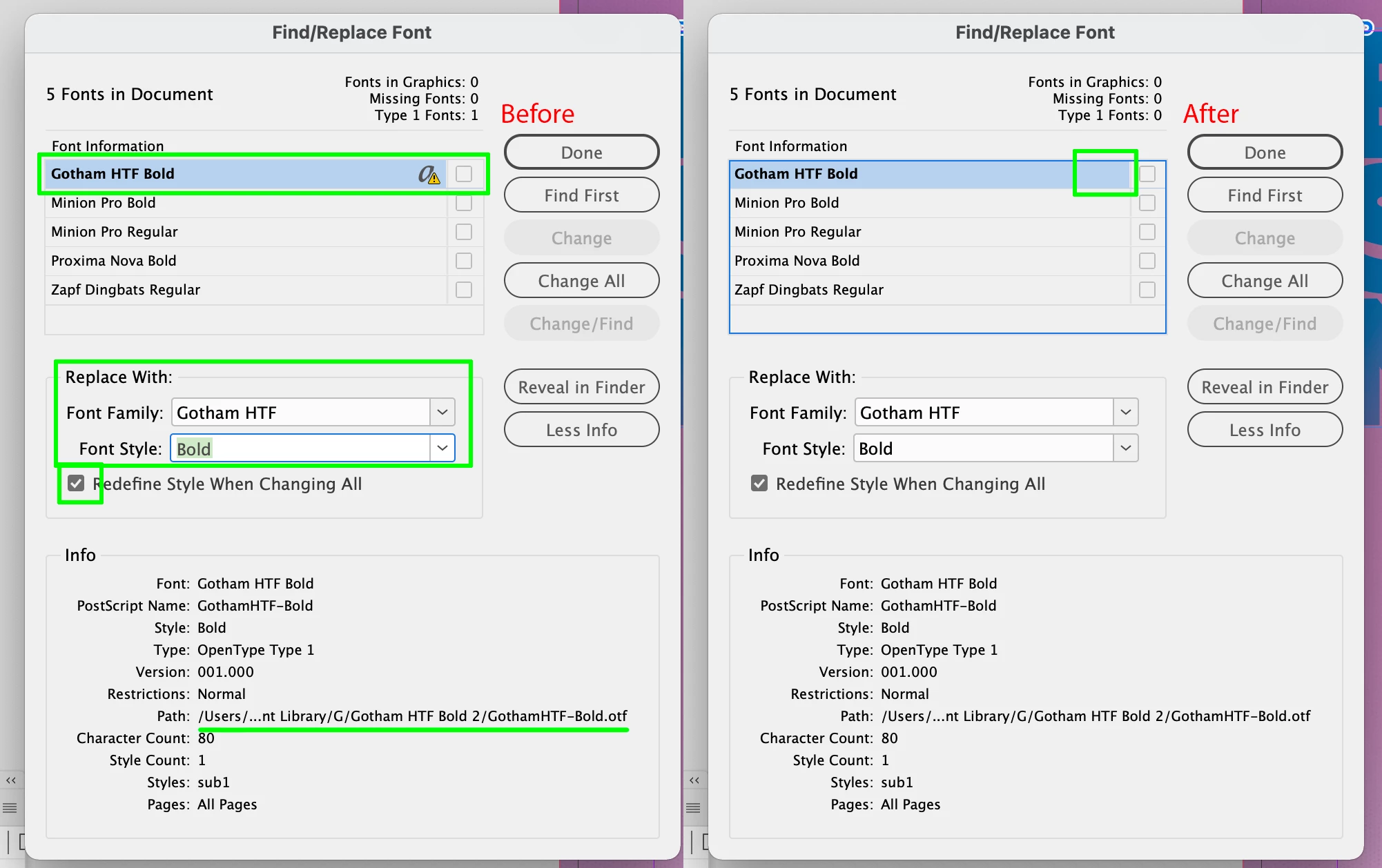
In the window Find Font I see all used fonts in the document. Some fonts still have the PostScript Type 1 warning. You can see in the screenshot that the selected font has this warning, but in the Info section you see that this font is an Open Type font with an otf file extension.
Is this an InDesign bug?

This topic has been closed for replies.
Correct answer Brad @ Roaring Mouse

If it's an existing document that used to use Type 1 versions of the exact same name, the document may still be internally referencing the old font because that's what was used when it was created. InDesign stores the used fonts in an internal xml list in each document, which includes a reference to the name and includes a reference to the font type. However, when you open such a document, ID looks for the fonts on your system by name and automatically substitutes your new OTF fonts when you open the document (The Path you see when you list the fonts is the path of the currently substituted font, so, yes, this is confusing), but you actually haven't replaced the Type 1 with the OTF yet.

Two ways to clear this: Find/Replace the fonts and replace the flagged font with itself from System (making sure to Refine Styles when you do that. Another way I have found is to save the file as IDML and then reopen it, this purges the old list.

Give either method a shot.


9 replies

Participant
June 28, 2022

I am currently using Indesign 17.3 and the problem persists. Both Indesign and Fontbook indicate that the fonts are OpenType, but I still get a warning in indesign, along with the annoying blue bar.

Community Expert
June 28, 2022

Hi @default2jjvqdttci40 ,

that's very unusual. InDesign 17.3.0 should be OK with that. Are you sure that you scrolled through all used fonts in the Find/replace font panel?


Regards,
Uwe Laubender
( Adobe Community Professional )

Participant
May 13, 2022

Is it possible that the same Bug occurs on the InDesign server?

HARSHIKA_VERMA
Community Manager
Community Manager
May 10, 2022

Hi All,


We appreciate your patience. The issue is fixed with the latest InDesign version (17.2.1). Please update InDesign to the latest version and see if that helps.


If you still experience the issue on the 17.2.1 version, then please try resetting the preferences. It will fix the issue.


Let us know if you need further assistance. We'd be happy to help.


Thanks,

Harshika

FunkyBeeAuthor
Known Participant
July 29, 2022

Hi,
 
It's been 6 months since I've started this topic. The topic has been flagged as solved.
Due to another InDesign problem I’d trashed the InDesign preferences. I've noticed that the mentioned OTF-fonts in the InDesign document still have the PostScript Type 1 warning.


As a test I’ve made a package of the InDesign document including the used fonts and moved this to the Windows (10) platform. Here I’ve opened this document in a freshly installed CC 2022 environment. When I inspect the Find Font window in InDesign (version 17.3), I get the same PostScript Type 1 warning.
The problem isn’t solved.


My question still stands: Is this an incidental issue with a faulty OTF font or is this a InDesign bug?

Community Expert
July 29, 2022

Hi @FunkyBee ,

please provide the InDesign document where you see this issue.

I'm on Windows 10 and have InDesign 17.3.0 installed. Also a newer pererelease version ( if that matters ).


Thanks,
Uwe Laubender
( Adobe Community Professional )

StudioRydo
Participating Frequently
April 4, 2022

I am having a similar persistent issue with (annoyingly) the font family I use for my own branded material. The font licenses were purchased a few years ago but they are OpenType — so should be supported … and continue to be supported. 


I'm glad to see Adobe appear to be aware of the issue though. Hopefully it's resolved as a bug fix through a software update sooner rather than later. 

As an aside: I contacted Fontshop about it to see if it might be worth upgrading my files for this family to more recent OpenType versions; and upgrade my Standard OpenType files to Pro while I was at it. I made clear I was more than happy to pay the difference in pricing from Standard to Pro to do this. They misunderstood my issue as being related to Postscript Type 1 fonts and basically asked me to buy new licenses … which isn't ideal.

Interestingly — and more relevant perhaps to an Adobe forum — the affected font files activate fine in Illustrator and Photoshop (+ Apple Pages). To my mind, this seems to confirm it's an InDesign issue.  

Help, Adobe! (Thanks!)

Willi Adelberger
Community Expert
Community Expert
April 4, 2022

OTF fonts can be PostScript or TrueType. This is ok, it is a reliable good OTF. You can use it in the future without any problem. Only those T1 are making problems which are open and ud several files. 

StudioRydo
Participating Frequently
April 4, 2022

Thanks Willi — yes, for sure. 

My problem here is actually that good OpenType Type 1 fonts are being marked as 'missing' and I'm unable to activate. 

I contacted Fontshop about replacing files as a workaround because I needed the font family for a presentation I was working on last week.

I'm pretty sure the bug lies with InDesign (given my previous mention of activation being fine in other applications). 

Logic might suggest it's down to confusion in recognising / differentiating OpenType Type 1 and PS Type 1 … but that's not my area of expertise at all. Just a guess based on other users’ experiences and comments here.

It's a very frustating problem in any case! 

Inspiring
January 12, 2022

Is this related to my issue with a font activated from Creative Cloud that is now showing up as missing?  We have a font that has been activated and used for years from CCC, whose name has suddenly changed to have an (OTF) at the end of it in my InDesign documents.  This font now shows up as missing in InDesign.  The font is still available from Creative Cloud.  If I replace the font with the one available on Creative Cloud, the font type changes.


Please see font info from the missing font, the font info on the replaced font, and a screenshot of InDesign that shows that there are OpenType options available on the font that is missing (suggesting it may have originally been an Open Type to begin with)?

Inspiring
January 12, 2022

Also...I'm seeing that this notice exists on the Postscript End of Life page on Adobe.  The missing font was activated several years ago from CC fonts, and shows up as type OpenType Type 1 in InDesign.  This font shows up as a Type 1 font in previously exported PDF files.  After replacing the font again from CC fonts, the type changes to OpenType True Type.


https://helpx.adobe.com/fonts/kb/postscript-type-1-fonts-end-of-support.html


Brad @ Roaring Mouse
Community Expert
Community Expert
January 5, 2022

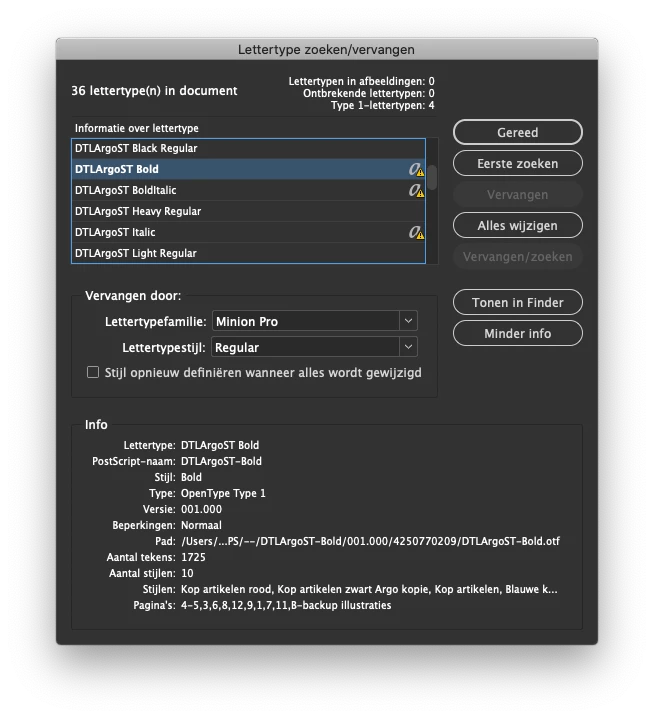
I had this issue with a legacy file as well. By appearances, my OTF fonts had "automatically" replaced the previous Type 1 ones, but it still referenced the Type 1 versions or some styles internally. A simple Find/Replace to "update" the missing fonts with themselves seemed to clear it.. e.g. in the dialog box above, Find and Replace the "missing" DTLArgoST Bold with DTLArgoST Bold, making sure the update Styles box is checked.

FunkyBeeAuthor
Known Participant
January 5, 2022

ThnX for your reply.
Before I've started the PostScript-to-OpenType swap in my document, I deleted all concerning PostScript fonts from Extensis Suitcase. Even with the option Update Styles checked I get the PostScript Type 1 flag.

Anshul_Saini
Community Manager
Community Manager
January 4, 2022

Hi there,


Sorry about that. The product team is aware of this issue, and they are working on a fix. I would request you to please stay patient and stay tuned for updates.


Thanks & Regards,

Anshul Saini

StudioRydo
Participating Frequently
April 4, 2022

Any update from Adobe with progress on this? I noticed your post is from 04 January Anshul … not great that this appears to be dragging on. It's really slowed me down in recent weeks.

Frans v.d. Geest
Community Expert
Community Expert
January 4, 2022

Switching to Dutch (lamguage used in the screenshot)
Het zijn bekende bugs, in de beta-versies gaat het al een stuk beter. Je ziet wel het PS symbooltje inderdaad (de a) maar je fonttype is .otf, ook te zien. Klik nu op de knop in het blauwe lint onderaan, uit mijn hoofd 'herinner' oid, en dan is het wachten op de bug fix die er binnenkort aankomt en in de tussentijd maar even diep zuchten 😉

FunkyBeeAuthor
Known Participant
January 5, 2022

Bedankt voor je reactie. 🙂

Het is inderdaad verwarrend.

Ik wil graag zekerheid na het ombouwen van het InDesign-document dat ik wel de goede fonts heb uitgekozen.

paveln20929470
Participant
January 4, 2022

I don't understand these messages - font type 1 - bottom number 4 top 0

FunkyBeeAuthor
Known Participant
January 4, 2022

Your problem is related, but it's no answer to my question.

Please read this Adobe webpage.

Bevi Chagnon - PubCom.com
Legend
January 4, 2022

This is the English version of Adobe's artcle mentioned above: https://helpx.adobe.com/fonts/kb/postscript-type-1-fonts-end-of-support.html


|    Bevi Chagnon   |  Designer, Trainer, & Technologist for Accessible Documents ||    PubCom |    Classes & Books for Accessible InDesign, PDFs & MS Office |