

Susan Culligan
Inspiring
June 7, 2024
Answered

Optical margin alignment problems, anyone?

  • June 7, 2024
  • 2 replies
  • 582 views

All of a sudden optical margin alignment doesn't seem to be working. I've reset my preferences to Adobe Paragraph Composer, I've saved as .idml and reopened, but neither works. Is this something in the latest update (I haven't used InD for a couple of months)?
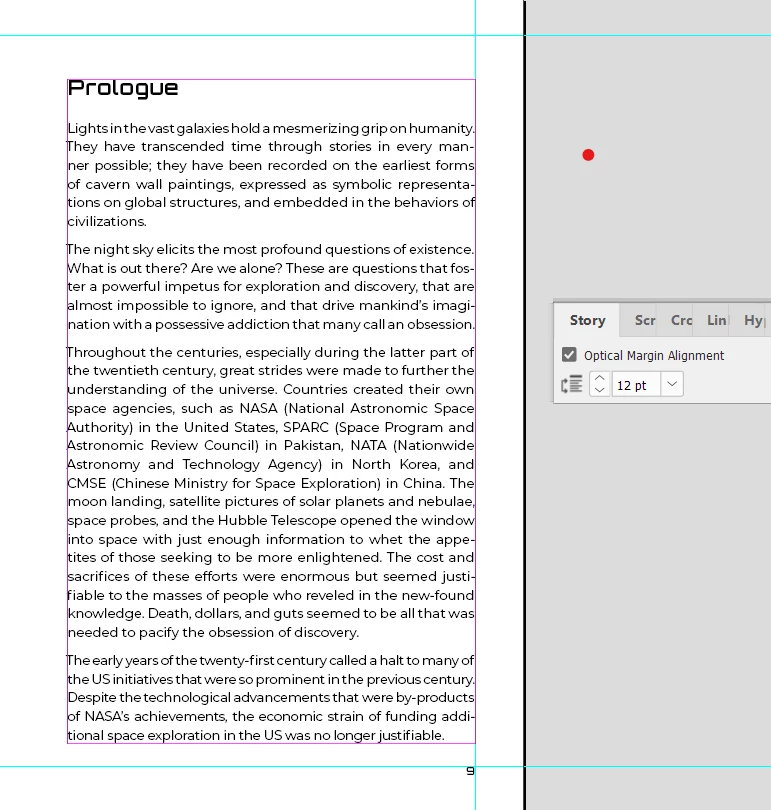


Thanks!

Susan

Correct answer Susan Culligan

I figured it out (by mistake). I had set my preferences for Adobe Paragraph Composer, but I hadn't changed my Basic paragraph style, which was still set to World-Ready Paragraph Composer. Since my text paragraph styles are based on Basic, when I changed it—actually to fix my justification—Optical Margin Alignment suddenly sprang to life!!!


Yippee!

2 replies

Susan Culligan
Susan CulliganAuthorCorrect answer
Inspiring
June 8, 2024

I figured it out (by mistake). I had set my preferences for Adobe Paragraph Composer, but I hadn't changed my Basic paragraph style, which was still set to World-Ready Paragraph Composer. Since my text paragraph styles are based on Basic, when I changed it—actually to fix my justification—Optical Margin Alignment suddenly sprang to life!!!


Yippee!

Community Expert
June 9, 2024

Glad you figured it out - but it's scary that you are basing styles on Basic Styles

Just a side note for you - it's up to you - but you should take notice of this
https://creativepro.com/beware-basic-styles/


Best of luck.

Mike Witherell
Community Expert
Community Expert
June 7, 2024

Did you select the textframe first and then turn on that little switch in the Story panel? You screenshot does not indicate a selected textframe.

Mike Witherell
Susan Culligan
Inspiring
June 8, 2024

Yes I did. But thanks!