
December 1, 2025
Question

Orden table

  • December 1, 2025
  • 1 reply
  • 305 views

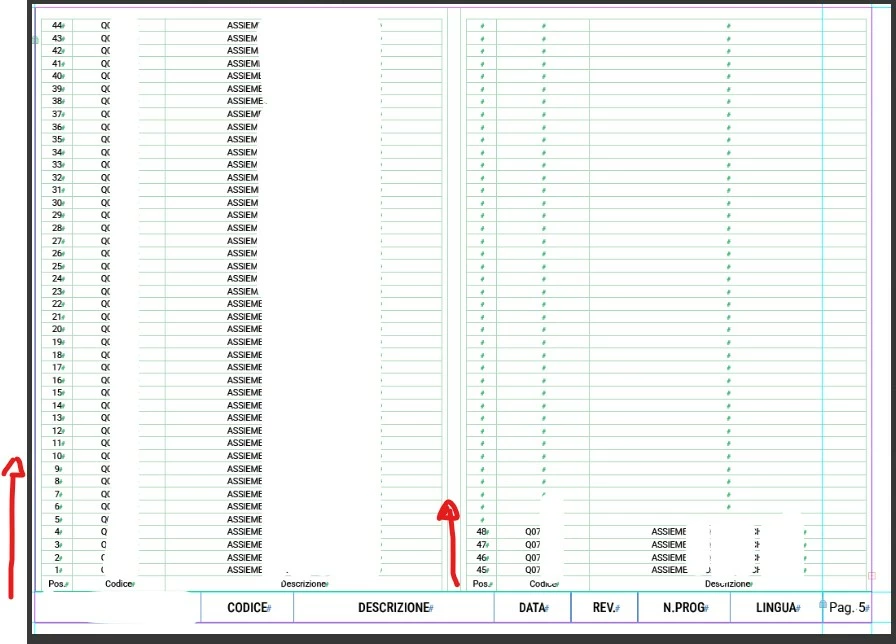
Hi, can anyone help me with the tables? I'm creating a spare parts catalog, so I have an Excel file with data sorted in ascending order from bottom to top in column A. In my InDesign spreadsheet, I'd like the data to start from the bottom left and continue in the same table on the right, always starting from the bottom. I'm trying to set text frame options with 2 columns and vertical justification from the bottom, but unfortunately I can't get this result (which I created manually by moving the cells in Excel).
 

1 reply

Peter Kahrel
Community Expert
Community Expert
December 2, 2025

What you want is to change the order of the columns. You can do that by setting the story direction to right-to-left. You need the Middle Estern version of InDesign, but you can do it with this one-line script:

app.selection[0].parentStory.storyPreferences.storyDirection = 
  StoryDirectionOptions.RIGHT_TO_LEFT_DIRECTION;

Select a text frame and run the script.

FRIdNGE
December 3, 2025

Hi Peter,


Not sure that is the op would like to get.


At the beginingAfter Script: Table FlipAfter Script again: Table Reset


/*
    _FRIdNGE-0816_TableFlip.jsx
    Script written by FRIdNGE, Michel Allio [03/12/25]
*/

app.doScript("main()", ScriptLanguage.javascript, undefined, UndoModes.ENTIRE_SCRIPT, "Table Flip! …");

function main() {
    
    var myDoc = app.activeDocument;

    app.windows[0].transformReferencePoint = AnchorPoint.CENTER_ANCHOR;

    // Place the Cursor Inside the Table:
    if ( app.selection.length != 1 || app.selection[0].parent.constructor.name != "Cell" || app.selection[0].constructor.name != "InsertionPoint" ) {
        alert( "Place The Cursor Inside A Table! …" )
        exit();
    }

    var myTable = app.selection[0].parent.parent;
    var myTextFrames = myDoc.textFrames.itemByRange(app.selection[0].parent.parent.cells[0].insertionPoints[0].parentTextFrames[0], app.selection[0].parent.parent.cells[-1].insertionPoints[0].parentTextFrames[0]);

    if ( myTable.label === "" ) {
        myTextFrames.rotationAngle = 180;
        myTable.cells.everyItem().rotationAngle = 180;
        myTable.label = "180";
        alert( "Table Flipped! …" )
    } else {
        myTextFrames.rotationAngle = 0;
        myTable.cells.everyItem().rotationAngle = 0;
        myTable.label = "";
        alert( "Table Resetted! …" )
    }

}


(^/)  The Jedi

Peter Kahrel
Community Expert
Community Expert
December 3, 2025

Gianfranco mentioned that his table is already sorted descending (he called it 'ascending from the bottom'). And the imported headers should be deleted from the table and done as InDesign headers.