sarai53562771
Known Participant
December 13, 2017
Question

Original vs Alternate Format? How to switch between the two?

  • December 13, 2017
  • 4 replies
  • 522 views

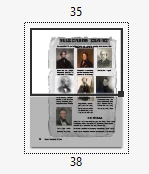
I am printing an indesign file in pdf. It was created by someone who I think did an alternate layout, which I know nothing about. When I print the pages, one in Adobe reader look like this which I think is the old page size highlighted.  How can I get the entire page to highlight. I think I need to know how to switch from the original format to the alternate format...
This topic has been closed for replies.

4 replies

Barb Binder
Community Expert
Community Expert
December 16, 2017

It was created by someone who I think did an alternate layout, which I know nothing about.

Alternate layouts are confusing to those who don't use them. The idea behind them is to have multiple layouts of a single document in a single file. I find it easiest to work with them when I go to the Pages panel menu and select  View Pages > By Alternate Layout.

And then I adjust the Pages panel so that I can see everything. Note the two master pages controlling the paper sizes (one is US Letter, the other A4). Those names also appear above each Layout.

Now that you are oriented, head back to File > Export (which is a much better way to create a PDF than File > Print). You can select either layout in the Range menu, and then specify the pages underneath.

~Barb

~Barb at Rocky Mountain Training
sarai53562771
Known Participant
December 16, 2017

Actually, I was not able to use Export because I do not know how to enter the page range as there seems to be some amiss (alternate format) with the message, "multiple pages use the same page number". I was glad to be alert to Export however as I forgot it was there!

I proceeded with print to Adobe PDF and found, with some fussing around, that I could physically move the 'shadow' off the first page in Adobe and then all the pages were okay!

Community Expert
December 18, 2017

sarai53562771  wrote

Actually, I was not able to use Export because I do not know how to enter the page range as there seems to be some amiss (alternate format) with the message, "multiple pages use the same page number". I was glad to be alert to Export however as I forgot it was there! …

Hi,

if some page names are the same you still could export a range of pages using absolute numbers and not the names.

With Barb's example you could e.g. export pages 1 to 3 of the document with:

+1-+3

or:

+1,+2,+3

Regards,
Uwe

Srishti_Bali
Legend
December 15, 2017

Hi sarai,

I would like to know if the step suggested by Aandi worked for you, or the issue still persists.

Kindly update the discussion if you need further assistance with it.

Thanks,

Srishti

Legend
December 13, 2017

Don’t print to PDF. Use Export.