noraz90065746
Participant
January 25, 2019
Answered

Orpheus Pro font in InDesign

  • January 25, 2019
  • 1 reply
  • 891 views

Hi everyone,
I choose the Orpheus font on Creative cloud and there it displays correctly. And when I use it in my layout the 'o' the capital 'E' and the 'i' has some little crosses added that I do not see in the CC Assets when I choose it.
I have gone through all the open types options but nothing changes it!

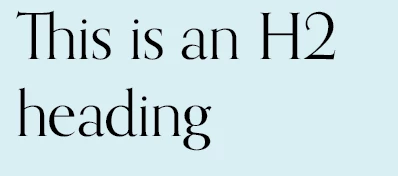
I have it on another file and it displays correctly (this is an H2 heading).

Any help much appreciated.

    This topic has been closed for replies.
    Correct answer Jongware

    Disclaimer: perhaps you did go through "all the open type options" and the local font on your computer or your InDesign document got corrupted. It happens. Although in most cases this turns out to be a user error.

    Checking Orpheus on MyFonts: https://www.myfonts.com/fonts/canadatype/orpheus-pro/ , I see that these crosses and double-crossbar A are enabled with the OpenType feature "Stylistic Set 1". Switching it off should fix this for you.

    1 reply

    Jongware
    Community Expert
    JongwareCommunity ExpertCorrect answer
    Community Expert
    January 25, 2019

    Disclaimer: perhaps you did go through "all the open type options" and the local font on your computer or your InDesign document got corrupted. It happens. Although in most cases this turns out to be a user error.

    Checking Orpheus on MyFonts: https://www.myfonts.com/fonts/canadatype/orpheus-pro/ , I see that these crosses and double-crossbar A are enabled with the OpenType feature "Stylistic Set 1". Switching it off should fix this for you.