
Participant
November 4, 2023
Answered

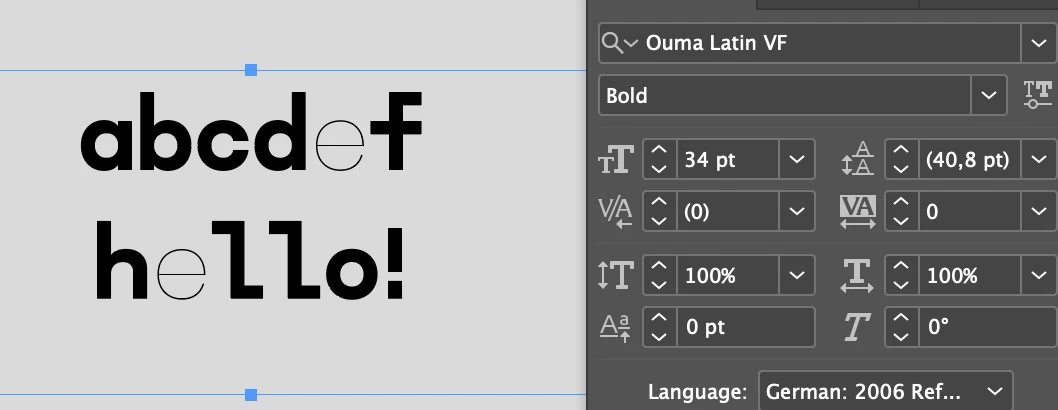
Ouma Latin bug on Indesign
  • November 4, 2023
  • 1 reply
  • 213 views


Hey There,

I just fell in love with Ouma Latin!

It works perfectly in illustrator, but in InDesign, but in InDesign the small caps "e" appears in Thin when set to bold. When set to semibold it displays in regular. All other thicknesses work fine. When I try to move the cursor of the weight (because it is a variable typeface) the result doesn't change.

Thankful to anyone who can help, cheers!

This topic has been closed for replies.
Correct answer leo.r

Other users also report similar problems with variable fonts in InDesign 2024. From other discussions, it looks like the only solution right now is to revert to InDesign 2023 until it's fixed. (You can try to use forum search to find other threads on the subject.)

1 reply

leo.r
Community Expert
leo.rCommunity ExpertCorrect answer
Community Expert
November 4, 2023

Other users also report similar problems with variable fonts in InDesign 2024. From other discussions, it looks like the only solution right now is to revert to InDesign 2023 until it's fixed. (You can try to use forum search to find other threads on the subject.)