Inspiring
June 8, 2018
Answered

Overflow in a frame due to textWrap of other

  • June 8, 2018
  • 1 reply
  • 1439 views

Hi All,

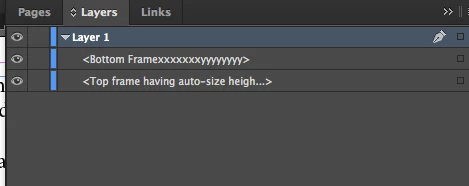
My test document contains two frames as shown in below image also see the layers.png
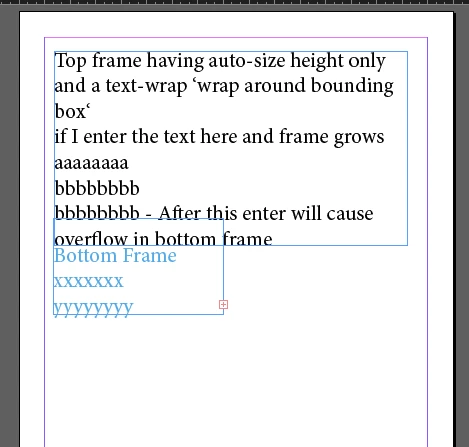
Top frame have both auto-size (height-only) and textWrap ("wrap around bounding box set")

Now when I start entering text in top frame and it grows then at some point text-insertion in top frames causes the overflows in bottom frame

Is there a way using which I can find that Overflows in bottom frame is caused by "textWrap" set on top frame.?

Regards,

Alam

This topic has been closed for replies.
Correct answer Laubender

Hi Uwe,

What info I get after fetching baseline of first line of text and how it would be help me to identify textWrap of another object and how I could identify the frame which causes overflow.

Regards,

Alam


Hi Alam,

you would go through all page items of a spread and note all items with applied textWrap.

Then you note the value of baseline of the first line of your text frame in question. Now turn off textWrap one by one and with every time you do this check if baseline will change.

Note: It could be the case that more than one item with textWrap influences the baseline of the text frame in question.

Regards,
Uwe

1 reply

Community Expert
June 8, 2018

Hi Alam,

you could check the first line of text of the frame that overflows and its baseline property.

If it's position is not where you might suspect it the cause might be text wrap of another object.

Now the question is: Which one?

You could test all objects on the page one after another for text wrap.

Turn it off and see if the value for baseline of the first line of text in the other frame is different.

Regards,
Uwe

alam_84Author
Inspiring
June 11, 2018

Hi Uwe,

Thanks for reply, Can you named the property which I need to check for baseline position/offset change.

firstline you mean textFrame.lines.item(0) or some other thing?

A sample piece of code will help me to understand your approach, if possible can you provide that

Regards,

Alam

Community Expert
June 11, 2018

Hi Alam,

the property is baseline.

textFrame.lines[0].baseline

See DOM documentation by Jongware:

Indesign JavaScript Help

Here the online DOM documentation:

Adobe InDesign CS6 (8.0) Object Model JS: Line

Regards,
Uwe