
Inspiring
October 14, 2017
Answered

Overprint Text - How To?

  • October 14, 2017
  • 1 reply
  • 674 views

I've created a document with text that flows through several pages.  On one of the pages, I've imported and image and used Text Wrap to get the text to flow around it.  Now I need to put some text on top of the image and can't figure out how to do this.  I've tried creating a text box outside the margins and then dragging it to the proper location, but when I do so, the contents disappear and the overset symbol shows up.
    This topic has been closed for replies.
    Correct answer Bill Silbert

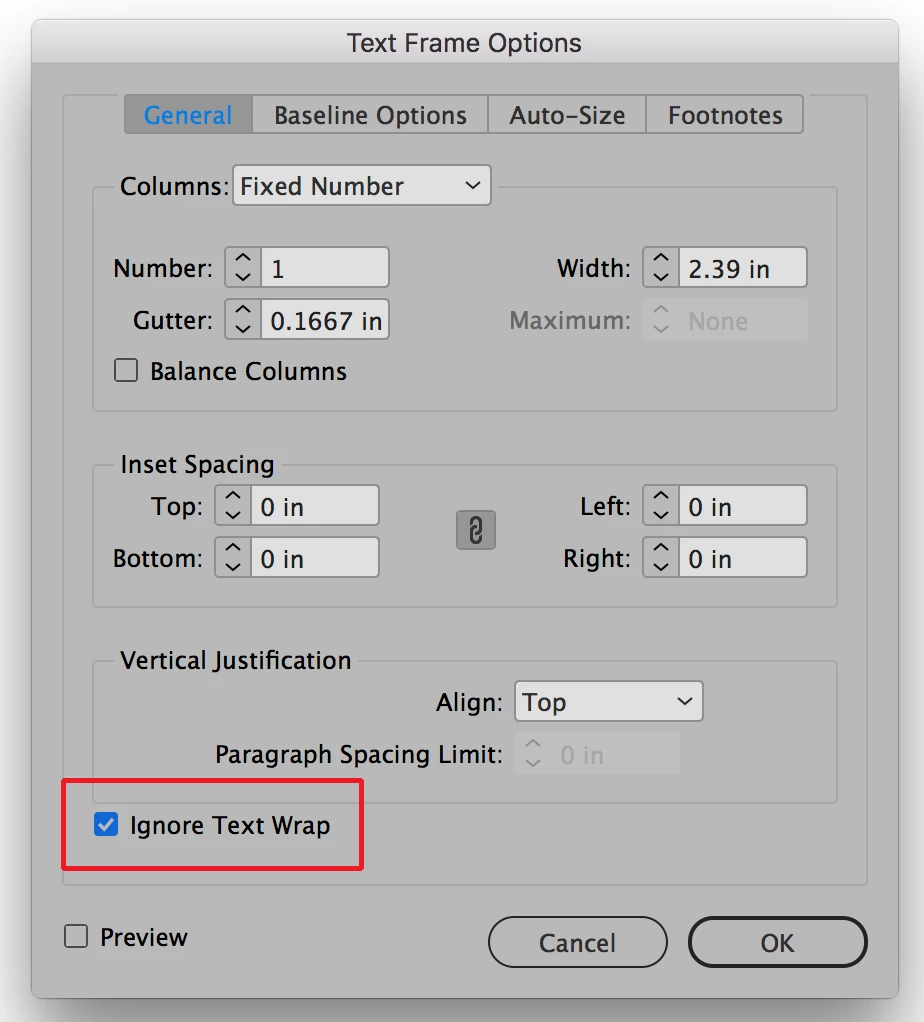
    With the text frame that you want on top of the image selected open the Text Frame Options dialog (Command B on Mac Control B on PC) and click on Ignore Text Wrap. See screen shot:

    1 reply

    Bill Silbert
    Community Expert
    Bill SilbertCommunity ExpertCorrect answer
    Community Expert
    October 14, 2017

    With the text frame that you want on top of the image selected open the Text Frame Options dialog (Command B on Mac Control B on PC) and click on Ignore Text Wrap. See screen shot:

    Inspiring
    October 14, 2017

    Thanks, Bill!

    Bill Silbert
    Community Expert
    Community Expert
    October 14, 2017

    Happy to help.