
Inspiring
May 9, 2022
Question

Override All Parent Page Items Causes Misalignment?

  • May 9, 2022
  • 3 replies
  • 281 views

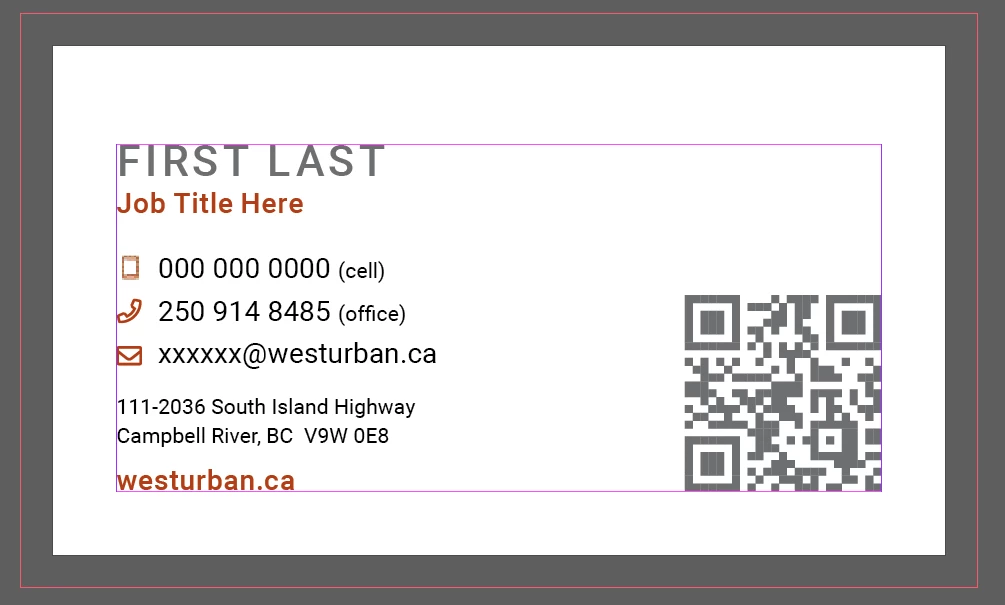
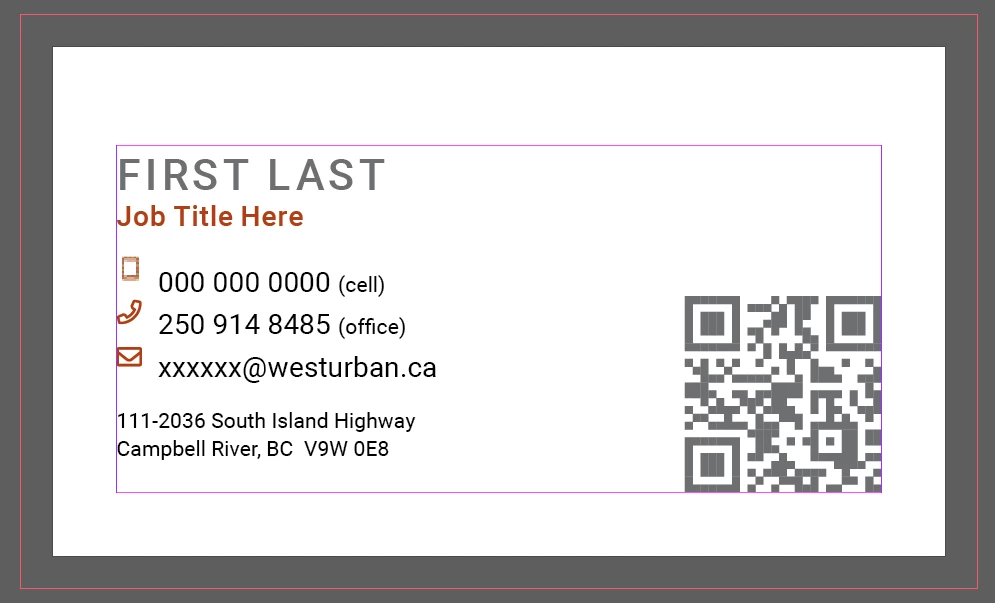
I am trying to edit some business card templates for my work and in order to do that I must select "Override All Parent Page Items" in orfder to edit the text. When I do that though, the web address on the bottom gets cut off. It's like the whole document gets shifted down a bit and therefore is no longer lined up the same as previous business cards. Is there some setting I have to select or deselect to prevent this from happening? Attached are before and after photos of selecting "Override All Parent Page Items"
 

This topic has been closed for replies.

3 replies

Community Expert
June 7, 2023

Hi @29517685 ,

best show a small sample InDesign document where you see the issue.

Attach it to your reply using the forum's editor.


Regards,
Uwe Laubender
( Adobe Community Expert )

Community Expert
May 9, 2022

Hi Jasper,

make sure that the used fonts are exactly the same one that you used when creating the document.

Seen issues when a font from Google Fonts was substituted with one from Adobe Fonts that has exactly the same name.

Or perhaps if Adobe Fonts were substituted by Google Fonts with the same name ( I have to look that up; we had some threads here in the forum with similar issues. )


What helps:

Set the text frame options for Start First Baseline Offset to e.g. Cap Height.

Do not use Ascent.


Regards,
Uwe Laubender

( ACP )

June 6, 2023

Hi, I am facing these same issue
We are team of 3 designers, this happens only in my system, Override All Parent Page Items works just fine in other two designer system, but not in mine.
Could you give steps, it will helpful.
Thanks

Randy Hagan
Community Expert
Community Expert
May 9, 2022

It seems as though you have a shift in the space between your Job Title line and your first phone number listing.


I don't know without looking at the file, but I strongly suspect that the original designer specified a certain leading (space for the text line you're setting characters into) that is different than what I suspect your InDesign application is using, which would be (Auto) by default.


Before you enter new information, get your Text tool and click into your text for the first phone number, making not of the setting for both your type size and your leading, as shown by the cursor in the example at right.


You can learn more about type sizing and leading by clicking on this link and reading the help article in detail.


Hope this helps,


Randy