December 18, 2020
Answered

Overset text in auto-generated Index

  • December 18, 2020
  • 4 replies
  • 738 views

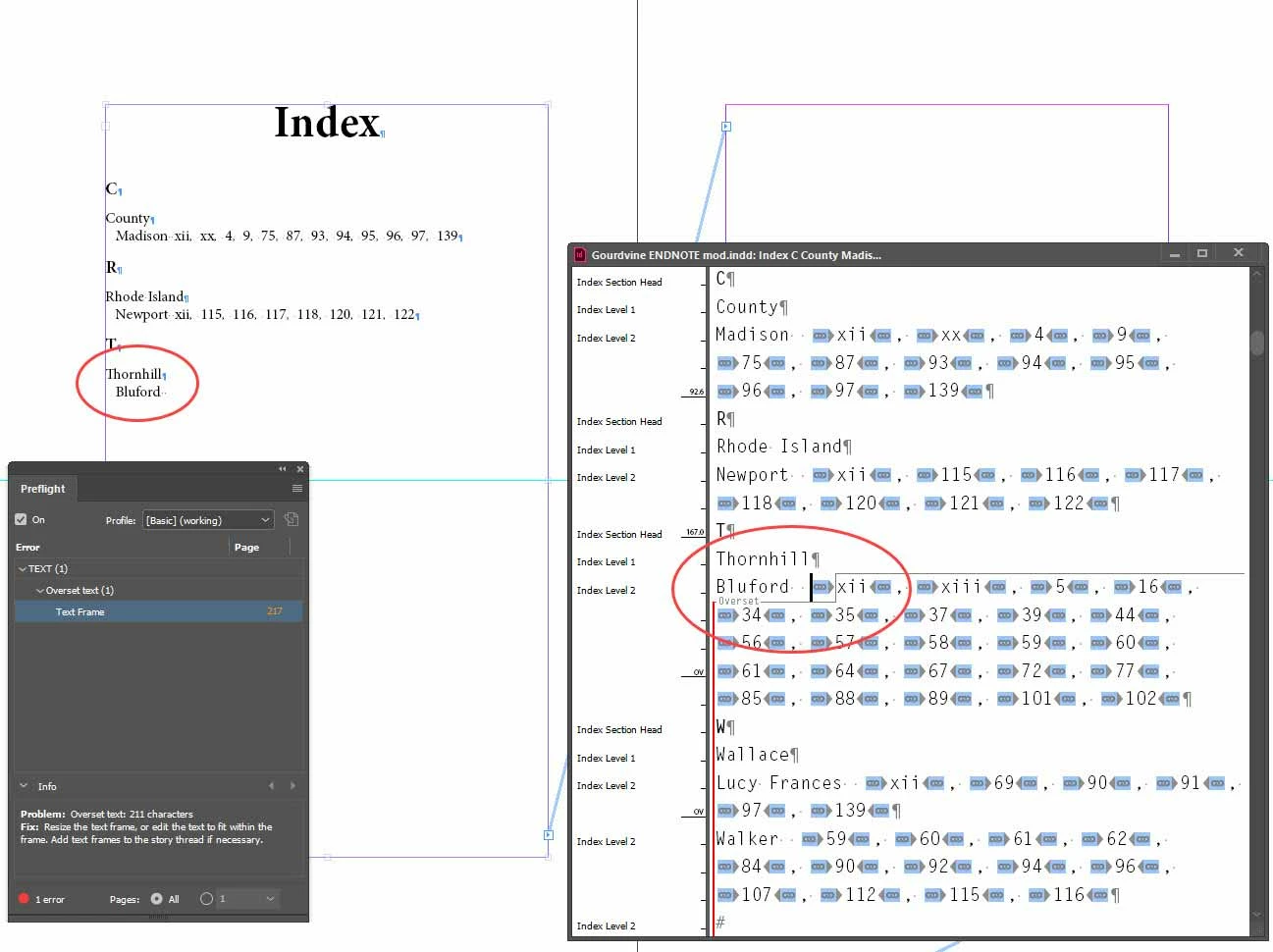
Using the Index feature on a long document, and after adding a few reference entries, InDesign generates an index that when placed creates an overset text situation. Subsequent indexed words are cut from the list. Flowing to additional frames is no solution. The overset indicator appears in the Story Editor. I have been unable to determine the cause or find a workaround. I have created a sample short index to visually illustrate the problem. 
This topic has been closed for replies.
Correct answer Barb Binder

Hi Tim:


Here is a document on troubleshooting a damaged file:

https://helpx.adobe.com/indesign/kb/troubleshoot-file-issues.html


We totally understand that some files can't be shared for security reasons. If you can't work this out on your own, consider direct messaging me just what you showed in your screen shot—save as a new file and delete the pages before and after—leaving just the one InDesign page you have already displayed publicly. If it isn't a damaged file, the answer will be on that page.


~Barb 

4 replies

Barb Binder
Community Expert
Community Expert
December 24, 2020

Ok, Tim, this is a weird one—maybe you can shed some light on it?


The numbers—which can have a character style assigned via the Generate Index dialog box—don't have a character style assigned. 


However, the comma and spacebar—which cannot have a character style assigned via the Generate Index dialog box—have a style assigned called "dot leader". The "dot leader" style does have the suspected No Break assigned. 


Redefining "dot leader" to remove the No Break, allows the lines to break naturally and the numbers return as expected.


This is where I started—it looked like there was a no break issue, as per my very first answer. So here's why I think it is odd—how is the "dot leader" character style being assigned? Where is it coming from? I changed the size from 7 to 30 and it is assigned to the leader dots in the TOC  and to every single ¶ in the Index. I can't get rid of it. Updating the Index just brings it back. Thinking it might be a damaged document, I tried saving as .idml but it didn't make a difference.


So, here's my summary. I can see that you have assigned "dot leader" to the TOC correctly, through the Table of Contents dialog box. I can not see why it is showing up in the index. However, removing No Break from the"dot leader" definition does not break the TOC and does fix the index, so that's my recommendation. Or, just delete it altogethere (and disable retain formatting).

~Barb at Rocky Mountain Training
Barb Binder
Community Expert
Barb BinderCommunity ExpertCorrect answer
Community Expert
December 23, 2020

Hi Tim:


Here is a document on troubleshooting a damaged file:

https://helpx.adobe.com/indesign/kb/troubleshoot-file-issues.html


We totally understand that some files can't be shared for security reasons. If you can't work this out on your own, consider direct messaging me just what you showed in your screen shot—save as a new file and delete the pages before and after—leaving just the one InDesign page you have already displayed publicly. If it isn't a damaged file, the answer will be on that page.


~Barb 

~Barb at Rocky Mountain Training
Barb Binder
Community Expert
Community Expert
December 23, 2020

Hi Tim:


I'm happy to look at the file—I suspect it is something easy to rectify—but if you have gone in a different direction, that's fine too. 


~Barb 

~Barb at Rocky Mountain Training
December 23, 2020

Thanks, but the book's content cannot be shared. I'm open to places to look, though. Is there a way to "clean" a corrupt file?

Barb Binder
Community Expert
Community Expert
December 19, 2020

The Bluford topic has enough entries to wrap to a second line. Check the Generate Index dialog box—are you assigning a character style to the page numbers that includes No Break?


If it's not obvious, I'm happy to look at the file. Put the index on dropbox and message me a link. 


~Barb 

~Barb at Rocky Mountain Training
December 23, 2020

Thank you, but I gave up and have chosen to use the commercial IndexMatic2 script instead. There are no No Break characters associated with page numbers or styles. Other entries wrap appropriately. If the document file has some corruption, I cannot tell—it otherwise seems fine.