
tvosborn
Participant
Feb 3, 2020 3:54 PM UTC
Answered

Overset text in cells, but can't resize table row
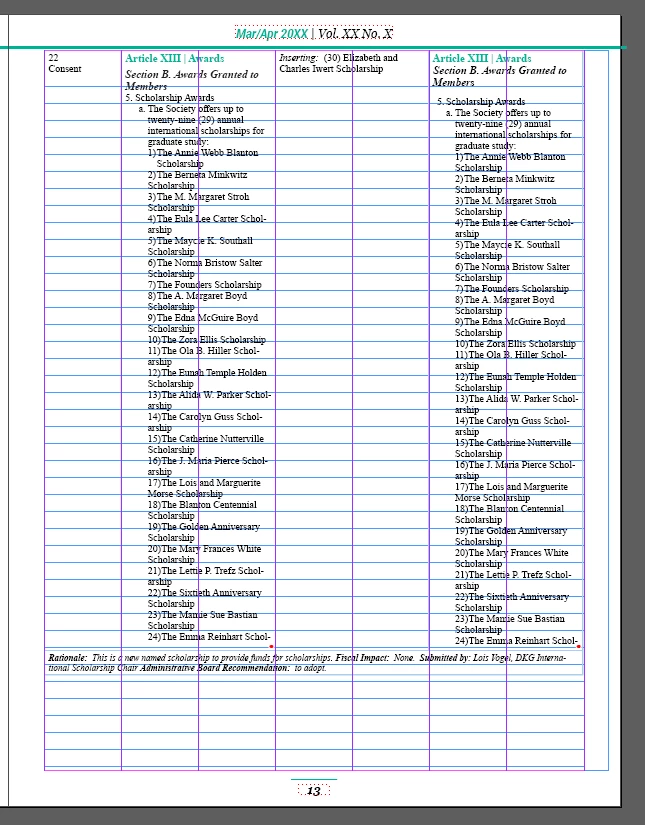
I'm working on a document with a very long table that flows through text boxes from one page to the next. I can clearly see that there's space at the bottom of the page, but I can't seem to increase the size of the cells or row any more. When I try to drag down with the arrow, nothing happens. When I try to adjust manually, I'm met with a window that says "The value must be between 0.0417 in and 8.3333 in." Can anyone help me increase the length of the cells so that there's not overset text, and the space at the bottom of the page is filled? Thanks!
Eugene TysonCorrect answer
Community Expert
Feb 3, 2020 4:33 PM UTC

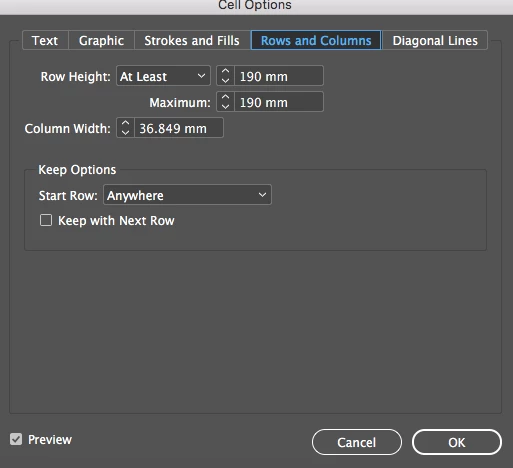
Edit the Cell Options and go to Row and Column and increase the Maximum height of the cell.


10 replies

Participant
Sep 21, 2026 9:19 PM UTC

Thank you


Translate
Participant
Apr 19, 2024 6:33 PM UTC

Correct answer but this is literally the dumbest setting EVER to be added to an app i've ever seen because I can't imagine a valid use-case for it and expecially for it to be enabled by default. Can anyone please enlighten me as to why on earth anyone might need to have a maximum table height when content automatically will adjust the height of tables anyway and if you need to keep rows together theres already a setting for that... just curious

Translate
Robert at ID-Tasker
Legend
Apr 19, 2024 7:36 PM UTC
quote

[...] Can anyone please enlighten me as to why on earth anyone might need to have a maximum table height when content automatically will adjust the height of tables anyway and if you need to keep rows together theres already a setting for that... just curious


By @lynettecamara


It's not a Table's property - but a Cell's property.


You can set AT LEAST - initial height - or EXACTLY - sets specific height.


If you set MAX - lower than your text column's height - you won't end up with overset texts.


Translate
Peter Kahrel
Community Expert
Community Expert
Feb 3, 2020 4:15 PM UTC

Cells and rows have a maximum height. You ran into it. Nothing you can doe about it.

Translate
tvosborn
tvosbornAuthor
Participant
Feb 3, 2020 4:28 PM UTC

Do you have any suggestions for a workaround?

Translate
Eugene TysonCommunity ExpertCorrect answer
Community Expert
Feb 3, 2020 4:33 PM UTC

Edit the Cell Options and go to Row and Column and increase the Maximum height of the cell.


Translate