

The Goth Editor
Known Participant
July 19, 2022
Answered

Overset text in story editor but not text fr

  • July 19, 2022
  • 2 replies
  • 288 views

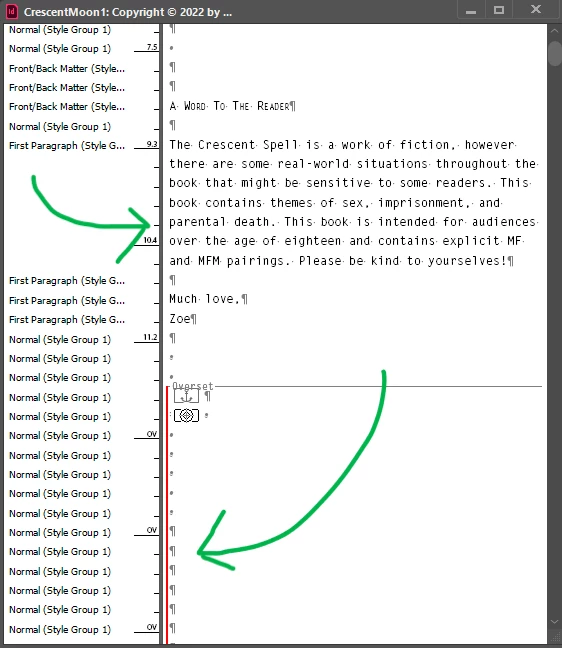
After I placed at the top pages of the book that I had JUST got done formatting, the rest of the book disappeared from the text boxes, but it's in the story editor. The editor shows a very long red line to indicate that it's all overset, but when I apply the overset text to the beginning of the book, nothing shows, so it's just an endless expansion of blank boxes.


In another thread, I saw someone mention exporting it to an IDML, which I did, but it just brought me back into InDesign as the same result.


I'd really not like to waste more time looking for a solution—and worse, having to reformat the entire book again.


Any advice?
 

This topic has been closed for replies.
Correct answer Peter Spier

It seems to be placed as an anchored object...

2 replies

Peter Spier
Community Expert
Peter SpierCommunity ExpertCorrect answer
Community Expert
July 19, 2022

It seems to be placed as an anchored object...

The Goth Editor
Known Participant
July 19, 2022

WHOA. That worked. I went into story editor, highlighted that first anchor, and removed. However, I don't recall anchoring the map when I was moving it around above the text. Super weird. 


Anywho, thank you for saving the day for me!

The Goth Editor
Known Participant
July 19, 2022

"Overset text in story editor but not in text frame" should be the correct title