


Participant
March 26, 2025
Answered

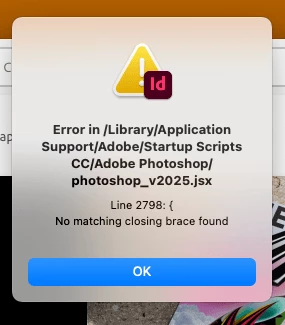
P: Error message (Script line 2798) with InDesign & Illustrator after update
  • March 26, 2025
  • 31 replies
  • 32874 views

I just installed updates for Photoshop and Photoshop beta and received this error on opening Indesign. Any ideas? [I am on a Mac Mini M4] - there is no error opening Photoshop or Photoshop Beta.


<Title renamed by MOD>

Correct answer SanyamTalwar

Hi,

As confirmed by the user, the issue is due to the latest Photoshop update, and the workaround below will resolve the issue.

  • Workaround 1:
    • Uninstall Photoshop 26.5 (make sure to remove preferences).
    • Reinstall Photoshop 26.5. This will install the correct “photoshop_v2025.jsx”.
  • Workaround 2:
    • Open jsx, which is available at "/Library/application support/Adobe/Startup Scripts CC/Adobe Photoshop/" mentioned in the alert in the Text Editor 
    • Add } in the last line

Reference UserVoice Thread - Error message is seen while opening InDesign after Photoshop 26.5 update 

Sanyam Talwar

31 replies

Robert at ID-Tasker
Legend
March 26, 2025

As per the message - something is wrong with the script located in the mentioned folder.


Can you post a screenshot of the "header" - contents of the first few lines - no need to post whole script.


Participant
April 4, 2025

Thanks !