Your inference is correct; InDesign packages only fonts that are actually stored on your system. It will not store cloud-based Adobe Fonts, as you've surmised correctly, because the fonts are protected by the subscription.
As for the latest versions of InDesign CC not creating .indd files that are backward-compatible with CS6, the issue is more than just font packaging. Adobe Systems made a conscious decision to break with CS6, which was introduced more than 7 years ago.
All is not lost, however. It's cumbersome, but you can reach back to InDesign CS6, with various degrees of success, by first packaging your InDesign CC 2019 version of the file.
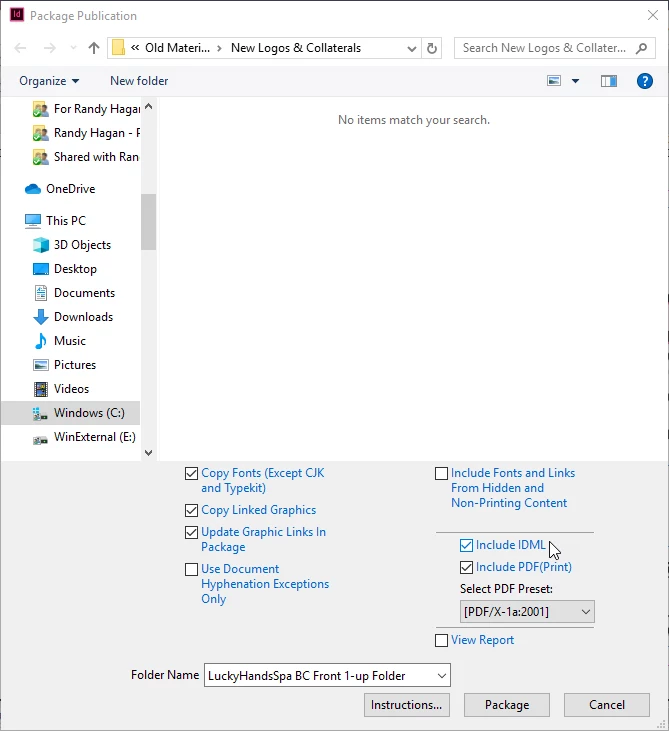
When you package the file, make sure that the Include IDML check box is selected. This will include a legacy file which can be opened as far back as InDesign CS4. Open the .idml file in CS6 and work from there. Do not save an .indd file from CS6. This will overwrite your current-version InDesign document file and can cause you unnecessary complication.
Understand that features introduced in later versions of the software won't make the trip, like use of Typekit/Adobe Fonts for example. And of course you will have to manually address version control issues, since you will be working with two separate files. But this will get you a job package folder that's useful in both the current version of InDesign CC and CS6.
Hope this helps. Good luck.
Randy

 AdChoices