
Participant
October 13, 2022
Answered

Packaging file Issues

  • October 13, 2022
  • 4 replies
  • 1025 views

I'm updated to the most current version of indesign 17.4 and I'm on Mac OS Catalina 10.15.7, I've been having a lot of issues with packaging files. For example the files are linked somewhere on my computer. Normally when you package, the files get collected into the links folder, however this is not happening. I've sent files to a printer not noticing that they were missing. I've also had them collect, but when I've updated the image from RGB to CMYK in photoshop and saved them, they don't update in the indesign file. I have to manually relink all updated images. They used to just update automatically. Please fix this bug!
This topic has been closed for replies.
Correct answer SJRiegel

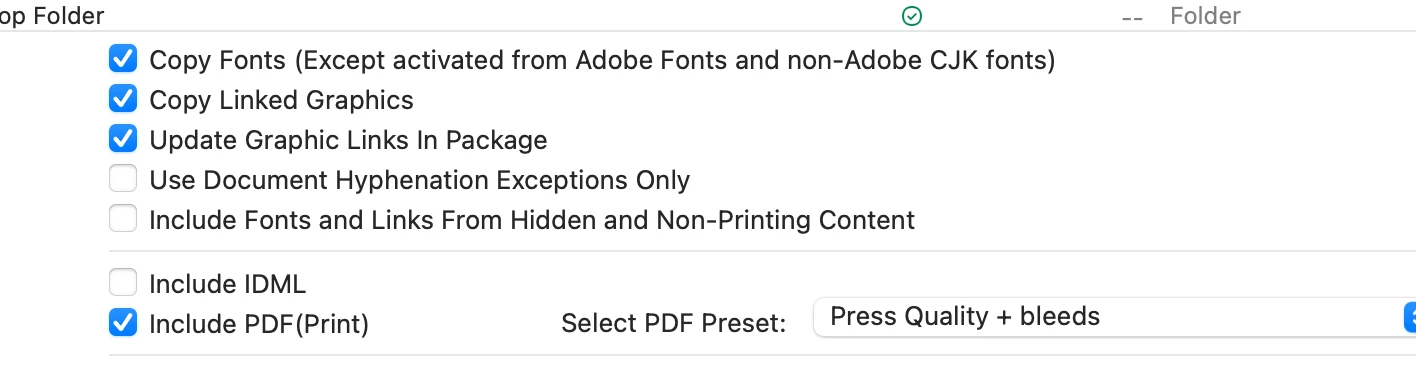
Check the settings in your Packaging dialog -- the option: Copy Linked Graphics may have gotten un-checked. 


4 replies

Jumpenjax
Community Expert
Community Expert
October 14, 2022

Yes, you do have to manually update the links or you can close the file and reopen it it will ask you if you want to update changes.

Lee- Graphic Designer, Print Specialist, Photographer
Willi Adelberger
Community Expert
Community Expert
October 13, 2022
  1. Take care that the files, if they are on a remote server or cloud server are available offline, otherwise the will not be packaged.
  2. Don't conert images to CMYK. Let them be RGB if they are RGB. Useless work to convert them.
  3. Don't send open files to the printer.Ask for the desired PDF specification and send PDF/X to the printer.
Participant
October 13, 2022

All of the files are together and available online at all times. And typically if the file is linked in indesign, when packaged, they collect for output. The only time they would not be packaged is if the link is broken. Secondly, I am a graphic designer and a lot of my work is printed offset, so the printer requires all imagery to be converted into cmyk to print. I open and save the image files in photoshop. The only time I leave images as RGB, is if the piece I am working on is for online use. It's very simple to convert. I have been working this way seamlessly for years with no issues. These issues have just been a recent development. I typically send all native files, supporting fonts and links as well as High resolution PDF/x files to a printer.

SJRiegelCorrect answer
Legend
October 13, 2022

Check the settings in your Packaging dialog -- the option: Copy Linked Graphics may have gotten un-checked. 


BobLevine
Community Expert
Community Expert
October 13, 2022

I'm sorry, but this sounds way more like user error than anything else. Where are you storing the files? Why are you saving in CMYK and how are you opening and saving the files?

Participant
October 13, 2022

I work with all of my images and files on dropbox. We have a virtual work space so files are accessble to other employees at any given time. I am a graphic designer and a lot of my work is printed offset, so the printer requires all imagery to be converted into cmyk to print. I open and save the image files in photoshop. I have been working this way seamlessly for years with no issues. These issues have just been a recent development.

BobLevine
Community Expert
Community Expert
October 13, 2022

Whatever is happening is unique to you...it's not a bug, so we really need to know, IN DETAIL, the exact steps you're taking along with screenshots. But if these files are in a Dropbox folder make sure you have Smart Sync features turned off!

LinSims
Community Expert
Community Expert
October 13, 2022

Let me move this to the InDesign forum for you, which is the appropriate forum for your question.

* The Using the Community forum is for help in using the Adobe Support Community forums, not for help with specific programs, installation issues, or account issues such as subscription questions or billing problems, or generalized questions about Creative Cloud services.
* Questions about business plans should be posted in Enterprise and Teams 
* Product questions should be posted in the associated product community.
* Installation questions should be posted in the Download & Install community.
* Account issues, including subscription questions or billing problems, should be posted in the Account, Payment, & Plan community.
* Questions about the Creative Cloud desktop app or general questions about apps in the Creative Cloud should be posted to the Creative Cloud Services community.