
Participant
February 10, 2025
Answered

Packaging in InDesign 20.1

  • February 10, 2025
  • 2 replies
  • 658 views

I have created a file in InDesign 20.1 and packaged it. I then tried to open the file in the package and it said that I couldnt open it because it had been created in a later version ... InDesign 20.1! Can someone help with this issue? 
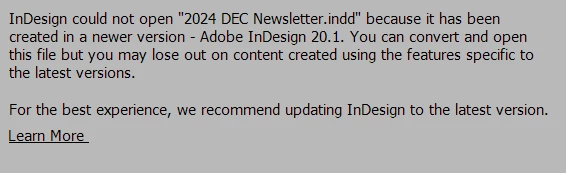
It wouldn convert, and Learn More wouldnt open!!!

Correct answer Suzanne244470922vpc

Thanks for responding. I ended up contacting Adobe help who were very helpful on Chat ... human to human. Yes, the problem was I had two versions installed, 19.5.2 and the latest 20.1.. I am used to the versions just updating, I havent ever had this probelem before. I had to uninstall version 19.5.2 as Indesign 2024 was acting as a default. Having done that and restarting seems to have fixed the issue and the default is now opening with InDesign 2025. thanks.

2 replies

Robert at ID-Tasker
Legend
February 10, 2025

@Suzanne244470922vpc 


Any chance you have TWO versions of InDesign installed - and older version is set as default?


Suzanne244470922vpcAuthorCorrect answer
Participant
February 10, 2025

Thanks for responding. I ended up contacting Adobe help who were very helpful on Chat ... human to human. Yes, the problem was I had two versions installed, 19.5.2 and the latest 20.1.. I am used to the versions just updating, I havent ever had this probelem before. I had to uninstall version 19.5.2 as Indesign 2024 was acting as a default. Having done that and restarting seems to have fixed the issue and the default is now opening with InDesign 2025. thanks.

Robert at ID-Tasker
Legend
February 10, 2025

@Suzanne244470922vpc


There was no need to uninstall older version - just switch default application. 


Some day you might need to use older version - Adobe let you install only one previous major version. 


leo.r
Community Expert
Community Expert
February 10, 2025

What is your version of the operating system?


Also, try these general troubleshooting steps:

https://www.rockymountaintraining.com/adobe-indesign-rebuilding-preferences-cache/