Participant
July 15, 2019
Question

Packaging Process in InDesign is altering font size

  • July 15, 2019
  • 3 replies
  • 549 views

I have packaged an indesign file numerous times with the same result every time with no clue as to why. Before the packaging process, my text formatting is correct, but when I package the file, the pdf, idml and indesign files generated in the packaged file now show the text as smaller and the text body as narrower, without changing the flow of the text. The font is showing the same size on both files, but clearly there is a shift. I can not find any reason for this. The font is a .ttf font that I use for all of our branded pieces and this doesn't happen with any other files I have ever packaged. There are no font errors on the preflight window or packaging window. Any advice would be greatly appreciated, as this has to go to print as soon as possible.
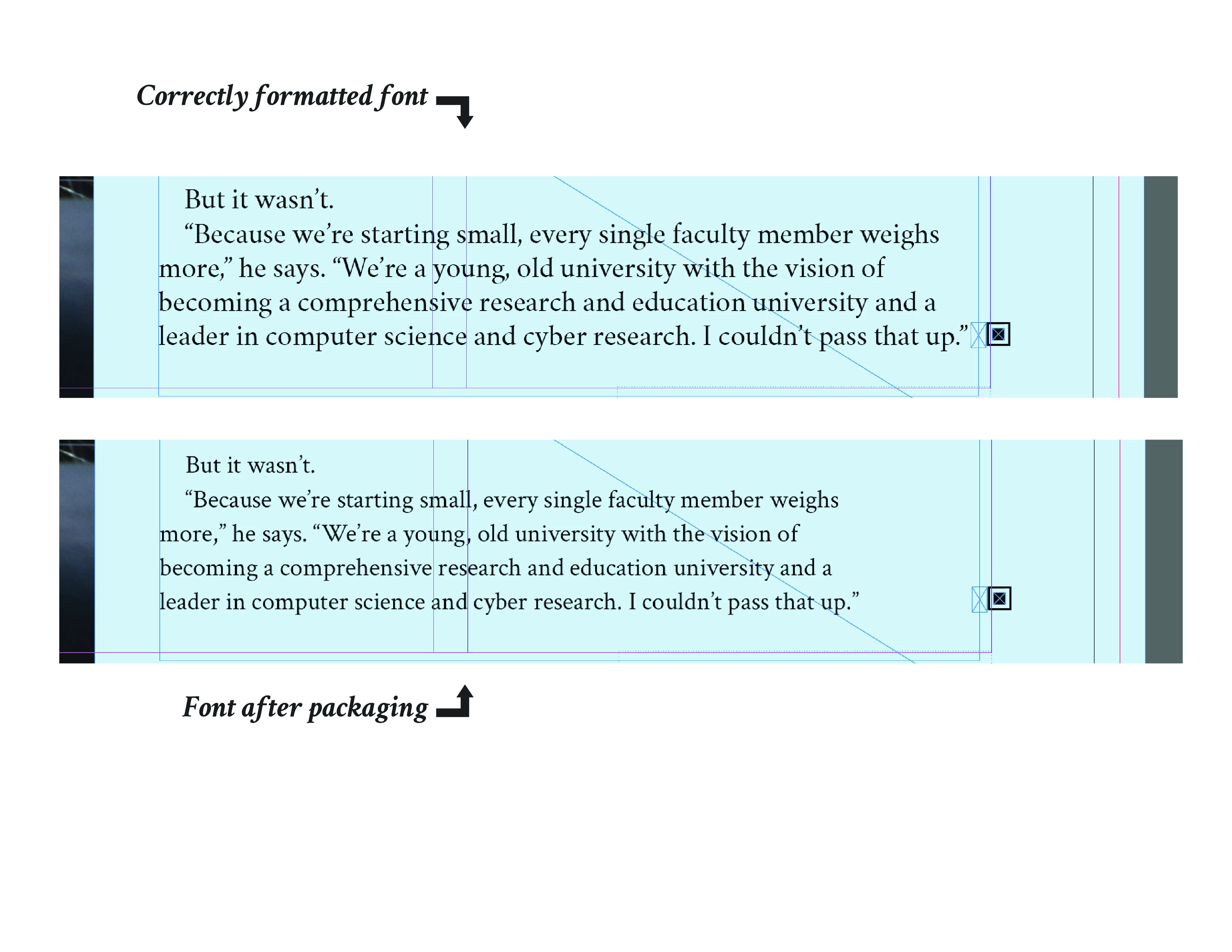
{Renamed by MOD}

This topic has been closed for replies.

3 replies

Colin Flashman
Community Expert
Community Expert
July 18, 2019

Is it just this particular file? What happens if you save the file as an idml, then open the IDML, save it as a new INDD file and package the file then?

Are you using any font management software such as Extensis Suitcase, or are the fonts loaded into a Document fonts folder in the same directory as the ID file, or installed into the OS' fonts folder?

If the answer wasn't in my post, perhaps it might be on my blog at colecandoo!
Legend
July 15, 2019

I'm not sure if you are packaging for archiving or for sending to another computer, but if you can, try opening the file on the original computer and on a different one to see if you get the same results.

Community Expert
July 15, 2019

Are there any graphics on the page that may use the font in question?

Participant
July 15, 2019

No, no graphics that share that font. My headers and captions weren't effected (this is a magazine layout), pretty much only the story text on all pages.

Srishti_Bali
Legend
July 18, 2019

Hi Sergio,

Thanks for reaching out. I tried but couldn't reproduce this issue at my end.

I would request if you can share a few more details like:

  • OS and version of InDesign
  • Is the issue related to a specific document(s)/asset(s)? If yes, could you please share the document(s)/asset(s) with us? You can upload the completer folder to the creative cloud and share the download link.
  • Try using some other font on a new document and check if you see the same behavior.

Looking forward to your response!

Regards,

Srishti