
Participating Frequently
October 24, 2023
Question

Packaging with Include PDF (Print) selected doesn't properly render .ai images

  • October 24, 2023
  • 3 replies
  • 1638 views

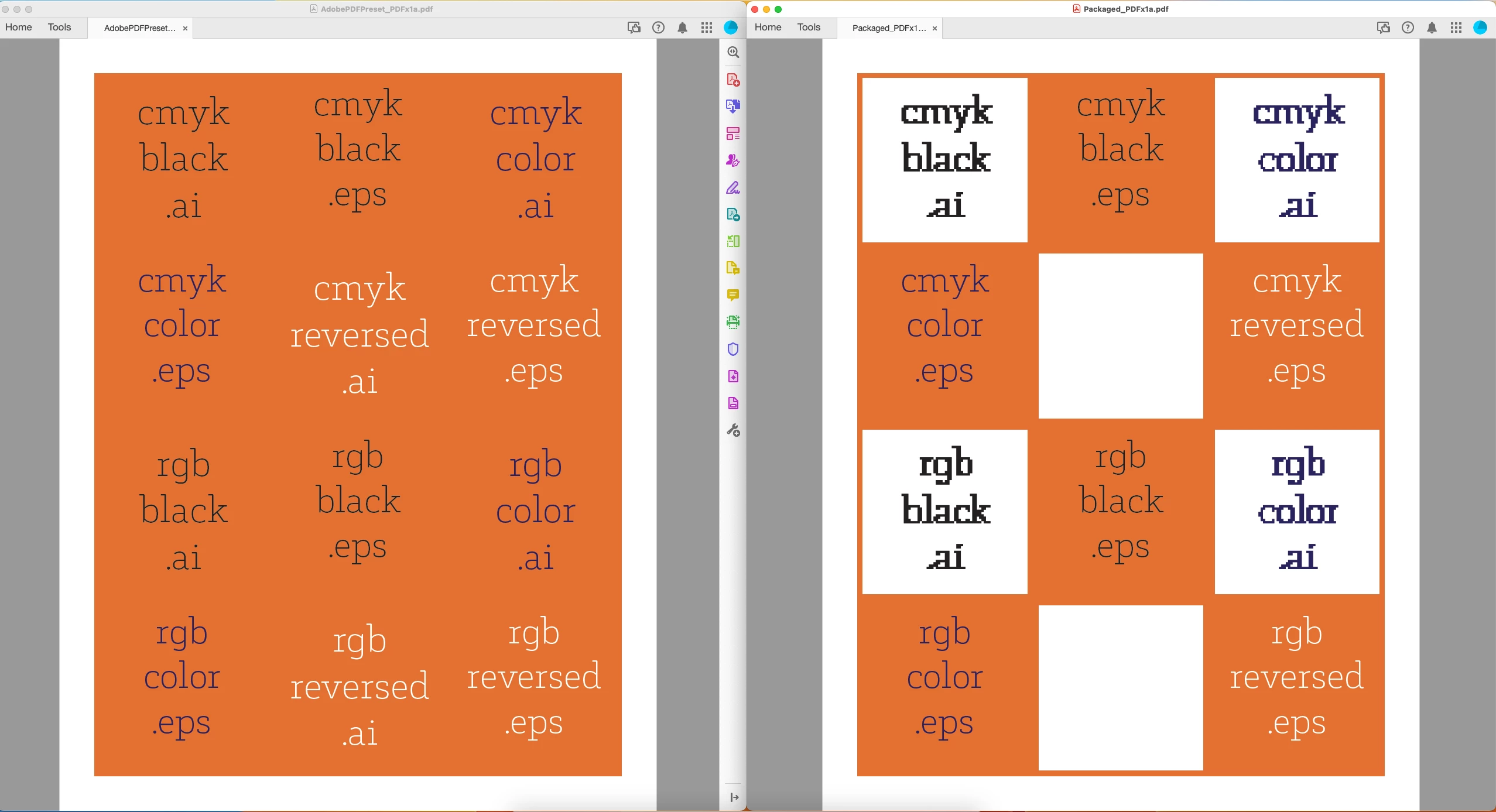
I have never been able to successfully use the "Include PDF" option when packaging files. I usually package, then export the pdf using my presets, then combine the files in the finder because the pdfs never come out correctly. It seems the problem is only with how it renders ai files. Color mode doesn't matter. The same thing happens whether or not I choose High Quality Print, Press Quality, PDFx1a, etc. Any solutions for this yet? It has been the case since the "Include PDF" feature was first released.  Example below has exported pdf on the left, and package generated pdf on the right.

I couldn't find this questioned anywhere else in the discussions in relation to packaging. 
This topic has been closed for replies.

3 replies

Participating Frequently
October 26, 2023

I (sort of) figured it out! I updated to 2024 (19.0)– I hadn't realized there was an update.

It did not solve my problem on its own, but I noticed when packaging it referenced an old printer of mine was named in the print settings area when packaging. I changed my printer default settings to postscript with device independent ppd. When I packaged it, it worked fine. There was something in the print settings or ppd that must have overriding the pdf preset chosen. 

I went back to my 2023 (18.5) and did the same thing but it still didn't work. But it does in 19.0. 

Willi Adelberger
Community Expert
Community Expert
October 25, 2023

Save in Illustrator as PDF with editing capabilities instead of AI files and use them. 

BobLevine
Community Expert
Community Expert
October 24, 2023

Is the orange a spot color? Turn on overprint preview in Acrobat.

Participating Frequently
October 24, 2023

It is not a spot and both look the same with overprint preview on. If I run preflight, the pdf exported using package files shows all .ai files are now low res vectors using exact same preset.

BobLevine
Community Expert
Community Expert
October 24, 2023

Please keep in mind you are not placing AI files, you are placing PDFs. When you save the AI files make sure the PDF section is saved with the default PDF/X-4 settings.