
Page count x of x
You just need to create a paragraph style and a list!
Start with a custom paragraph style. Under "Bullets and Numbering" create a new list. Make sure "Continue Numbers across Stories" and "Continue Numbers from Previous Document in Book" are both selected.
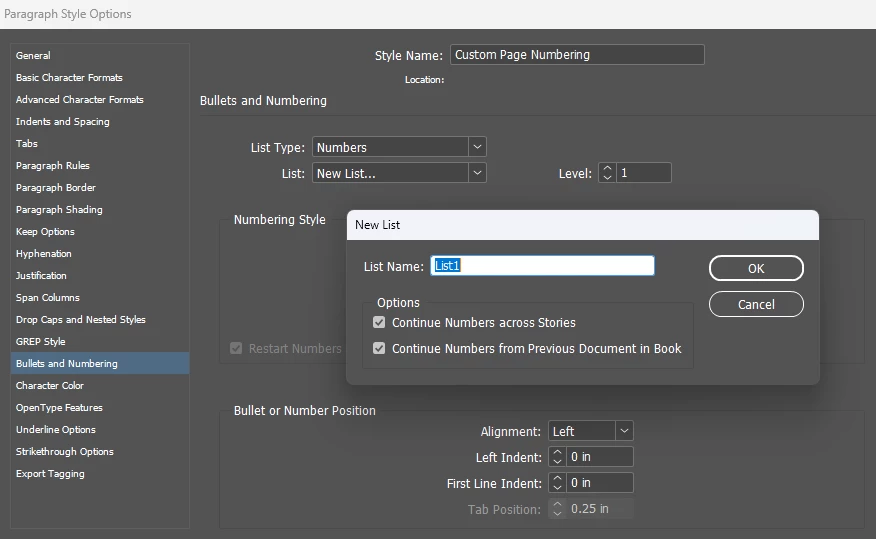
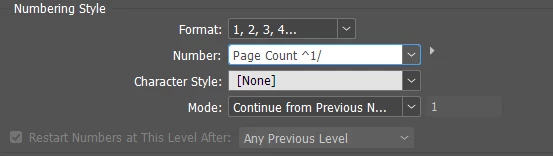
Here are the settings I use for the numbering style but if you just want the number by itself you just need "^1":
Now on your Parent page you just insert a text box and set the paragraph style! For my use, I want the final to say "Page Count 1/42" where the 1 is the incrementing number and the 42 is whichever page limit I have for that document. So on each page that counts towards my custom page limit, I CTRL+SHIFT click on the text box to edit the Parent object and type in 42 (or whatever my page limit is) and the 1 updates automatically. Here's what it looks like in the text box:

If you only want the incrementing number, I believe you need to put a space in the original text box, but you might need to test that.


 AdChoices