Kasyan Servetsky
Legend
July 8, 2021
Answered

Page numbering bug: both while referencing by script and in UI

  • July 8, 2021
  • 5 replies
  • 1559 views

InDesign CC version 16.2.1 x 64 on Windows 10

Let’s make a test:

Create a new document using the default settings: the single page only, page numbering starts at 1, and run this one-liner:

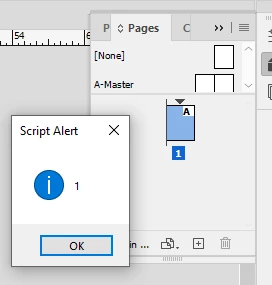
alert(app.activeDocument.pages.itemByName(app.activeDocument.pages[0].name).name);

So far so good:

Now change 'start page number at' from the default ‘1’ in the numbering & section options to, say, ‘2’.

Note: the page moves to the left, but the pages panel shows 1 instead of 2 which is wrong!
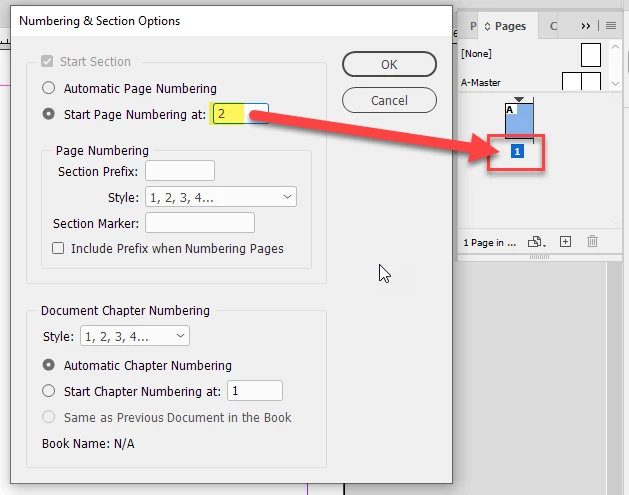
Running the script now results in the ‘object is invalid’ error.

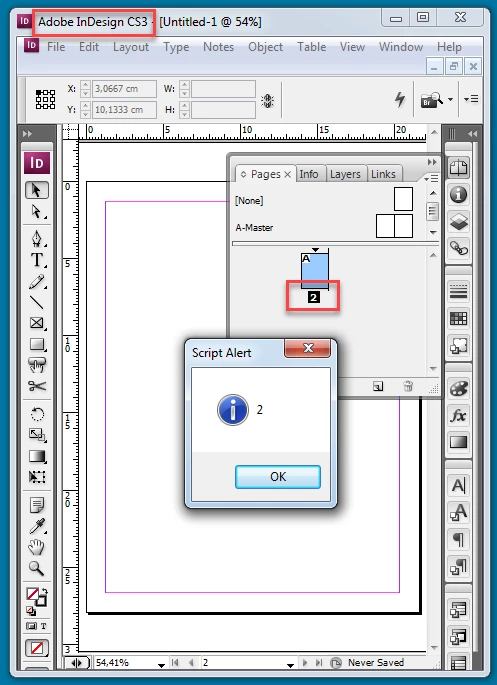
Then I got out of the pantry my old, covered with dust, notebook with InDesign CS3 and found out that the bug wasn’t present in that version: everything works as expected.
I noticed a post in the InDesign Scripting Forum group on Facebook: a guy reported that the pre-installed AdjustPageItems.jsx script didn't work for him throwing the error. When I looked into the problem, I discovered the bug.

I wonder when it was introduced? Is it present in the latest version 16.3? (We still don't have this update available here in Ukraine for some reason).

— Kas

 

This topic has been closed for replies.
Correct answer brian_p_dts

From what I posted above, the pages are not resolving as valid in the snippet before page numbering is being set to absolute: 

var myOldPageNumbering = app.generalPreferences.pageNumbering;
    app.generalPreferences.pageNumbering = PageNumberingOptions.section;
    var myStartPage = app.activeDocument.pages.item(myStartPageName);
    var myEndPage = app.activeDocument.pages.item(myEndPageName);
    //Set page numbering to absolute
    app.generalPreferences.pageNumbering = PageNumberingOptions.absolute;

However, if I alert myStartPage.name and myEndPage.name in this snippet, then the pages resolve as valid and the script executes fine. Not sure why the pages aren't resolving as valid otherwise. 

var myOldPageNumbering = app.generalPreferences.pageNumbering;
    app.generalPreferences.pageNumbering = PageNumberingOptions.section;
    var myStartPage = app.activeDocument.pages.item(myStartPageName);
    var myEndPage = app.activeDocument.pages.item(myEndPageName);
    alert(myStartPage.name + ": " + myEndPage.name);
    //Set page numbering to absolute
    app.generalPreferences.pageNumbering = PageNumberingOptions.absolute;


5 replies

Community Expert
July 9, 2021

FWIW: AdjustPageItems.jsx formerly known as AdjustLayout.jsx is already throwing error #45 with InDesign CS6 version 8.1.0 as you can see here:


Regards,
Uwe Laubender

( ACP )

Kasyan Servetsky
Legend
July 10, 2021

Thanks, Uwe and brianp311!

I replaced the alert with a variable declaration which is never used later in the script to avoid interrupting the process:

var foo = myStartPage.name + ": " + myEndPage.name;

This solves the problem (thanks again to brianp311 for posting the code — now I see what you mean) but I wonder what happens under the hood.
Here's my (current) version of the AdjustPageItems script.

— Kas

Community Expert
July 9, 2021

Hi Kasyan,

now I can see the issue with the script AdjustPageItems.jsx from the Scripts panel's Samples > JavaScript folder. The thing is this: Before it crashes with error #45 it sets the preferences of InDesign to absolute page numbering. Because of the crash that cannot be reset.


Now we can debate why the script is crashing.


EDIT: While I was writing this post Kasyan posted the line of the script code where this happens.

Thanks, Kasyan.


Regards,
Uwe Laubender

( ACP )

brian_p_dts
Community Expert
brian_p_dtsCommunity ExpertCorrect answer
Community Expert
July 9, 2021

From what I posted above, the pages are not resolving as valid in the snippet before page numbering is being set to absolute: 

var myOldPageNumbering = app.generalPreferences.pageNumbering;
    app.generalPreferences.pageNumbering = PageNumberingOptions.section;
    var myStartPage = app.activeDocument.pages.item(myStartPageName);
    var myEndPage = app.activeDocument.pages.item(myEndPageName);
    //Set page numbering to absolute
    app.generalPreferences.pageNumbering = PageNumberingOptions.absolute;

However, if I alert myStartPage.name and myEndPage.name in this snippet, then the pages resolve as valid and the script executes fine. Not sure why the pages aren't resolving as valid otherwise. 

var myOldPageNumbering = app.generalPreferences.pageNumbering;
    app.generalPreferences.pageNumbering = PageNumberingOptions.section;
    var myStartPage = app.activeDocument.pages.item(myStartPageName);
    var myEndPage = app.activeDocument.pages.item(myEndPageName);
    alert(myStartPage.name + ": " + myEndPage.name);
    //Set page numbering to absolute
    app.generalPreferences.pageNumbering = PageNumberingOptions.absolute;


Community Expert
July 9, 2021

Hi Kasyan,

also tested with my German InDesign 16.2.1.102 on Windows 10.

No issue. After changing the start page number to 2 the alert is still working:


Also working with InDesign 16.3.0.24 on the same machine.


Regards,
Uwe Laubender

( ACP )

Kasyan Servetsky
Legend
July 9, 2021

Thank you guys for your prompt replies!

That gave me a clue: something went wrong with my prefs. After I trashed them, the problem has gone.

After I trashed the preferences, the problem has gone, but only for a few minutes. It appeared again:

The AdjustPageItems.jsx still throws the error whenever the 1st page is changed from 1 to anything else.

— Kas

Kasyan Servetsky
Legend
July 9, 2021

I think there is something the AdjustPageItems.jsx script that corrupts InDesign prefs.

  1. Create a doc, add some page items and make the 1st page start from 2, or download the attached test doc below.
  2. Run the AdjustPageItems.jsx script ( WARNING: you may need to trash your prefs after that! )


Before


After

Peter Kahrel
Community Expert
Community Expert
July 9, 2021

I don't see that problem here (ID 16.2.1.102, Windows 10/64)


P.

brian_p_dts
Community Expert
Community Expert
July 8, 2021

I was also on that thread. Worth noting that the AdjustPageItems script attempts to address this with: 

var myOldPageNumbering = app.generalPreferences.pageNumbering;
    app.generalPreferences.pageNumbering = PageNumberingOptions.section;
    var myStartPage = app.activeDocument.pages.item(myStartPageName);
    var myEndPage = app.activeDocument.pages.item(myEndPageName);
    //Set page numbering to absolute
    app.generalPreferences.pageNumbering = PageNumberingOptions.absolute;

The pages aren't resolving as valid. If I put in an alert for myStartPage.isValid and myEndPage.isValid right after declaring those variables, they did resolve as true, and the script worked as expected. It's bugged on both my Windows running your same specs and my Mac (Big Sur 11.2.3, ID 16.0.1)