
kanaatb
Participant
July 31, 2017
Answered

Page numbering from right to left for Arabic Document

  • July 31, 2017
  • 4 replies
  • 17250 views

Hello Everybody,

I have document which consists of 24 Page. In pdf export I think there will not be problem but If people would print out the document that contains Arabic text. Page numbering will be problem. By default in the left side of the facing page, there exist page 4, in the right side page 5. I want it to be opposite. How can I achieve this?

Thank you.

By the way, I also downloaded MENA version of the indesign. But the document I created is designed in International version of Indesign. In the MENA version, it creates pages with right-to-left by default. But this is not the case for this document.
This topic has been closed for replies.
Correct answer Zaid Al Hilali

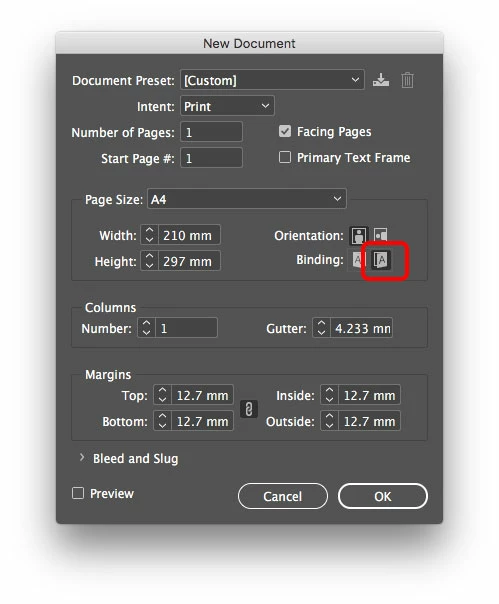
Since you are using Middle Eastern version of Adobe InDesign, in the new document window, or in the menu File > Document Setup, you can choose the Right-to-Left binding direction as shown below. Then, the usual auto page numbering in the master pages will allow you to paginate in the right order ie. page 4 on the right of the spread, and page 5 on the left.

4 replies

Participating Frequently
July 31, 2017

Thanks from middle east : )

bogdang81380018
Participant
December 3, 2018

Hi,

I am using Adobe CC 2019, there is no binding direction option...

Zaid Al Hilali
Community Expert
Community Expert
December 3, 2018

Make sure you have InDesign version with Arabic support or Middle Eastern version (ME). Here is a topic that may shed light on how to acquire InDesign ME version.

kanaatb
kanaatbAuthor
Participant
July 31, 2017

Thank you so much. These suggestions helped me to solve the issue.

Zaid Al Hilali
Community Expert
Zaid Al HilaliCommunity ExpertCorrect answer
Community Expert
July 31, 2017

Since you are using Middle Eastern version of Adobe InDesign, in the new document window, or in the menu File > Document Setup, you can choose the Right-to-Left binding direction as shown below. Then, the usual auto page numbering in the master pages will allow you to paginate in the right order ie. page 4 on the right of the spread, and page 5 on the left.

Jongware
Community Expert
Community Expert
July 31, 2017

That is properly called the "Binding direction". The online Help "Arabic and Hebrew features in InDesign: Binding directions" doesn't help (it merely defines the term again without stating where it can be changed), but here is an earlier thread with your exact same question: How to add Arabic format in the Binding Direction options of Adobe Indesign CC?