Inspiring
February 12, 2026
Question

Page numbering start section on new spread

  • February 12, 2026
  • 5 replies
  • 71 views

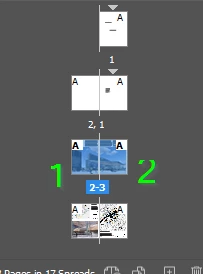
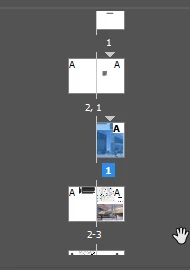
I am trying to achieve this


I can only get this
Thanks for any help.

    5 replies

    rob day
    Community Expert
    Community Expert
    February 13, 2026

    Hi ​@Charlie329572228uvx , You can set the spread to not Allow Selected Spread to Shuffle and set odd page numbers to the left of the spine. Before you do it, see if you can find a published book with page numbers set that way


    Willi Adelberger
    Community Expert
    Community Expert
    February 12, 2026

    I think it is good to create for each section a new INDD and bundle them in an INDB book file.

    Mike Witherell
    Community Expert
    Community Expert
    February 12, 2026

    Hi Charlie,

    The old tradition in page numbering is even numbers on the left folio; odd numbers on the right folio. That is why InDesign “enforces” this. To get InDesign to loosen its grip on that traditional way of managing page numbers, select all your pages and turn off both those Shuffle switches in the Pages panel menu button flyout (as PK shows in the previous post). Then you can select individual pages, go to the Pages panel menu button, and choose Numbering & Section Options, and choose to begin a page on any explicit number you wish to use.

    Mike Witherell
    Peter Kahrel
    Community Expert
    Community Expert
    February 12, 2026

    In the Page panel’s fly-out menu, select Allow Document Pages to Shuffle and Allow Selected Spreads to Shuffle:


    Ton Frederiks
    Community Expert
    Community Expert
    February 12, 2026

    This is the Illustrator forum, myou may want to post this in the InDesign forum:

    https://community.adobe.com/questions-671