
Participant
January 27, 2017
Answered

PAGE/SPREAD BREAK??

  • January 27, 2017
  • 2 replies
  • 1423 views

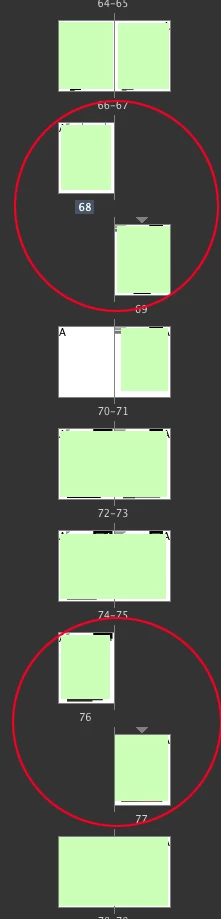
I have the most complicated question to search for. If anyone can help me please! When I combine pages from another InDesign document into my main one, I can't ever seem to get rid of these break in the spreads? If I insert a page it just creates an empty page and the break goes away, but once I remove it the break again appears.
    This topic has been closed for replies.
    Correct answer SJRiegel

    Try right-clicking on the small gray triangle above the misplaced pages in the Pages pallet - Go to Numbering and Section Options -
    un-click Start Section, and select Automatic page numbering.

    Make sure that Allow Document Pages to Shuffle and Allow Selected Spread to Shuffle are both checked.

    2 replies

    Participant
    October 27, 2021

    I had the exact same issue. Thanks for having it first! @SJRiegel you're a legend.

    SJRiegelCorrect answer
    Legend
    January 27, 2017

    Try right-clicking on the small gray triangle above the misplaced pages in the Pages pallet - Go to Numbering and Section Options -
    un-click Start Section, and select Automatic page numbering.

    Make sure that Allow Document Pages to Shuffle and Allow Selected Spread to Shuffle are both checked.