

dublove
Legend
Nov 16, 2026 3:56 PM UTC
Question

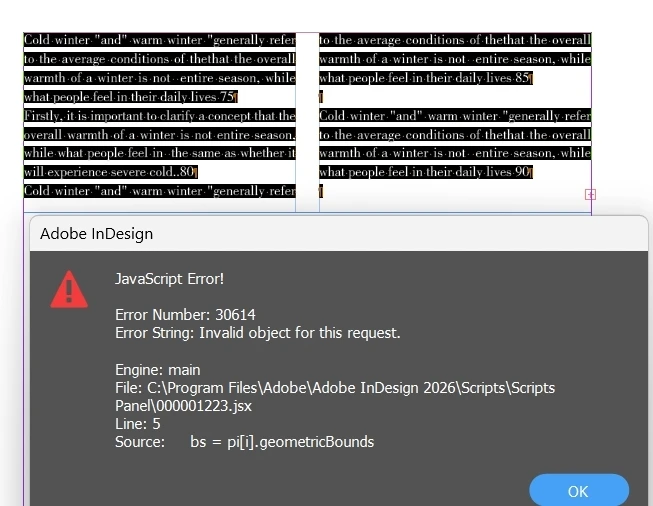
pageItems cannot obtain the geometricBounds of the geometric shapes in the overflow text?

Hello everyone.

I want to obtain the geometricBounds of all pageItems before expanding the overflow text.

I'm dizzy again. I thought I could get the geometricBounds of the graph in the overflow text
I have found that both the graphics and geometric shapes are not working.

var doc = app.activeDocument;
var item = app.selection[0]; //select text
var pi = item.pageItems;
for (var i = 0; i < pi.length; i++) {
bs = pi[i].geometricBounds
alert(bs);
};
 

    6 replies

    m1b
    Community Expert
    Community Expert
    Nov 17, 2026 4:39 AM UTC

    Hi ​@dublove another approach is to add threaded text frames until the overset is gone, do the resizing, then remove the extra frame(s). Here is a script showing the technique. Run it on your test doc.

    It resizes to the nearest column’s width, but that is just an example. Replace line 58 “var result = resizeToClosestColumn(rectangles[j], FIT_CONTENTS);” with your own function call if you want something else.

    – Mark

    /**
    * @file Resize Anchored Rectangles.js
    *
    * Resizes the anchored rectangles in the selected stories to the width
    * of their closest text column, including rectangles in overset text.
    * Handles anchored objects in overset text by temporarily adding text frames.
    *
    * Usage: select some text, or one or more text frames, and run script.
    *
    * @author m1b
    * @version 2026-11-17
    * @discussion https://community.adobe.com/questions-671/pageitems-cannot-obtain-the-geometricbounds-of-the-geometric-shapes-in-the-overflow-text-1656430
    */

    // whether to fit each rectangle's contents proportionally after resizing
    const FIT_CONTENTS = true;

    // the height, in points, of each temporary text frame
    const TEMPORARY_FRAME_HEIGHT = 10000;

    // the outcomes of resizeToClosestColumn
    const ResizeResult = {
    RESIZED: 1,
    UNCHANGED: 2,
    OVERSET: 3
    };

    function main() {

    if (0 === app.documents.length)
    return alert('Please open a document and try again.');

    var doc = app.activeDocument;
    var stories = getStories(doc.selection);

    if (0 === stories.length)
    return alert('Please select some text or text frames and try again.');

    var oldRulerOrigin = doc.viewPreferences.rulerOrigin;
    var temporaryFrames = [];
    var resizedCount = 0;
    var skippedCount = 0;

    try {

    // spread coordinates, so a rectangle and its text frame share an origin
    doc.viewPreferences.rulerOrigin = RulerOrigin.SPREAD_ORIGIN;

    for (var i = 0; i < stories.length; i++) {

    var rectangles = stories[i].rectangles.everyItem().getElements();

    composeOversetText(stories[i], temporaryFrames);

    // go backwards in case the change reflows text
    for (var j = rectangles.length - 1; j >= 0; j--) {

    var result = resizeToClosestColumn(rectangles[j], FIT_CONTENTS);

    if (ResizeResult.RESIZED === result)
    resizedCount++;
    else if (ResizeResult.OVERSET === result)
    skippedCount++;

    }

    }

    }

    finally {

    // removing the temporary frames returns their text to overset
    for (var k = temporaryFrames.length - 1; k >= 0; k--)
    temporaryFrames[k].remove();

    doc.viewPreferences.rulerOrigin = oldRulerOrigin;

    }

    var message = 'Resized ' + resizedCount + ' anchored objects.';

    if (skippedCount > 0)
    message += '\n' + skippedCount + ' could not be resized because they would not fit in a text frame.';

    alert(message);

    };

    var savedMeasurementUnit = app.scriptPreferences.measurementUnit;

    try {

    // points, to match TEMPORARY_FRAME_HEIGHT
    app.scriptPreferences.measurementUnit = MeasurementUnits.POINTS;
    app.doScript(main, ScriptLanguage.JAVASCRIPT, undefined, UndoModes.ENTIRE_SCRIPT, 'Resize Anchored Rectangles');

    } catch (error) {
    alert('Resize Anchored Rectangles: ' + error.message + ' (line ' + error.line + ')');
    }

    finally {
    app.scriptPreferences.measurementUnit = savedMeasurementUnit;
    }

    /**
    * Returns the unique stories of the given items.
    * @author m1b
    * @version 2026-11-17
    * @param {Array<PageItem|Text>} items - the items, eg. a selection.
    * @returns {Array<Story>}
    */
    function getStories(items) {

    var stories = [];
    var unique = {};

    for (var i = 0; i < items.length; i++) {

    if (!items[i].hasOwnProperty('parentStory'))
    continue;

    var story = items[i].parentStory;

    if (unique[story.id])
    continue;

    unique[story.id] = true;
    stories.push(story);

    }

    return stories;

    };

    /**
    * Threads new text frames, matching the width and columns of
    * the story's last frame but TEMPORARY_FRAME_HEIGHT tall,
    * onto `story` until it no longer overflows.
    * @author m1b
    * @version 2026-11-17
    * @param {Story} story - the story to compose.
    * @param {Array<TextFrame>} temporaryFrames - the added frames are pushed onto this array.
    */
    function composeOversetText(story, temporaryFrames) {

    while (story.overflows) {

    var lastFrame = story.textContainers[story.textContainers.length - 1];

    if (
    !(lastFrame instanceof TextFrame)
    || 0 === lastFrame.characters.length
    )
    return;

    var newFrame = getSpread(lastFrame).textFrames.add({ itemLayer: lastFrame.itemLayer });
    var bounds = lastFrame.geometricBounds;

    newFrame.appliedObjectStyle = lastFrame.appliedObjectStyle;

    // a very tall frame takes most overset text in one go, and fits very tall anchored objects
    newFrame.geometricBounds = [bounds[0], bounds[1], bounds[0] + TEMPORARY_FRAME_HEIGHT, bounds[3]];

    // copy only the column settings: copying every text frame preference resizes the frame
    newFrame.textFramePreferences.properties = {
    insetSpacing: lastFrame.textFramePreferences.insetSpacing,
    textColumnCount: lastFrame.textFramePreferences.textColumnCount,
    textColumnGutter: lastFrame.textFramePreferences.textColumnGutter
    };

    newFrame.previousTextFrame = lastFrame;

    temporaryFrames.push(newFrame);

    }

    };

    /**
    * Sets an anchored rectangle's width to the width
    * of the text column closest to it, unless it is
    * already that width.
    * @author m1b
    * @version 2026-11-17
    * @param {Rectangle} rectangle - an anchored rectangle.
    * @param {Boolean} [fitContents] - whether to fit the rectangle's contents proportionally (default: false).
    * @returns {ResizeResult} - OVERSET, if the rectangle's anchor is in overset text.
    */
    function resizeToClosestColumn(rectangle, fitContents) {

    // an anchored rectangle's parent is its anchor character
    var frames = rectangle.parent.parentTextFrames;

    if (0 === frames.length)
    return ResizeResult.OVERSET;

    var bounds = rectangle.geometricBounds;
    var column = getClosestColumn(frames[0], (bounds[1] + bounds[3]) / 2);

    // allow for floating point error
    if (Math.abs((bounds[3] - bounds[1]) - (column[1] - column[0])) < 0.001)
    return ResizeResult.UNCHANGED;

    rectangle.geometricBounds = [bounds[0], column[0], bounds[2], column[1]];

    if (
    fitContents
    && rectangle.pageItems.length > 0
    )
    rectangle.fit(FitOptions.PROPORTIONALLY);

    return ResizeResult.RESIZED;

    };

    /**
    * Returns the left and right of the text frame's column
    * whose centre is closest to `x`.
    * @author m1b
    * @version 2026-11-17
    * @param {TextFrame} frame - the text frame.
    * @param {Number} x - the horizontal position to compare.
    * @returns {Array<Number>} - [left, right].
    */
    function getClosestColumn(frame, x) {

    var preferences = frame.textFramePreferences;
    var insets = preferences.insetSpacing;
    var count = preferences.textColumnCount;
    var gutter = preferences.textColumnGutter;
    var left = frame.geometricBounds[1] + insets[1];
    var right = frame.geometricBounds[3] - insets[3];
    var width = (right - left - gutter * (count - 1)) / count;
    var closest;
    var closestDistance = Infinity;

    for (var i = 0; i < count; i++) {

    var columnLeft = left + i * (width + gutter);
    var distance = Math.abs(columnLeft + width / 2 - x);

    if (distance < closestDistance) {
    closestDistance = distance;
    closest = [columnLeft, columnLeft + width];
    }

    }

    return closest;

    };

    /**
    * Returns the spread (or master spread) containing `item`.
    * @author m1b
    * @version 2026-11-17
    * @param {PageItem} item - the page item.
    * @returns {Spread|MasterSpread}
    */
    function getSpread(item) {

    var parent = item.parent;

    while (
    !(parent instanceof Spread)
    && !(parent instanceof MasterSpread)
    )
    parent = parent.parent;

    return parent;

    };


    Translate
    dublove
    dubloveAuthor
    Legend
    Nov 16, 2026 5:13 PM UTC

    I found that this seems to be a false proposition
    The geometricBounds in the overflow text do not exist.

    But I want the width of the image in the proportional scaling to be the same as the column width of the first text box, is it possible?

    Translate
    Peter Kahrel
    Community Expert
    Community Expert
    Nov 16, 2026 9:06 PM UTC

    There is no geometry at all in overset text: geometricBounds, baseline, etc. etc.

    You can get the size of a page item by copying it onto the page, then deleting it again.

    Translate
    dublove
    dubloveAuthor
    Legend
    Nov 17, 2026 3:57 AM UTC

    HI ​@Peter Kahrel 

    This method may work, but I feel like it requires constant selection, deselection, and whether there will be any mistakes when making another selection.
    Is it possible to copy to the beginning of the first text box?

    or

    Can it be moved  to the beginning first, obtain the geometricBounds, and then move it back to its original position?

    Like this?

    //Assuming the image on the selected page has been selected
    var img = app.selection; ‌‌
    //Ensure that the selected item is an image or a frame containing an image
    if (img.constructor.name === "Image" || img.constructor.name === "Rectangle") {
    var anchor = img.anchoredObjectSettings;
    var story = anchor.parentStory;
    var currentIndex = anchor.insertionPoint.index;

    //Target insertion point position: for example, after moving to the 5th character
    var targetIndex = 5;

    //Move insertion point
    story.insertionPoints[targetIndex].move(LocationOptions.AFTER, story.insertionPoints[currentIndex]);
    }


    Translate