

Jack Brannen
Known Participant
Jun 23, 2024 7:06 PM UTC
Question

Pages panel doesn't scroll all the way down

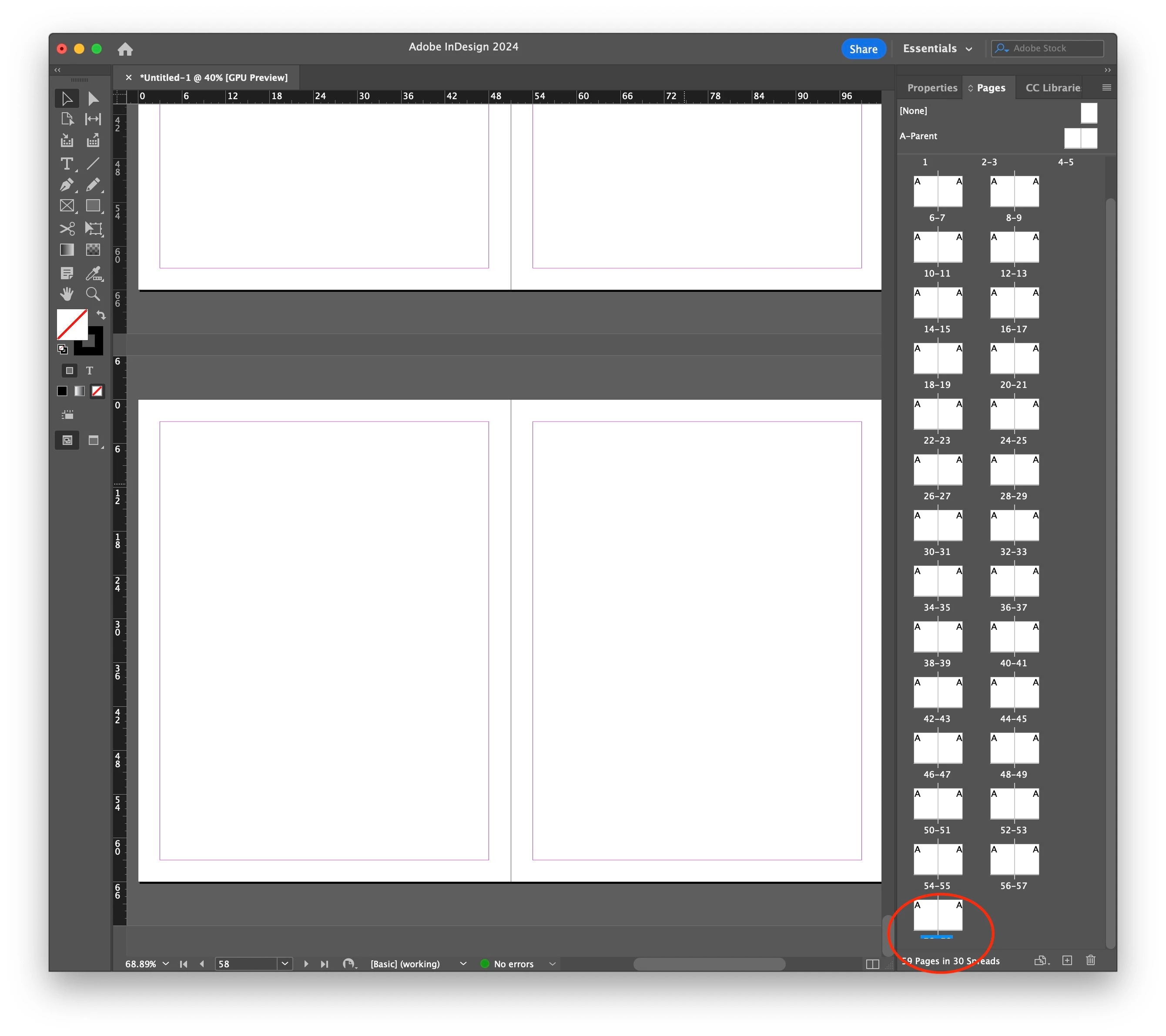
When the Pages panel is set to "View Pages" > "Horizontally," if there are enough pages in the document, the bottom page numbers are cut off when you scoll all the way down. I can reproduce this in InDesign even with preferences reset.


InDesign 19.4

macOS 14.5
 

31 replies

.random..
Inspiring
Nov 2, 2025 2:37 PM UTC

Hi,
I’m experiencing a frustrating issue in InDesign.


In the Pages panel, the page numbers at the bottom of each thumbnail are partially or completely hidden, making it really hard to navigate through the document.


I’ve tried resizing the panel, restarting InDesign, and resetting preferences, but the problem persists.
Could you please help me fix or reset whatever is causing this display bug?


Thanks in advance!

Translate
Peter Spier
Community Expert
Community Expert
Nov 2, 2025 3:05 PM UTC

Have you tried dragging the divider between the halves of the panel, or putting the parent pages on top?

Translate
.random..
Inspiring
Nov 2, 2025 3:21 PM UTC

 Yes.

Translate
Known Participant
Sep 27, 2024 3:01 PM UTC

This bug has been around since at least InDesign 16. It also doesn't matter how you have the panel setup to show pages, or how big the panel window is.  https://indesign.uservoice.com/forums/601180-adobe-indesign-bugs/suggestions/43451784-last-row-of-pages-panel-in-horizontal-view-is-miss

Translate
Jack Brannen
Known Participant
Sep 27, 2024 3:34 PM UTC

Thanks, @Larry29731486lwom . It's insane that we pay monthly for these apps and still can't get simple bugs fixed!

Translate
Participant
Oct 14, 2024 12:24 AM UTC

I have this issue too – v19.5 – any updates as to a fix?

Translate
Harshika Verma
Community Manager
Community Manager
Jun 24, 2024 1:24 PM UTC

Hi @Jack Brannen,

Thank you for reaching out. Would you mind adjusting the pages panel as shown in the video below and let us know if you're able to see the page numbers properly?


I will check with the product team if this is an expected behavior or actually a bug.


Thanks,

Harshika 

Translate
Jack Brannen
Known Participant
Jun 24, 2024 1:40 PM UTC

Hi @HARSHIKA_VERMA , thanks for your reply. 

I have tried resizing the pages panel as shown. No change.

If you have more specific instructions for me, or want me to record my screen, I'm happy to do so.

Translate
Inspiring
Sep 25, 2024 2:29 PM UTC

@HARSHIKA_VERMA Yo

Translate
Community Expert
Jun 24, 2024 4:51 AM UTC

Yeh I get the same thing


You should post bugs here
https://indesign.uservoice.com/forums/601180-adobe-indesign-bugs


Not much else to do on this one.

Translate
leo.r
Community Expert
Community Expert
Jun 24, 2024 4:30 PM UTC

Yes I can confirm this, too. Also in InDesign 2023. Definitely a bug (even if rather minor). I guess that the situation where this bug manifests itself is rather uncommon (plus the last page numbers are known anyway), so it went under the radar until now.

Translate
Jack Brannen
Known Participant
Jun 25, 2024 12:47 PM UTC

@leo.r Thanks for confirming. This bug bites me again and again when I'm trying export the last pages in a long document. So, not minor for me! 😣

Translate