Participant
September 14, 2022
Question

Pages panel highlighted

  • September 14, 2022
  • 4 replies
  • 505 views

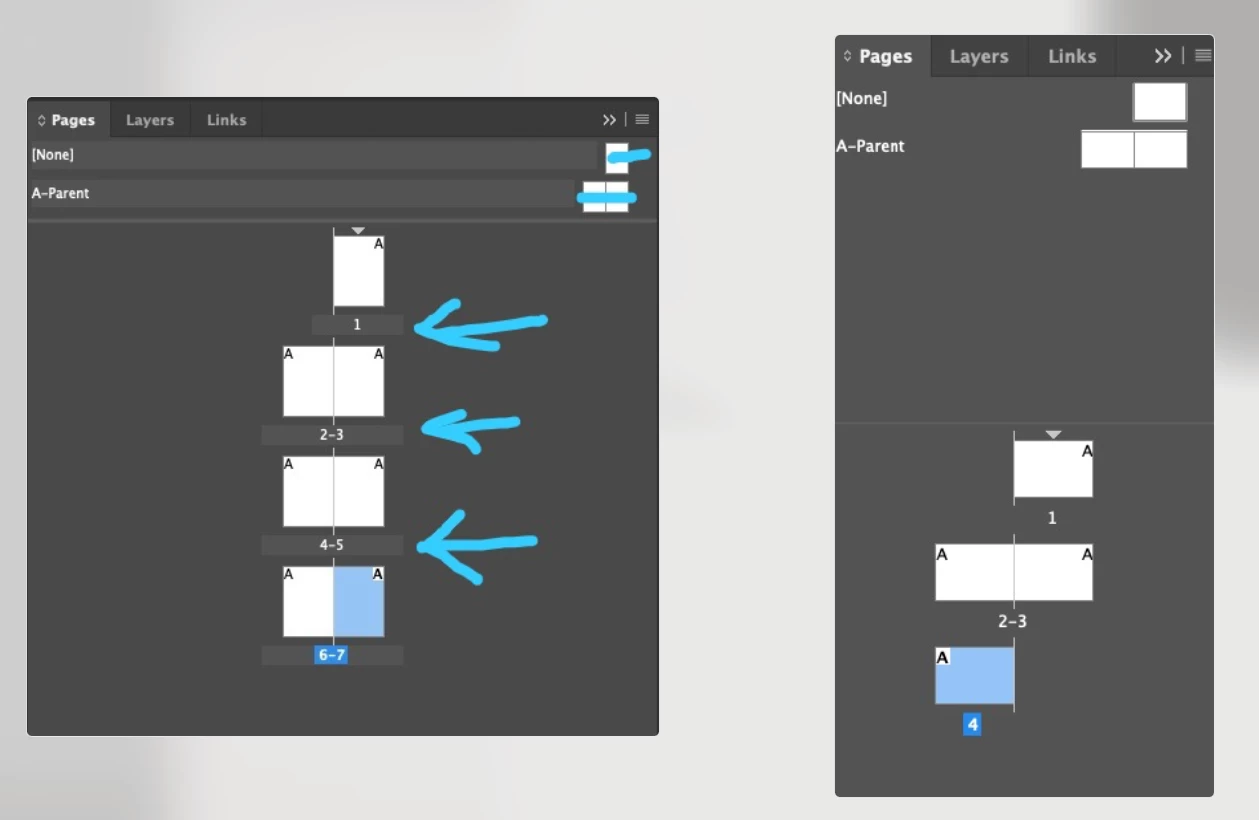
Hi, does anyone knows why my Pages Panel is highlighted like this image? 
I'm usign MacStudio M1 and indesign 17.4

This topic has been closed for replies.

4 replies

Participant
September 21, 2022

@wanderleic41568133  did you manage to solve this? Got exactly the same thing on a fresh install (last night) of InDesign on new mac studio.

Community Expert
September 22, 2022

Hi @mat_hob ,

do you see any bad side effects with that?

Did you try to trash caches and/or preferences of InDesign?

What's your exact version and what is your operating system?


Regards,
Uwe Laubender
( Adobe Community Expert )

Participant
September 22, 2022

Hi Uwe


No side effects, it was just annoying! It appears to have gone now. The documents it was appearing on no longer have it and new doc don't seem to be effected. So it looks like it solved itself!


Just for 100% clarity the mac arrived new on the day of my original message, and InDesign was installed on the same day. OS 12.5.1 InDesign 17.4.


Thanks

Community Expert
September 15, 2022

@Willi Adelberger@Bill Silbert it seems the OP is referring to the slight grey background on the lines marked with arrow. Notice the page number portion is slightly in a different color across the panel from the rest of the panel and the same with other marked portions

@wanderleic41568133 if this is the case then probably its a glitch with preferences/cache. Try deleting them

-Manan

-Manan
Participant
September 15, 2022

Yeah, @Manan Joshi, the problem is the grey background on the lines, @Willi Adelberger and @Bill Silbert . I tryed delete preferences using "(Mac OS) While pressing Shift+Option+Command+Control, start InDesign. Click Yes when asked if you want to delete preference files." But still have de hrey brackground... 

Community Expert
September 15, 2022

Try manually deleting the cache as well. Instructions given in the article below

https://www.rockymountaintraining.com/adobe-indesign-rebuilding-preferences-cache/

-Manan

-Manan
Bill Silbert
Community Expert
Community Expert
September 14, 2022

If you mean why is page 7 on the left screenshot and page 4 on the right one showing in a light blue color then the answer is simple. Those pages are the current active page of their respective documents and are thus highlighted to show that.

Willi Adelberger
Community Expert
Community Expert
September 14, 2022

I cannot see any problem in your screen shoot.