charlesb69396587
Participant
April 1, 2021
Answered

Pages Panel Scroll Bar Weirdness
  • April 1, 2021
  • 1 reply
  • 305 views

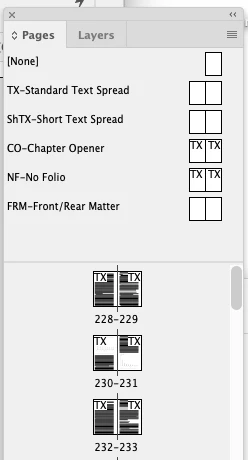
Here is a screen-grab of the pages panel of a ~500-page doc. See how the scroller handle is at the very top of the track? Why is this the case, given that page 228 is near the middle of the document? It's annoying because I find that when I'm trying to navigate to a given page the panel, like, resets and shows the top of the doc in the pages panel, instead of whatever part in the middle where I'm currently working. 

This topic has been closed for replies.
Correct answer Mike Witherell

What happens if you press Cmd/Ctrl+J to Go To Page and type in, say, page 1? After that, what has happened to the scrollbars?

1 reply

Mike Witherell
Community Expert
Mike WitherellCommunity ExpertCorrect answer
Community Expert
April 1, 2021

What happens if you press Cmd/Ctrl+J to Go To Page and type in, say, page 1? After that, what has happened to the scrollbars?

Mike Witherell
charlesb69396587
Participant
April 1, 2021

Yeah, at that point it starts to function as I think would be expected, with track of the pages-panel scroll bar representing the full length of the document and the pill of the handle representing the relative length and location of the content visible in the active window. But why would that step be necessary? I never use command-J (though mostly because I can't break the habit of thinking it means Join, not Jump!). I guess I mostly use that scroll bar to navigate through my documents, and I feel like I didn't used to have the problem of the handle not accurately functioning before. 


I guess I'm wondering if this is a bug, or a functionality that's intentional and I'm just not understanding why it was built in.