Question
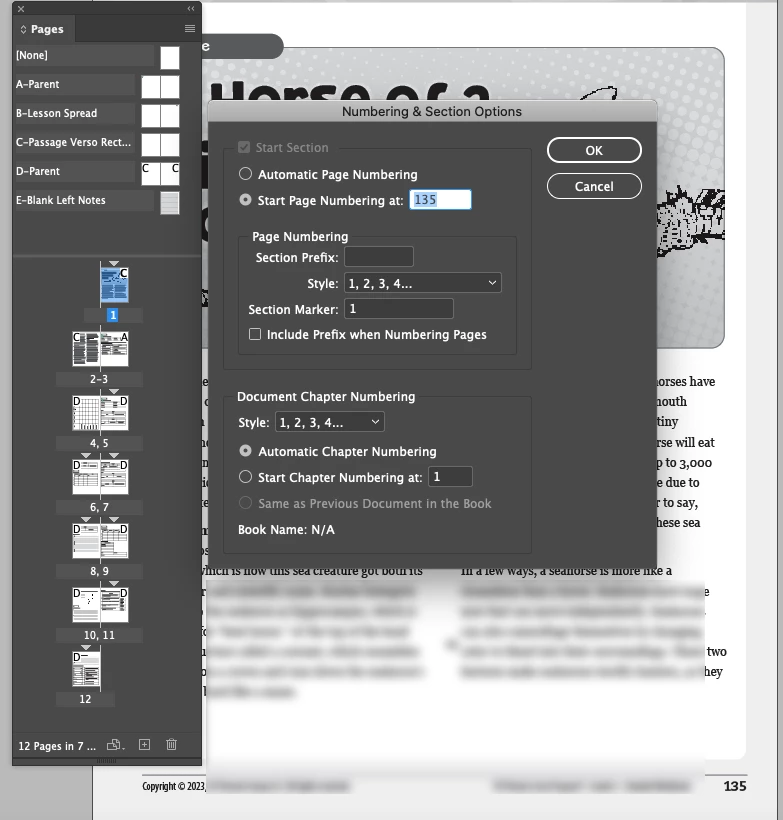
Pages panel starts at 1 regardless of Numbering settings
This just started happening and I upgraded to 18.1 and it's still happening. Screenshot below.
Regardless of the Numbering settings, the Pages panel shows the first page as 1.
I've looked at all the settings I can find. Restarted ID, restarted the Mac mini.
The page numbering in the document is working fine, as far as I can tell. Not a Book, not automatic, just set for each file.
This seems like a small glitch, but it's really hard to work when you can't see page numbers here.
Wondering if anyone is experiencing same or know a setting I don't?
Mac Mini 2018, OS 10.15.7, ID 18.1
(Yes, I need an upgrade soon, but this setup has worked well until now.)
 AdChoices