Ok, this is making more sense. So basically use the pantone+ when the color is available for a true cmyk definition, use the older library when the pantone color is not listed understanding it will be a simulation. Fyi, 99.9% of my jobs are printed cmyk so I do convert all my spot color selections to cmyk.
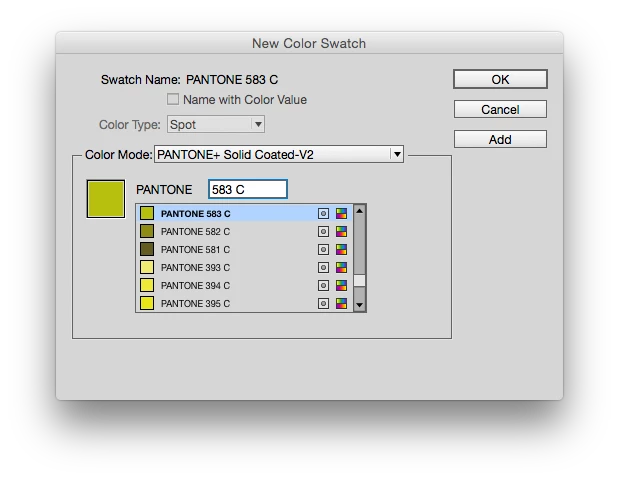
Having said that... what is the difference between the Pantone+ and the Pantone + Color Bridge Libraries (which I have never used). Maybe an example of what I'm trying to do will help. I want to use pantone 583. It is not listed in the Pantone+ solid coated... what are my options?
I really appreciate all the info. I have been in the business for 30+ years but as I am a "one man show" I do not have the benefits of networking with others who can help keep me up to date on changes/technology. I'm feeling like a nube right now. lol...
Rob... for the libraries I downloaded from the drop box... do I need to install all of them?
Thanks everyone!!!
|
Fyi, 99.9% of my jobs are printed cmyk so I do convert all my spot color selections to cmyk.
|
If you use the Pantone+ spot libraries, the conversion to process CMYK will be color managed Lab-to-CMYK and that's the biggest difference in InDesignCS6 and later—the output values will depend on your color settings. So that can be an effective way of simulating the spot color if you have the correct printer or press profile and you understand how the Color Settings' color intent choices work. So if you don't want to get into the intricacies of color conversions and the job is going to a typical offset condition then you'll want to start using the pre-defined Bridge libraries.
583 is not a new color so it should be in the installed libraries. Try typing 583 plaus a space in the search field:
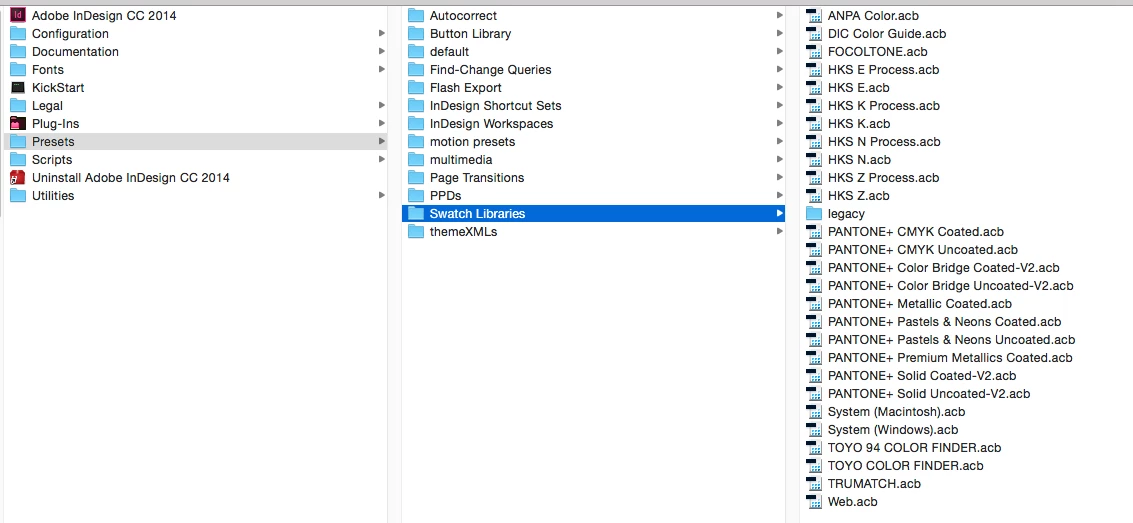
The Pantone Color libraries work like plugins. The .acb files that are in your Swatch libraries folder show up in the Swatches panel. Here's my setup:




 AdChoices