Para Style Numbering & Lists (for my Figures) not reseting for new chapters in new files
I set up an INDD book to test using multiple Tables of Contents TOCs with three INDD files forming sample chapters from 0 to 2. Chapter 0 will be front matter. Chapter 1 Introduction, Chapter 2 Modelling Methods.
I duplicated Chapter 1 to make Chapter 2. Chapter 0 has no figures or tables in it, so none appear
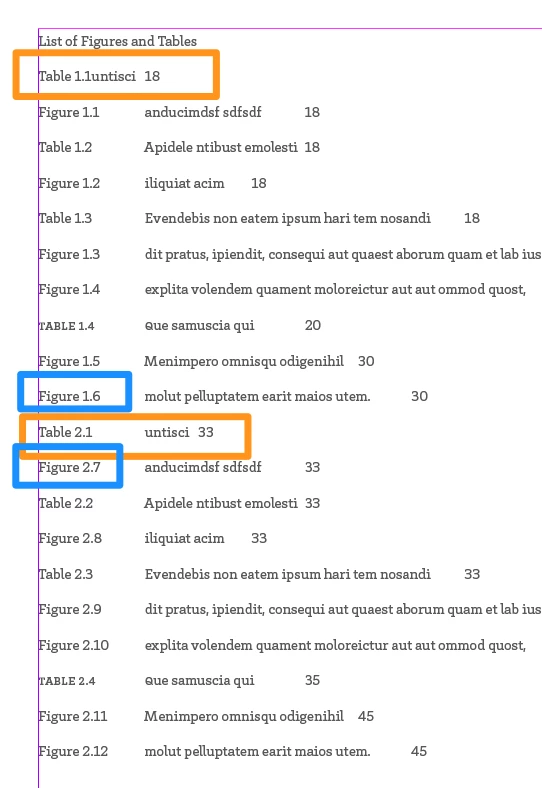
The main reason for this post is that the Figures numbering is not reseting in Chapter 2, so continuing on the first Figure is numbered 2.7 rather than what it should be 2.1. The paragraph style is set to reset if any higher level does. It's working with Tables but not with Figures. I think I saw it work correctly for a moment when I edited something in the Para Style but didn't last. Tables and Figures have essentially identical settings for lists, other than they are seperate lists and label text. Both use the Chapter Symbol (^H) followed by the Level 2 symbol (^2) followed by tab (^t). See images below.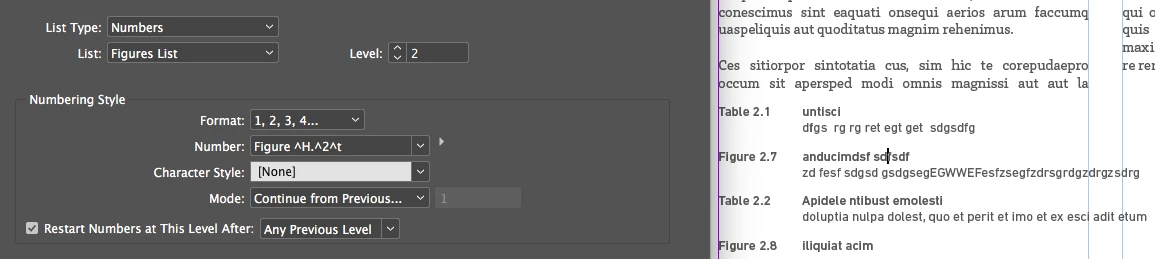
(I tried changing the level to level 1 and it temporarily starts at Figure 2.2 in Chapter, when I update all the numbering in the Book palette, it reverts to what we have here with Level 2 numbering and Chapter as level 1. Do I need to create a non-printing text frame with a level one list on it? Why is it working for Tables abut not for Figures?!
This is a LINK to the CC INDD files including book file.
 AdChoices