Participant
July 21, 2017
Answered

Paragraph and Character Style Menu bug

  • July 21, 2017
  • 1 reply
  • 621 views

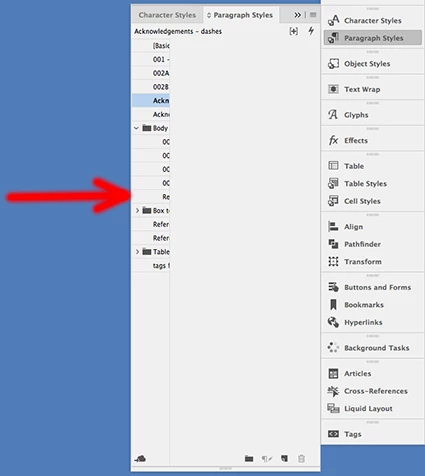
The paragraph and character style menus seems to have a bug.

When you open up the menu there seems to be a dead white space (x-marks the spot) and when I try to move the menu over to the right to make it smaller the dead space stays the same size but the panel containing the paragraph and character names get smaller until they are unreadable.

To see the menu fully I have to open the panel right up and it takes up a third of my screen.

Any workarounds?

    This topic has been closed for replies.
    Correct answer Bill Silbert

    I see no such problem when I check those panels in InDesign CC 2017 on a Mac. Try resetting your preferences and also deleting your InDesign caches.

    To reset preferences:

    For Macintosh Users: With InDesign closed launch a Finder Window in column view and click on your home folder. With the Option Key pressed choose Library from the Finder Go Menu. Within the Library folder find the following two files and delete them: “Adobe InDesign” and “com.adobe.InDesign.plist”. When InDesign is next launched it will create new preference files and the program will be restored to its defaults.

    After you’ve reset up the program (make sure that no document window is open) to your liking, it is a really good idea to create copies of your personalized “mint” preference files (make sure that you quit the program before copying them—that finalizes your customization) and use them in the future to replace any corrupt versions you may need to delete.

    For Windows Users: Hold down Ctrl + Alt + Shift when launching InDesign and respond affirmatively when asked if you want to reset.

    To delete cache files:

    For Macintosh Users: With InDesign closed launch a Finder Window in column view and click on your home folder. With the Option Key pressed choose Library from the Finder Go Menu. Within the Library folder find the “Caches” folder. Within the Caches folder find and delete the entire file “Adobe InDesign”. I find that deleting the cache file completely leads to a lasting change. 

    For Windows Users: Follow the path to C:\Users\[User Name]\AppData\Local\Adobe\InDesign\Version [#]\en_US\Cache

    1 reply

    Bill Silbert
    Community Expert
    Bill SilbertCommunity ExpertCorrect answer
    Community Expert
    July 21, 2017

    I see no such problem when I check those panels in InDesign CC 2017 on a Mac. Try resetting your preferences and also deleting your InDesign caches.

    To reset preferences:

    For Macintosh Users: With InDesign closed launch a Finder Window in column view and click on your home folder. With the Option Key pressed choose Library from the Finder Go Menu. Within the Library folder find the following two files and delete them: “Adobe InDesign” and “com.adobe.InDesign.plist”. When InDesign is next launched it will create new preference files and the program will be restored to its defaults.

    After you’ve reset up the program (make sure that no document window is open) to your liking, it is a really good idea to create copies of your personalized “mint” preference files (make sure that you quit the program before copying them—that finalizes your customization) and use them in the future to replace any corrupt versions you may need to delete.

    For Windows Users: Hold down Ctrl + Alt + Shift when launching InDesign and respond affirmatively when asked if you want to reset.

    To delete cache files:

    For Macintosh Users: With InDesign closed launch a Finder Window in column view and click on your home folder. With the Option Key pressed choose Library from the Finder Go Menu. Within the Library folder find the “Caches” folder. Within the Caches folder find and delete the entire file “Adobe InDesign”. I find that deleting the cache file completely leads to a lasting change. 

    For Windows Users: Follow the path to C:\Users\[User Name]\AppData\Local\Adobe\InDesign\Version [#]\en_US\Cache

    bigstuAuthor
    Participant
    July 21, 2017

    Thanks Bill, that did the trick.

    Many thanks