
arthurlucena
Participant
March 2, 2019
Answered

Paragraph Border not showing

  • March 2, 2019
  • 3 replies
  • 1808 views

For some reason, I can't see the options to add a border to a paragraph, the option is just not there, this is the control panel:
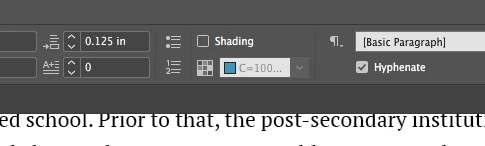
I can only see the Shading option. And this is the paragraph style options window:
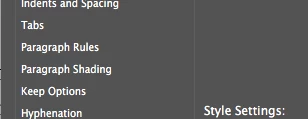
What am I missing here? This is a basic paragraph on a simple text frame. I am using InDesign CC 2017.

Please help

This topic has been closed for replies.
Correct answer Barb Binder

Hi Arthur:

Try holding the Alt key (Option on a Mac) and click the checkerboard icon to the left of your teal color (in your first screen shot), then click on the Border tab at the top.

I don't have 2017 installed anymore, but in 2018 and 2019 border should be sitting under shading. If that is the case here and it has now gone missing, it is likely a preferences issue. See Adobe InDesign: Rebuilding Preferences and Cache Files – Rocky Mountain Training .

~Barb

3 replies

arthurlucena
Participant
March 3, 2019

Thanks, Chad. I thought about the space issue, too, that's why I posted 2 places where the option should be, in case the control panel didn't have enough room, the Paragraph Style Options window would suffice. But unfortunately, it wasn't showing anywhere.

BarbBinder thank you! I updated my InDesign to 2018 and the option was there. Didn't know why my Creative Cloud wasn't updating it as I have the subscription, so when you mentioned you didn't have 2017 anymore the first thing I tried was to update it.

TL;DR: The option appeared when I updated to the CC 2018 version.

Barb Binder
Community Expert
Community Expert
March 3, 2019

Hi Arthur:

I just looked it up—borders were new in 2018. That's why you didn't have option in CC 2017.

You have to enable Auto-update in your CC desktop app for the applications to update automatically. I prefer to keep it off, and update when I'm ready. And as a heads up, the current version is CC 2019 or 14.0.1.

Anyway, glad you are back on track.

~Barb

~Barb at Rocky Mountain Training
hammer0909
Community Expert
Community Expert
March 3, 2019

It could simply be a case of real estate. Depending on your monitor resolution, sometimes there's just not enough room in the Control panel to show every icon. You can also access the Border options in the Paragraph panel. Choose Window > Type and Tables > Paragraph. You should see the Border option at the bottom left. Also, remember you need to be clicked within text to apply the Border option.

Barb Binder
Community Expert
Barb BinderCommunity ExpertCorrect answer
Community Expert
March 2, 2019

Hi Arthur:

Try holding the Alt key (Option on a Mac) and click the checkerboard icon to the left of your teal color (in your first screen shot), then click on the Border tab at the top.

I don't have 2017 installed anymore, but in 2018 and 2019 border should be sitting under shading. If that is the case here and it has now gone missing, it is likely a preferences issue. See Adobe InDesign: Rebuilding Preferences and Cache Files – Rocky Mountain Training .

~Barb

~Barb at Rocky Mountain Training