Participant
April 23, 2023
Answered

Paragraph indent style?

  • April 23, 2023
  • 3 replies
  • 627 views
Hey, does anyone know how to format paragraphs in InDesign like the example below. So where the last line of a paragraph ends, dictates where the first line of the next paragraph starts.
 
Perhaps even if someone can tell me what this paragraph style is called?
 
--------
Lorem ipsum dolor sit amet, consectetur adipiscing elit, sed do eiusmod tempor incididunt ut labore et dolore magna aliqua. Ridiculus mus mauris vitae ultricies leo integer malesuada nunc vel. Tincidunt vitae semper quis lectus nulla at volutpat.
                                        At lectus urna duis convallis. Malesuada fames ac turpis egestas integer eget aliquet nibh. Erat imperdiet sed euismod nisi porta. Convallis aenean et tortor at risus viverra. Nibh sit amet commodo nulla facilisi nullam. Vitae suscipit tellus mauris a diam maecenas sed enim ut.
                                                                                                                                   Enim diam vulputate ut pharetra sit amet. Dignissim enim sit amet venenatis urna cursus eget nunc scelerisque. Elementum sagittis vitae et leo duis ut. Elementum sagittis vitae et leo.
----------
 
I can do this manually but that would take a really long time! I know there's a way to do it where InDesign formats it automatically, but I don't know how and I can't find how to anywhere!
This topic has been closed for replies.
Correct answer rob day

I can do this manually but that would take a really long time!


Select a range of paragraphs and try this script:


var s = app.activeDocument.selection[0].paragraphs.everyItem().getElements();
var eho, b, tfl;
for (var i = 0; i < s.length-1; i++){
    tfl = s[i].parentTextFrames.length;
    b = s[i].parentTextFrames[tfl-1].geometricBounds[1];
    try {
        eho = s[i].characters[-1].horizontalOffset - b;
        s[i+1].firstLineIndent = eho
    }catch(e) { }  
};   


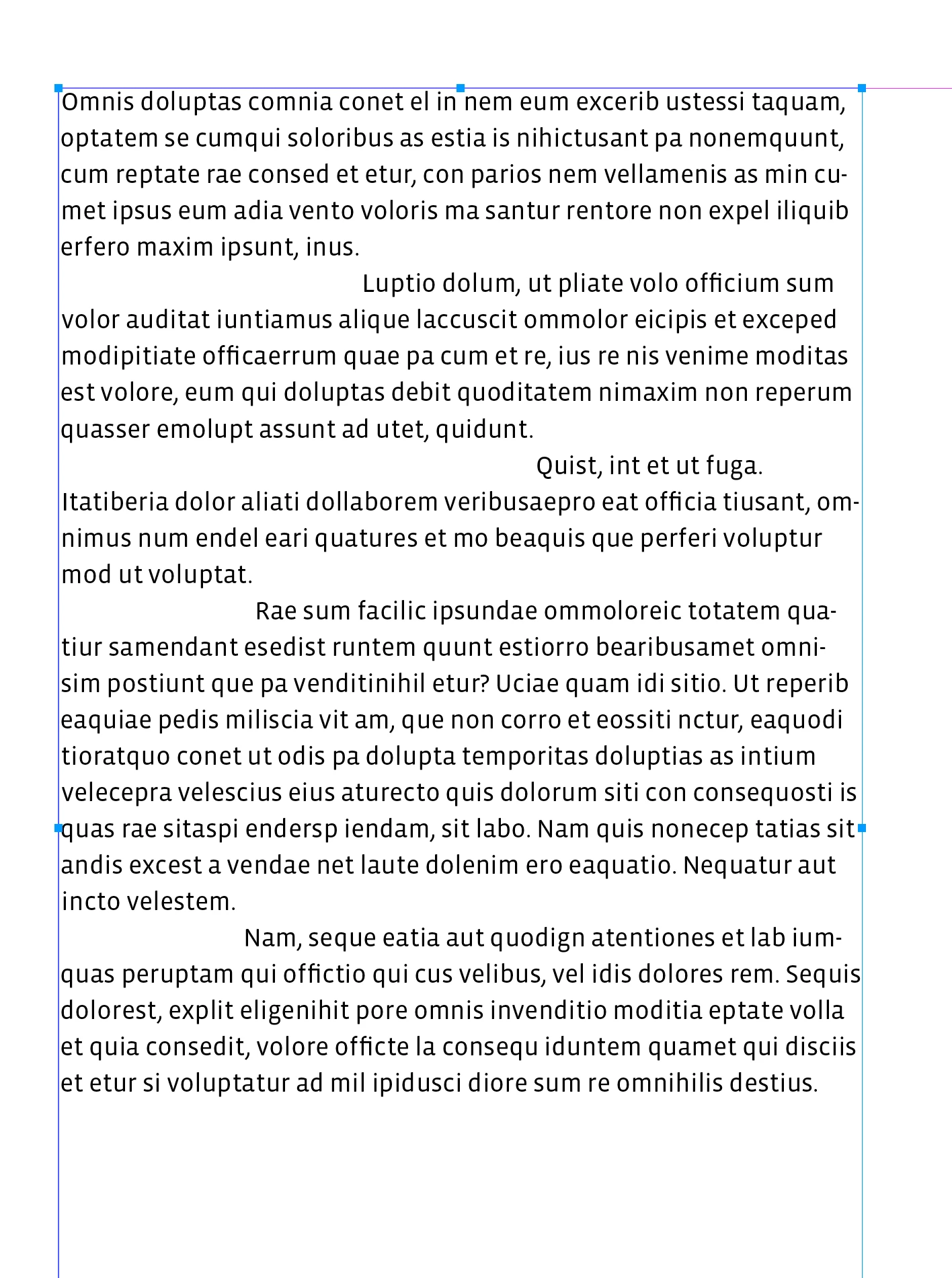
Before:


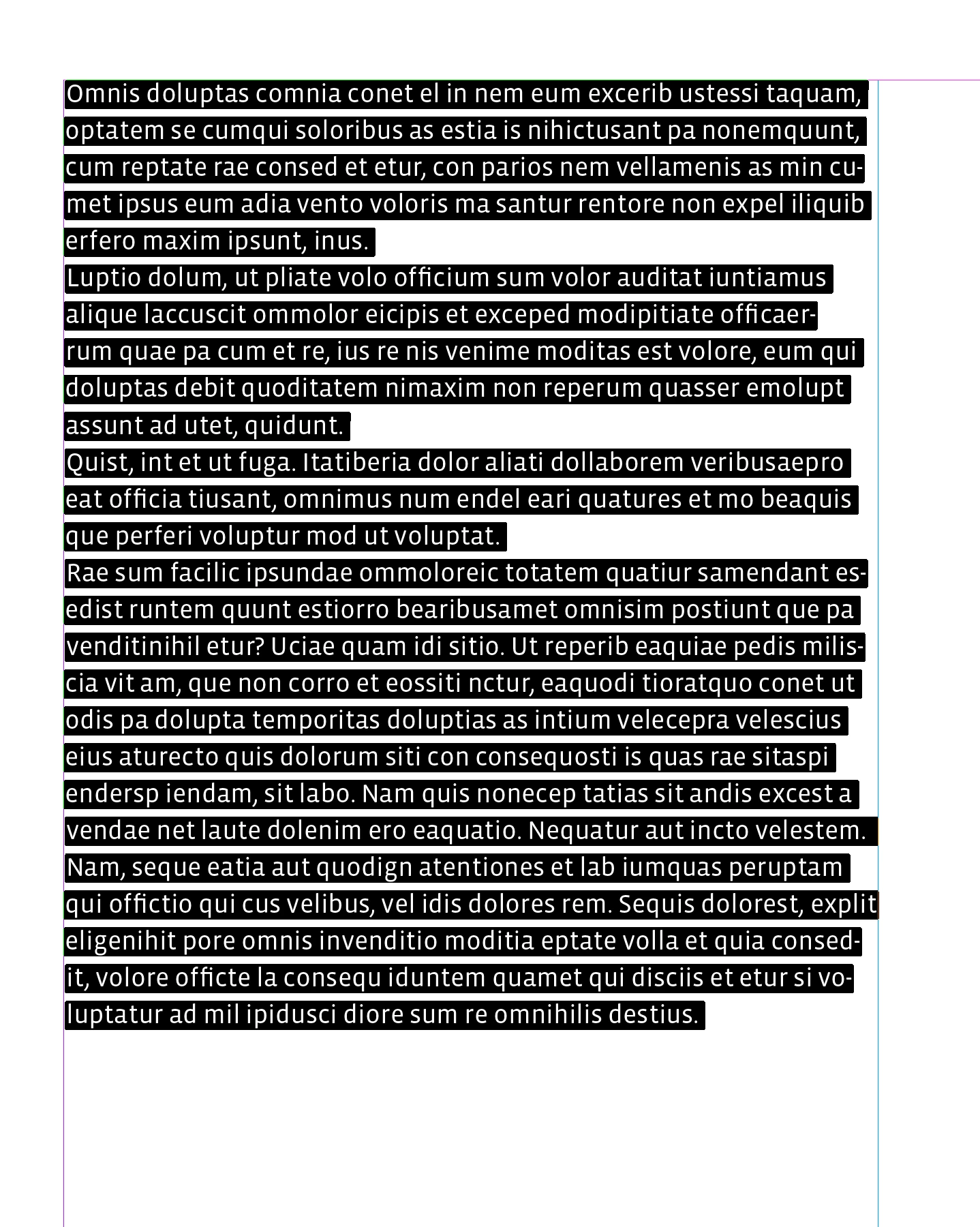
After:

3 replies

rob day
Community Expert
rob dayCommunity ExpertCorrect answer
Community Expert
April 24, 2023

I can do this manually but that would take a really long time!


Select a range of paragraphs and try this script:


var s = app.activeDocument.selection[0].paragraphs.everyItem().getElements();
var eho, b, tfl;
for (var i = 0; i < s.length-1; i++){
    tfl = s[i].parentTextFrames.length;
    b = s[i].parentTextFrames[tfl-1].geometricBounds[1];
    try {
        eho = s[i].characters[-1].horizontalOffset - b;
        s[i+1].firstLineIndent = eho
    }catch(e) { }  
};   


Before:


After:

ÄLSAFFARAuthor
Participant
April 25, 2023

Thank you so much for this! That explains why I couldn't find anything online!

rob day
Community Expert
Community Expert
April 23, 2023

Hi @ÄLSAFFAR , There’s no style property that would do that, but it could be scripted.

ÄLSAFFARAuthor
Participant
April 23, 2023

Sorry that did not come out right!!! I mean like the image i've attached onto here.