
Inspiring
June 19, 2019
Answered

Paragraph Justification

  • June 19, 2019
  • 5 replies
  • 1102 views

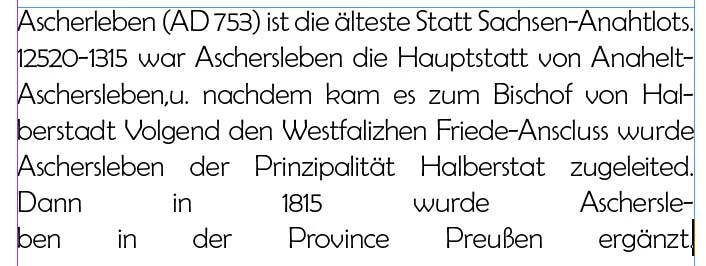
My text para. is set fo 'full justify' with no indents. The last two lines have excessively long spaces in them, for unaccountable reasons. I also need to _not_ justify the last line in the paragraph, but have forgotten which control(s) make(s) that happen. Please see German-language sample attached.
    This topic has been closed for replies.
    Correct answer Willi Adelberger

    Zudem hat Du ein paar kräftige Tippfehler drinnen, auch in Thüringen und Sachsen-Anhalt gilt immer noch Deutsch, nicht nur bei uns in Österreich oder Bayern, wo man wenigstens reines Deutsch nach der Schrift spricht.

    5 replies

    Willi Adelberger
    Community Expert
    Community Expert
    June 20, 2019

    Achte auf die Sprache:

    1. Voreinstellungen: Verwende DUDEN und wenn Du den nicht hast, Proximity für Rechtschreibprüfung und Silbentrennung Deutsch 2006
    2. In den Absatzformaten verwende Deutsch 2006
    3. Verwende statt kompletten Blocksatz, den Blocksatz mit letzter Zeile linksbündig. Ich vermute, das ist das was Du willst, nicht Blocksatz alle Zeilen.
    4. Pflege Dein Benutzerwörterbuch, trage die Wörter ein und setze in den Silbentrennungen eine Tilde ~für die vorrangige Silbentrennung, zwei ~~ für durchschnittliche, drei ~~~für nachrangige Silbentrennungen, setze vor den Einträgen, die nicht getrennt werden dürfen eine Tilde ~.
    Willi Adelberger
    Community Expert
    Willi AdelbergerCommunity ExpertCorrect answer
    Community Expert
    June 20, 2019

    Zudem hat Du ein paar kräftige Tippfehler drinnen, auch in Thüringen und Sachsen-Anhalt gilt immer noch Deutsch, nicht nur bei uns in Österreich oder Bayern, wo man wenigstens reines Deutsch nach der Schrift spricht.

    Legend
    June 20, 2019

    While formatting is important, I'd strongly suggest to also put more effort into the text - especially if it is meant to be contemporary German. Punctuation, spelling - including most geographic names, even inconsistencies in the misspellings, diverse wrong translations, wrong concepts (e.g. bishop vs. diocese, Prussia was a kingdom back then). The whole thing sounds like a transcribed copy from loud reading Wikipedia, combined with a ton of wrong substitutions.

    Barb Binder
    Community Expert
    Community Expert
    June 20, 2019

    Hi Jack:

    If you are formatting manually, choose Justify with Last Line Aligned Left:

    Oddly, the exact same option is called Left Justify (see Bob's answer above) if you are using styles. Confusing, at best.

    ~Barb

    ~Barb at Rocky Mountain Training
    dave c courtemanche
    Inspiring
    June 19, 2019

    You can tweak your justification settings (Paragraph/Justification) to try and fine tune the rivers. What Bob is referring to is your last line. You have it set to justify all lines, causing the funkiness on the last line. Set to Justify Left, the copy will be justified with the last line ragged left.

    Attached are my tweaked justification settings.

    JackAuthor
    Inspiring
    June 22, 2019

    Thanks, Dirk' I'll have access to a German professional in correcting all of this..

    Schönen Dank, Wili! Meinen Deutsch ist nichtmehr so prima.

    For all: Simple left-justification works just fine; many thanks.

    BobLevine
    Community Expert
    Community Expert
    June 19, 2019

    Use left justify.

    JackAuthor
    Inspiring
    June 19, 2019

    That helped in part, but now I have ragged right edges on the page. If possible, I would like full justification on all but the last line of text.