grif030
Participant
April 6, 2019
Question

Paragraph rules: fixed distance

  • April 6, 2019
  • 2 replies
  • 2862 views

Hi there… i couldn’t find the answer to this question in the forum, so…

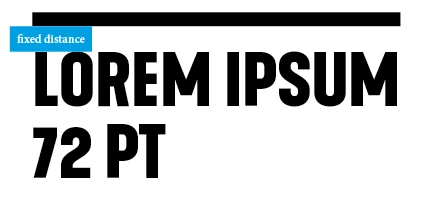
I would like to create a rule above a heading that has always the same distance between the top of my heading and the paragraph rule above it. Independently the heading font size. Let me explain.

Say i have a heading font size of 72 pt and a heading rule above with an offset of 24 mm. When i change the heading font to example 36 pt the distance between the top of the heading and the heading rule increases, because the offset setting is still 24 mm. To keep the distance the same i need to change the heading rule offset. Is there a way or a work around to keep the distance always the same, independently the heading font size and without changing the heading rule offset manually every time?

Hope you understand what try to achieve! Thanks!
This topic has been closed for replies.

2 replies

rob day
Community Expert
Community Expert
April 6, 2019

When i change the heading font to example 36 pt the distance between the top of the heading and the heading rule increases, because the offset setting is still 24 mm.

How many variations of the headline are there? Can’t you make the adjustment in your header style sheets?

grif030
grif030Author
Participant
April 6, 2019

I want to to use this in a magazine design. So the size of the headings are changing constantly, depending on their length and the space there is on the page. So changing them manually is timefull and creating different paragraph styles is pointless.

Community Expert
April 6, 2019

Hi grif030 ,

to expand my suggestion about a feature request:

An option for stroke weight of Rule Above and Rule Below should also be a percentage value of the Cap Height of the applied font of a paragraph style.

Regards,
Uwe

FWIW: Baseline shift values and other properties like Underline or Paragraph Border weight should also be part of the "percentage value" campaign :-)

Steve Werner
Community Expert
Community Expert
April 6, 2019

It's not available in the InDesign interface. If you don't get an answer here, you might ask in the InDesign Scripting forum (if it's scriptable).

InDesign Scripting

grif030
grif030Author
Participant
April 6, 2019

Thanks. I will do that.

Community Expert
April 6, 2019

Hi grif030 ,

a wonderful example for a feature request:

Distance from Rule Above or Rule Below should be a percentage of the Point Size or even better, the Cap Height of the font used in a paragraph style.

Go to InDesign Uservoice, do a feature request, come back here to post the link to the request so that we can vote for it:

Adobe InDesign Feedback

Regards,
Uwe