Participant
January 9, 2019
Answered

paragraph rules in InDesign 2019?

  • January 9, 2019
  • 2 replies
  • 1738 views

where have paragraph rules gone in InDesign 2019? I no longer see anywhere to set paragraph rules in the paragraph control panel. (add a line below text in body copy)

    This topic has been closed for replies.
    Correct answer Bill Silbert

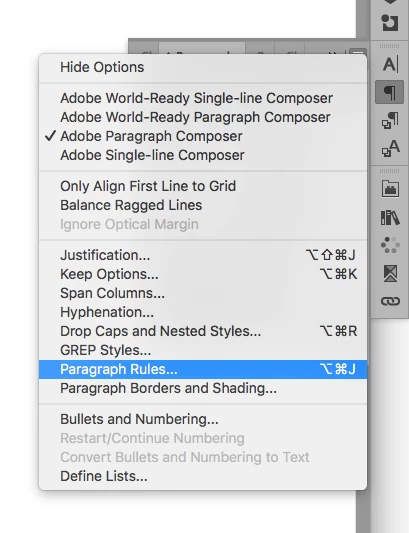
    You can access them either through the Paragraph Panel pull-down menu (top right corner of paragraph panel) or through the keyboard command Option-Command-J (Mac) or Alt-Control-J (PC).
    2 replies

    Participant
    January 9, 2019

    the panel no longer looks like it used to since I upgraded to 2019, I used to find it exactly where your screen shot shows. It is no longer in the paragraph panel pull down (which now expands from three little dots) BUT that key command worked so thank you!

    Bill Silbert
    Community Expert
    Community Expert
    January 9, 2019

    It sounds like you've been using the new Properties panel. This new panel has been set up with, in some cases, incomplete versions of the actual panels. If you access the complete Paragraph Panel through Window>Type & Tables>Paragraph you'll find the complete version that I showed in my screen shot. The pull-down menu with all of the options is still there.

    Participant
    January 9, 2019

    yes!! I see it there now, thank you so much Bill.

    Bill Silbert
    Community Expert
    Bill SilbertCommunity ExpertCorrect answer
    Community Expert
    January 9, 2019

    You can access them either through the Paragraph Panel pull-down menu (top right corner of paragraph panel) or through the keyboard command Option-Command-J (Mac) or Alt-Control-J (PC).