Inspiring
May 20, 2025 9:12 AM UTC
Question

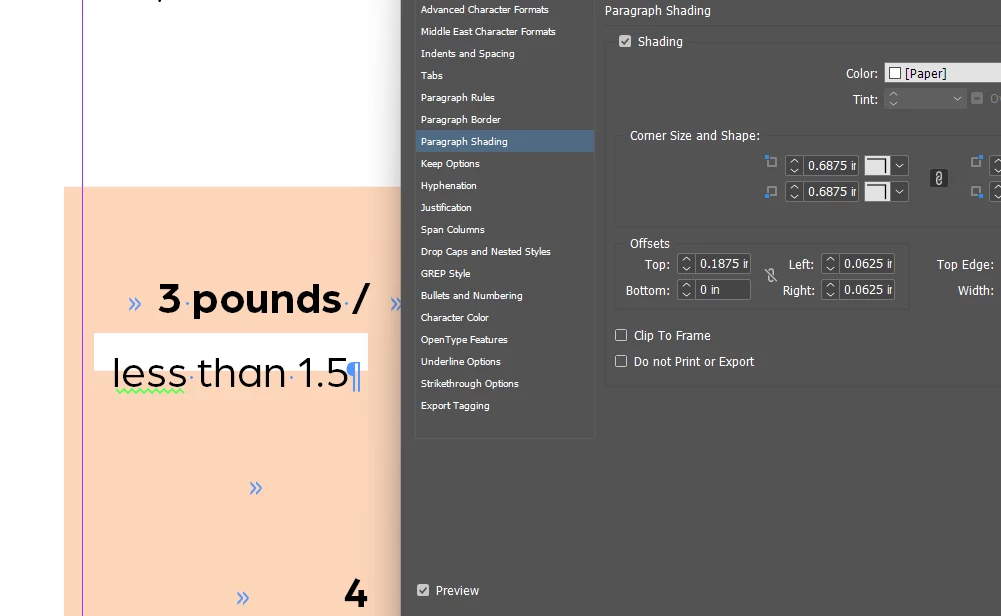
paragraph shading not accurate

Why isn't the paragraph shading allowing me to go any lower??
 

11 replies

Mike Witherell
Community Expert
Community Expert
May 20, 2025 2:00 PM UTC

Hendy,

Try the export to IDML and re-open the IDML and Save As to a new filename trick. Then test to see if the same problem is occurring.

Translate
Mike Witherell
Robert at ID-Tasker
Legend
May 20, 2025 1:41 PM UTC

@hendy_5450 


You need to play with BOTTOM OFFSET:


And it's also covered by the Shading in the NEXT Paragraph:


BEFORE:


AFTER:


Translate
Robert at ID-Tasker
Legend
May 20, 2025 1:42 PM UTC

@hendy_5450 


Everything is "stacked" - formatting of the NEXT Paragraph - covers PREVIOUS Paragraph.


Translate
Inspiring
May 20, 2025 2:13 PM UTC
why would this make a difference?
Translate
Mike Witherell
Community Expert
Community Expert
May 20, 2025 1:37 PM UTC

Then, is the paragraph style you are editing actually applied to that example paragraph?

If not applied, then you could edit the style and the text appearance wont change.

Translate
Mike Witherell
Mike Witherell
Community Expert
Community Expert
May 20, 2025 1:07 PM UTC

Hendy,

Do you mean physically lower down the page?

Maybe increase the Bottom Offset to a positive amount to move the white color further down?

Translate
Mike Witherell
Inspiring
May 20, 2025 1:18 PM UTC
of course I tried this,
nothing happens
Translate
BobLevine
Community Expert
Community Expert
May 20, 2025 11:23 AM UTC

Use a real color. Paper is for display only.

Translate
Inspiring
May 20, 2025 12:18 PM UTC
when I change it, in fact when I make any changes, the whole text box
disappears!
Something's very wrong here!
Translate
