
stefw19067
Participating Frequently
May 17, 2018
Question

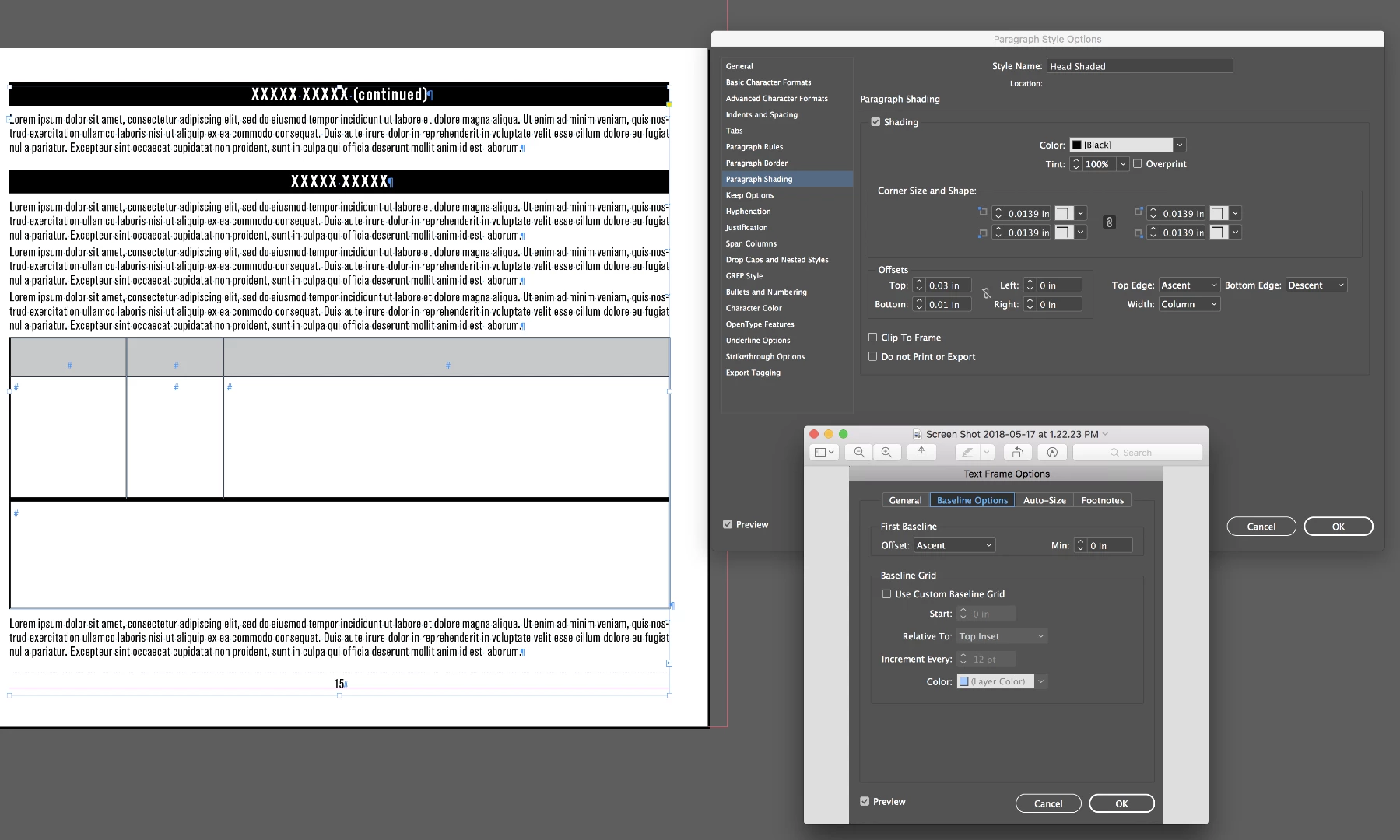
Paragraph Shading - rule cutting off at top of frame

  • May 17, 2018
  • 2 replies
  • 412 views

looking for the way around this

if i change my frame first baseline options to leading - the shaded rule tag will work both at the top of the frame and the body of the frame.

BUT keeping the setting at leading causes the other frames without shaded rule tag to NOT sit at the top of the frame.

i typically use First baseline: ascent, and created 2 different tags as work around, would love to figure this out

!

help please
    This topic has been closed for replies.

    2 replies

    Srishti_Bali
    Legend
    May 30, 2018

    Hi,

    I would like to know if the steps suggested by Steve worked for you, or the issue still persists.

    Kindly update the discussion if you need further assistance with it.

    Thanks,

    Srishti

    Steve Werner
    Community Expert
    Community Expert
    May 17, 2018

    I would use the same baseline setting on all the frames. For the frame with the shading, tweak the position of the shading with the four offset values.

    stefw19067
    Participating Frequently
    May 31, 2018

    Steve

    I usually use the same settings on all my frames, just experimenting with the settings, trying to figure out how to get the top of the frame to acknowledge the shading. I am looking for a way to have both shaded rules (one at the top of the frame, the other in the body of the text) have the same settings (paragraph style). We create multiple pages/docs with the shaded rules, sometimes it is hard to visually catch the ones with the wrong tag when the file reflows.

    Thanks for your help

    rob day
    Community Expert
    Community Expert
    May 31, 2018

    You could also do it with Object Styles, but I'm not sure that helps because you still have to apply the style to the different text frames. But the application of the object style could be scripted by checking the p style of the textframe's first line.