sundaymorning
Participating Frequently
October 25, 2018
Answered

paragraph style applies to wrong places

  • October 25, 2018
  • 2 replies
  • 747 views

Hey all,

I created a paragraph style and it adds indents to wrong places. how do I fix them? manually is fine, but I cant even use backspace to bring the text back.

Thank you, thank you, thank you!

This topic has been closed for replies.
Correct answer Barb Binder

Hi SundayMorning:

Indents can be added to four locations: Left, Right, First Line and Last line. Right click your style name in the Paragraph Style panel and choose Edit [Your Style Name]. Then set all four values to 0 in Indents and Spacing.
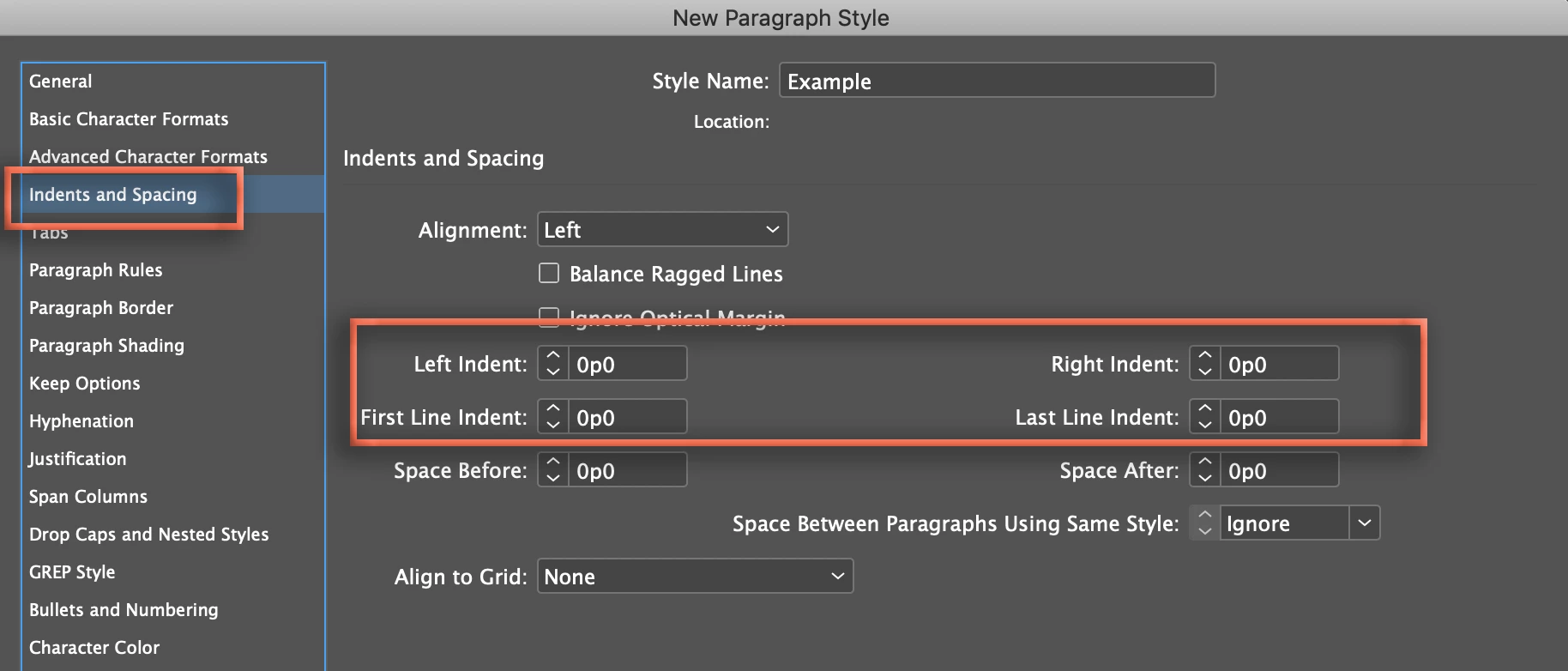
~Barb

2 replies

Barb Binder
Community Expert
Barb BinderCommunity ExpertCorrect answer
Community Expert
October 25, 2018

Hi SundayMorning:

Indents can be added to four locations: Left, Right, First Line and Last line. Right click your style name in the Paragraph Style panel and choose Edit [Your Style Name]. Then set all four values to 0 in Indents and Spacing.

~Barb

~Barb at Rocky Mountain Training
sundaymorning
Participating Frequently
October 25, 2018

Hey, thanks! When I do that. And add left indent, it adds it to the beginning of a paragraph just like I want it to, but then it also adds it to places where I don't want it. And when I go to those spots where I don't want it, I cant get rid of it. Is there a way to fix that?

Scott Falkner
Community Expert
Community Expert
October 25, 2018

Once again, show us what you mean. Add a screen grab in your reply. Make sure Show Hidden Characters is on and that we can see the indents in the Paragraph panel.

It sounds like you want a first line indent but are adding a left indent. The left indent will add a left marking to every line in the paragraph.

Legend
October 25, 2018

If you will post a screen shot of your paragraph with Hidden Characters showing, and a screen shot of the indents panel of your paragraph style, it will help with figuring out what is going wrong.