tomb92906800
Known Participant
November 13, 2025
Question

Paragraph style exporting tag options

  • November 13, 2025
  • 1 reply
  • 92 views

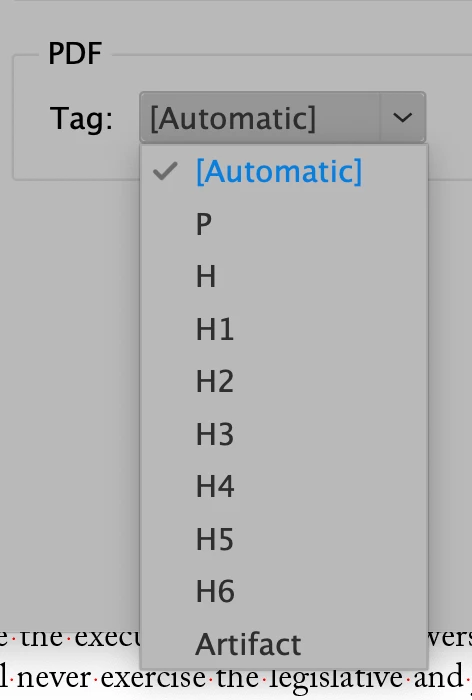
Is there any way to add additional tags other than the 10 that are listed in the Export Tagging list in the Paragraph style options window?

 

1 reply

Joel Cherney
Community Expert
Community Expert
November 13, 2025

Not for interactive PDF export, which is what that dropdown refers to. 


I have never tried it myself, but I see that the dropdown for EPUB and HTML tags allows free input, seems like you may be able to type in whatever <customTag> you like. Is that what you were looking for? 


But the PDF export section doesn't allow that. I'm currently looking at all of the other Container Tag types in the dropdown in Acrobat in the Object Properties dialog, and I think that you shouldn't need to apply them in this way. For instance, I just make a few footnotes in a demo PDF I'd made for another question, and I see that InDesign correctly applied <Reference> and <Note> tags without my intervention upon export to tagged interactive PDF:


tomb92906800
Known Participant
November 14, 2025

Thanks for the quick reply Joel. 

I would like to appy a <Reference> tag to all the sidebar styles in the document. There are hundeds achored in the document and remidiation is out of the question. I attached another screen shot to show the problem.

Any ideas?


Joel Cherney
Community Expert
Community Expert
November 14, 2025

Honestly not sure how to set that up. But they're not really References, are they? I'm looking at the Reference tags that InDesign spits out by default, in my sample interactive tagged PDF with a few footnotes. The <Reference> tag gets applied to the footnote number in the text, and the <Note> tag gets applied to the footnote. That seems to be backed up by what I read in this ostensibly official document. Also plenty comments to that effect on the Acrobat forum, for what it's worth. 


I was able to get sidenotes to be encapsulated in <Note> tags by inserting endnotes, then styling the numeral references in the text to have a font size of 0.1 and a color of Paper. I could then go and remove the numbering from the endnotes, bring the endnotes frame into the body text... and then was stuck positioning sidenotes with paragraph spacing, because the endnotes were all stuck in their endnote-frame. 


Seems like obvious feature request material, for what it's worth.