
Participating Frequently
May 25, 2025
Answered

Paragraph style freezes since the lastest update!

  • May 25, 2025
  • 3 replies
  • 442 views

Does anyone else have this issue? before the update, my file was working perfectly. Now, the same file freezes every time I open the paragraph style. I tried closing the app, restarting, and in a new file in InDesign and another in Illustrator! Any ideas what to do?
Correct answer Barb Binder

Hi @Zahra24083627m3k6:


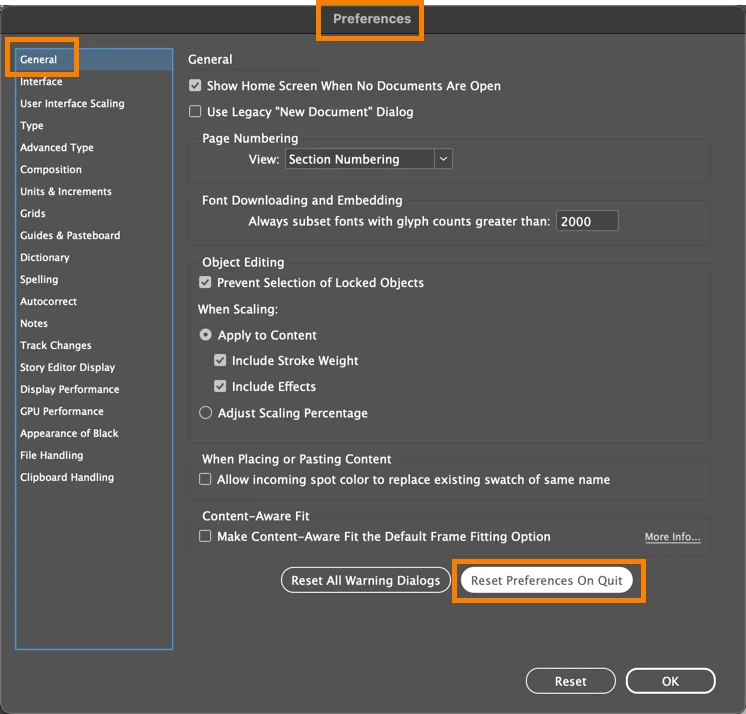
It's likely corrupt preferences. Start with Reset Start Preferences on Quit.


~Barb


3 replies

Participant
March 15, 2026

Hi,

I have the exact same problem with my Indesign, except that the reset of the Preferences didn’t work. It still freezes everytime I want to change anything in the paragraph options. 😭 I really don’t want to create another user in my computer, so can another solution be found for this?

Thanks in advance. 😁

leo.r
Community Expert
Community Expert
March 15, 2026
Abhishek Rao
Community Manager
Community Manager
May 29, 2025

Hi @Zahra24083627m3k6,


I hope expert's suggestion to reset preferences helped fix the issue with the Paragraph Styles panel freezing. If you're still running into the same problem, could you let me know exactly which version of InDesign you're using and the operating system on your machine? Also, is this freeze happening only with one specific file or across all files, even new ones?

If possible, try creating a fresh user profile on your system and test the same workflow there (it helps rule out any user-level configuration issues).
Reference:

macOS: https://support.apple.com/en-in/guide/mac-help/mh15191/mac

Windows: https://support.microsoft.com/en-us/windows/manage-user-accounts-in-windows-104dc19f-6430-4b49-6a2b-e4dbd1dcdf32


And if the problem continues, a short screen recording showing where it freezes would be super helpful for checking with the team.


Let me know how it goes! Looking forward to your response. 

Abhishek

Participating Frequently
June 2, 2025

It seems to have resolved the issue; I will follow your instructions if the issue happens again. 

Barb Binder
Community Expert
Barb BinderCommunity ExpertCorrect answer
Community Expert
May 25, 2025

Hi @Zahra24083627m3k6:


It's likely corrupt preferences. Start with Reset Start Preferences on Quit.


~Barb


~Barb at Rocky Mountain Training
Participating Frequently
June 2, 2025

thanks alot 🙂