
chrystinah48968508
Participant
September 16, 2022
Question

Paragraph styles, nested styles GREP

  • September 16, 2022
  • 2 replies
  • 294 views

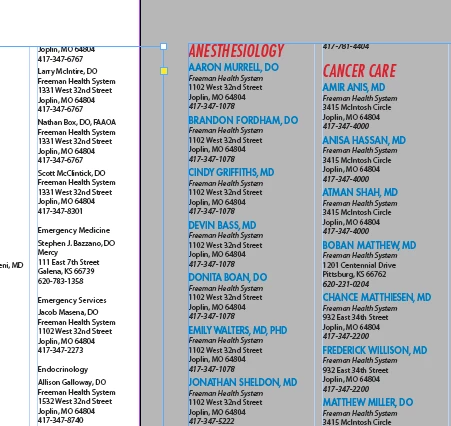
Hello, I'm trying to create a directory. The column on the left is the text that was created using data merge. I want to create some kind of style, in order to deal with changes. I want it to look like the columns on right. Is this possible? Thank you in advance.
This topic has been closed for replies.

2 replies

Barb Binder
Community Expert
Community Expert
September 16, 2022

Good point. You'd have to do it in sections. 


~Barb

~Barb at Rocky Mountain Training
Barb Binder
Community Expert
Community Expert
September 16, 2022

If it is truly as consistent as you are showing us, you can do this with nested styles.


Create these 5 styles (fine tuning the formatting):

  1. Name: Blue, uppercase, Next style: Company
  2. Company: Italics: Next style: Address1
  3. Address1: Roman, Next style: Address2
  4. Address2: Roman, Next style: Phone
  5. Phone: Italics, Next Style: Name 


Then, select the entire story, right click Name in the Styles panel and choose Apply Name, then Next style. It's magical!


Details on the next style attribute here: https://www.rockymountaintraining.com/adobe-indesign-how-to-use-the-next-style-attribute/


~Barb


~Barb at Rocky Mountain Training
chrystinah48968508
Participant
September 16, 2022

Thank you so much, I'll give this a try.