
nadines81997130
Participant
May 23, 2019
Answered

Paragraph Styles - Setting Big Numbering with Text Aligned to Top

  • May 23, 2019
  • 1 reply
  • 1985 views

I am creating paragraph styles for install instructions. I created a large style for the install steps (based on what we liked) and set it up in the Numbering field:

I would like the text to be aligned with the top of the number, does anyone know how I can achieve this?

This topic has been closed for replies.
Correct answer Jongware

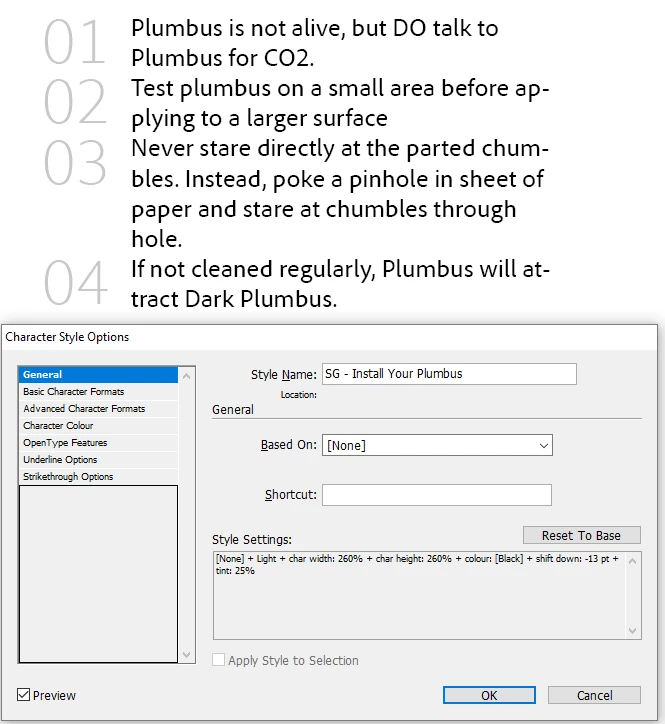
Change the definition of your "SG - Install Step Numbers" character style. As it is, the large font height forces InDesign to use a much larger line height for the first line. You cannot prevent that, even if you move down the numbers by shifting the baseline.

To get larger numbers without messing up the line height do not use Size but Horizontal and Vertical Scale (in the Advanced section). Set these both to something like 200%, and then use Baseline Shift with a large-ish negative value to set the vertical position. You need to do this by eye, there is no preset or function for it.

This is what it should look like:

1 reply

Jongware
Community Expert
JongwareCommunity ExpertCorrect answer
Community Expert
May 23, 2019

Change the definition of your "SG - Install Step Numbers" character style. As it is, the large font height forces InDesign to use a much larger line height for the first line. You cannot prevent that, even if you move down the numbers by shifting the baseline.

To get larger numbers without messing up the line height do not use Size but Horizontal and Vertical Scale (in the Advanced section). Set these both to something like 200%, and then use Baseline Shift with a large-ish negative value to set the vertical position. You need to do this by eye, there is no preset or function for it.

This is what it should look like:

vinny38
Legend
May 24, 2019

https://forums.adobe.com/people/%5BJongware%5D  wrote

As it is, the large font height forces InDesign to use a much larger line height for the first line.

Hi Jongware

I'm not sure to understand what you mean here...

I can't replicate a situation where character style applied to number changes the leading of the first line, even if I force it by defining huge leading.

Cs6 here (if that makes any difference)

Did I miss something?

Thanks in advance for your expert clarification

Either way, nadines81997130 you should insert a tab ^t instead of en-space ^> after numbering, in order to keep things aligned...

And also maybe use ^# instead of ^2, in case you change your multi-level list (but that's another story...)

Community Expert
May 24, 2019

vinny38  wrote

… Did I miss something?

Hi Vinny,

perhaps this:

Preferences > Type > Type Options

[ ] Apply Leading To Entire Paragraphs

Checked or not checked?

Regards,
Uwe