Participant
July 23, 2017
Answered

Paragraph symbol - left aligned and creating wonky problems

  • July 23, 2017
  • 3 replies
  • 671 views

Disclaimer: I don't usually work in InDesign, so the solution might be something super obvious to everyone else.

I'm having problems with some formatting. The paragraph symbol is showing up to the left instead of the right, and the program is automatically inserting the period there instead of at the end of the sentence.
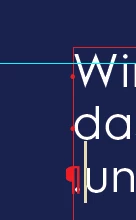
Any idea how to fix this?

    This topic has been closed for replies.
    Correct answer Jongware

    You may have accidentally enabled a right-to-left setting. Check the usual suspects: the paragraph setting, the language. If your other paragraphs don't do this, it must be a local override, so check if you see a + in the paragraph style panel for this line, and if so, clear all overrides.

    3 replies

    Participating Frequently
    July 24, 2017

    Exactly i have faced the same problem.

    This is the Problem you are facing resolution for this is below

    Bill Silbert
    Community Expert
    Community Expert
    July 23, 2017

    I also notice that there is a space inserted to the left of the first word of each line. Since the text apparently is flowing from left to right as you type it I don't think that it has anything to do with a foreign keyboard setting so I would suggest deleting your InDesign preferences and see if the problem is corrected.

    To do so:

    For Macintosh Users: With InDesign closed launch a Finder Window in column view and click on your home folder. With the Option Key pressed choose Library from the Finder Go Menu. Within the Library folder find the following two files and delete them: “Adobe InDesign” and “com.adobe.InDesign.plist”. When InDesign is next launched it will create new preference files and the program will be restored to its defaults.

    After you’ve reset up the program (make sure that no document window is open) to your liking, it is a really good idea to create copies of your personalized “mint” preference files (make sure that you quit the program before copying them—that finalizes your customization) and use them in the future to replace any corrupt versions you may need to delete.

    For Windows Users: Hold down Ctrl + Alt + Shift when launching InDesign and respond affirmatively when asked if you want to reset.

    Jongware
    Community Expert
    JongwareCommunity ExpertCorrect answer
    Community Expert
    July 23, 2017

    You may have accidentally enabled a right-to-left setting. Check the usual suspects: the paragraph setting, the language. If your other paragraphs don't do this, it must be a local override, so check if you see a + in the paragraph style panel for this line, and if so, clear all overrides.

    Participant
    July 24, 2017

    These paragraphs had been set to "Adobe World-Ready Paragraph Composer". Once I switched back to "Adobe Paragraph Composer" things started working the way I wanted.

    Thanks everyone for the help!