
Shiv Allva
Known Participant
March 2, 2023
Question

ParagraphStyle keep issue leading to bad breaks

  • March 2, 2023
  • 2 replies
  • 641 views

A set of paragraph having 'keep all lines' together allows a line to break to the NextFrame. 
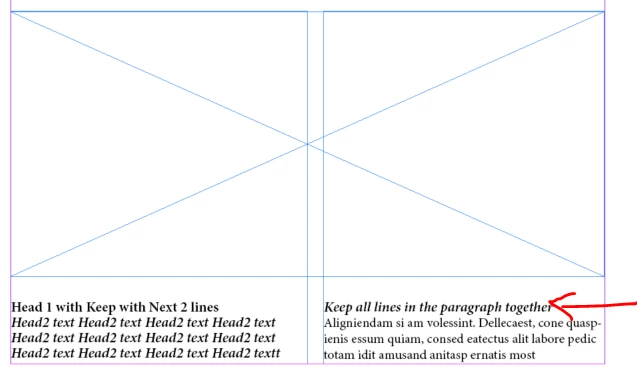
Here, I need to keep the (Head1 + Head2 + 2 lines of body text) together and in this case, the combined text should get pushed to the next available space/frame. I can't find any easy way to achieve this. Any suggestions would be helpful. (DEMO ATTACHED)


This topic has been closed for replies.

2 replies

m1b
Community Expert
Community Expert
March 2, 2023

Hi @Shiv Allva, I had a quick play with your demo file and I'm not sure that @Robert at ID-Tasker's suggestion will work—I couldn't get any permutation of keep options to do what you ask. (By the way, your demo file doesn't have properly constructed paragraph styles, eg. there is no body style, so please check that your styles are good in your real document.)


I can only think of two options, neither perfect:

1. Fix these manually (probably the best option in most cases)

2. A script that fixes these by adding a frame- or column-break character at the start of any h1 whose next paragraph has less than 3 lines of h2 (or is it body text?). The script will perform this action once—it won't keep updating if you change the text content or apply the para styles to new text. (I probably have the details wrong here, because there was ambiguity in your demo file, but in theory it should work with whatever rules you need, so long as they can be applied consistently.)


I also have a nagging feeling that there's another way... but I can't think of it.

- Mark

Shiv Allva
Known Participant
March 3, 2023

Question: I think InDesign doesn't let a frame go blank without any lines, so it overrides any KeepWithNext and KeepAllLinesTogether. Should it this be fixed in the InDesign or give us control like ForceKeep=True/False?


Response: I'm looking for an automated solution here, so #2 should partially work, but this is a full-fledged publishing solution in my scenario. I have a lot of other rules to consider as well, single/double column floats, footnote, floats position changes when citation moves, etc.


So, I think I could live with providing an attribute like <h1 PageBreak="true"> and the second run!


Robert at ID-Tasker
Legend
March 3, 2023

InDesign can make a TextFrame blank - but it looks like you've found a bug ?


I've just tried on a new doc from scratch - even without extra object with text wrap - and I can't force InDesign to shift text ...


Tried with CS6 - same problem ...


Even something like this doesn't work:


Looks like InDesign shifts only ONCE - then is unable/unwilling to shift again ...


Robert at ID-Tasker
Legend
March 2, 2023

Replying from my phone so can't check your file - but in order to keep Head1 + Head2 + 2lines of body text together - you need to set KeepWithNext and KeepAllLinesTogether for Head1 AND Head2.


Shiv Allva
Known Participant
March 3, 2023

H1 & H2 already have KeepWithNext and KeepAllLinesTogether set, but still it bad breaks!