
Known Participant
December 30, 2024
Answered

Parent alternate layout for title and images

  • December 30, 2024
  • 1 reply
  • 770 views

Hi,

I am still learning on how to use InDesign more proefficently.

I am in charge of a catalogue and I will have many pages to edit according to a model.

I want to have a red ribbon, the title of the product and below an image of the product, some icons.


Since I have an alternance of left and right pages, I want to have a parent organizint them directly with a specific font (size, family, placement) and to have the images respecting this order (left page: photo+icons/right page: icons+photo)
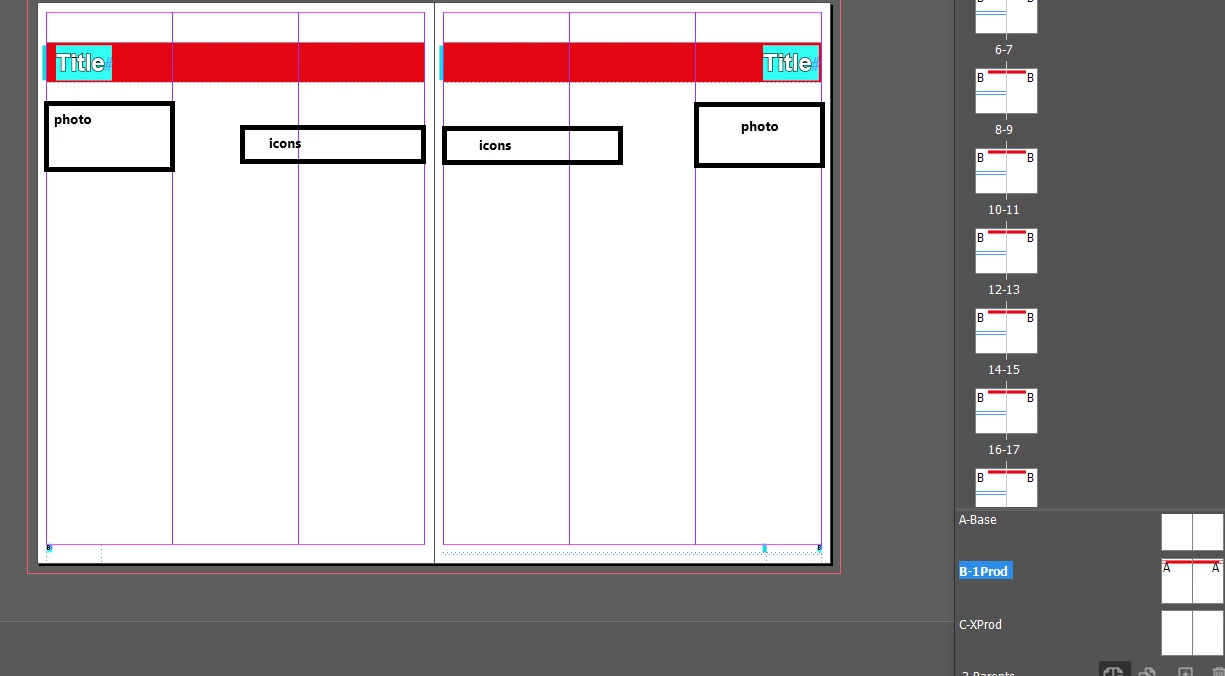


Is there a way to do it efficiently?

Thanks and Happy New Year!

This topic has been closed for replies.
Correct answer Robert at ID-Tasker

Unfortunately, built-in DataMerge is good only for "static" things - when number of elements is constant.


There are workarounds - but they require special way of preparing data - all rows from the table would have to be in separate columns in the same row in Excel.


Then script can be used to remove unnecessary rows / objects. 


Or you could combine contents of the data-table of the product into a single cell in Excel - with unique separators for columns and rows - then script in InDesign can convert this to a table.


Everything depends on your budged, how much time do you have and how well do you know Excel. 


Script in InDesign to cleanup is the easiest part 😉 


1 reply

Robert at ID-Tasker
Legend
December 30, 2024

What do you mean by "efficiently"? 


How many different layouts will you have? 


How will you fill them with data? 


Known Participant
December 30, 2024

Hi @Robert at ID-Tasker ,

quote

What do you mean by "efficiently"? 


I have 200 pages and as many of titles and tables to write.

Since then, I was working on 5-10 pages flyers so I was applying a parent with the basics (page number, logo) and was adding the title and images on the page directly (not the parent). I would like to have a parent with styles directly (character, paragraph) so the "title"=my product name, would be directly in Arial, 36pt, bold, white with black outline.

And below, the image either on the left (left page), or right (right page).

That would save me a lot of time.


quote

How many different layouts will you have? 

I would have 2 layouts (one for a single product and one for a page if there are 2 products on the same page). I would base the later on the former and just rearrange it later.


quote

How will you fill them with data? 

Manually, since I was given an excel file with 3 tabs (since there are 3 families of operations I am working on, with each of them a different level of details) so because of these different numbers of column (ie: operation A needs 4 columns; operation B needs 3, operation C needs 5), I might copy paste the data from the tabs manually.

Robert at ID-Tasker
Legend
December 30, 2024

Have you heard about DataMerge? 


https://helpx.adobe.com/uk/indesign/using/data-merge.html


If you show us an example of the data in Excel - and how it should look like in InDesign - we should be able to better help you to prepare your templates.