

Olivier Beltrami
Legend
February 15, 2025
Answered

Parent Page Size Conflict

  • February 15, 2025
  • 3 replies
  • 501 views

Hello,

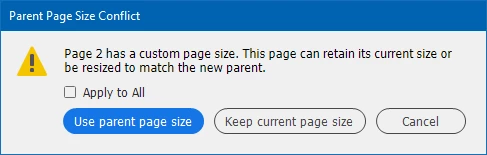
I have a document where all the pages and parents are the same size, but when I try to apply a parent page to any page I get the message below.

• Why am I getting this spurious message ?

• Is there some preference setting to avoid this message ?

• Is there some preference setting to have a document that has only 1 page size ?

This spurious message is interrupting scripts and plugins trying to apply a master page.

Very best regards,

Olivier
 

Correct answer Olivier Beltrami

Thank you to everyone for their suggestions.

It turned out that VS was not recompiling one of my .cpp files.

Doing a full rebuild fixed the issue.

3 replies

Olivier Beltrami
Olivier BeltramiAuthorCorrect answer
Legend
February 17, 2025

Thank you to everyone for their suggestions.

It turned out that VS was not recompiling one of my .cpp files.

Doing a full rebuild fixed the issue.

m1b
Community Expert
Community Expert
February 17, 2025

Thanks for letting us know, Olivier. All the best.

m1b
Community Expert
Community Expert
February 15, 2025

Hi @Olivier Beltrami, I don't know the answer, but does it help to insert near the start of the script:

app.scriptPreferences.userInteractionLevel = UserInteractionLevels.NEVER_INTERACT;

 I wondered if this might avoid the dialog and choose a default behaviour?


Otherwise, if you don't get a good answer here, please post a simple demo .indd document so we can test with it.

- Mark

Olivier Beltrami
Legend
February 15, 2025

@m1b Thank you for for post.

There is the equivalent enum in the SDK

enum PageResizeChoice { kResizeToMasterPageSize, kKeepCurrentPageSize, kAskUserForPageResizeChoice};

But it does not seem to make a difference (for the moment, still testing).

Very best regards,

Olivier

m1b
Community Expert
Community Expert
February 15, 2025

Another idea is to set the size to match the master before applying it — something like:

page.bounds = master.bounds:

 - Mark 

Willi Adelberger
Community Expert
Community Expert
February 15, 2025

You have probably resized a page with the page tool and maybe resizd to its original size. You should click on "Use parent page size". This will remove manual overrides which can cause problems and will increase file size.